The idea: change a shape with a small probe
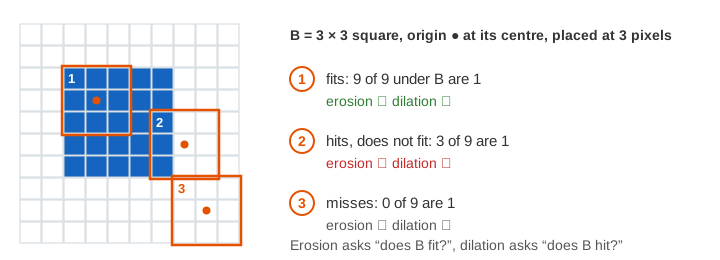
Morphology works on the shape of things in a binary image: each pixel is 1 (part of the object) or 0 (background). It uses a small pattern called the structuring element B. B has an origin, here its centre pixel. Put the origin on a pixel p and look at the image pixels under B. There are only two basic questions, and every other operation is built from them:
- Does B fit? Every pixel under B is 1. That is erosion, written A ⊖ B.
- Does B hit? At least one pixel under B is 1. That is dilation, written A ⊕ B.
The page uses a 12 × 12 image so every pixel is visible. Pixel (x, y) is column x, row y, counted from 0 with y going down. B is the 3 × 3 square (the 8 neighbours and the centre) or the 3 × 3 cross (the 4 side neighbours and the centre). Pixels outside the image count as 0. Panel A is the input, step 1 and step 2 hold the results. A green + marks a pixel that became 1, a red × one that became 0.
Erosion: keep only where B fits
A pixel stays 1 only if B, centred on it, lies completely inside the object. So every object loses its outer layer, as thick as B reaches (one pixel for a 3 × 3 B). Anything too small to hold B disappears completely. On the square with specks, the 6 × 6 square becomes 4 × 4 and the four specks vanish: 41 pixels become 16, and 5 pieces become 1 (Demo 1: erosion shrinks, specks vanish).
Dilation: add wherever B hits
A pixel becomes 1 if B, centred on it, touches the object anywhere. Every object grows by one layer shaped like B, and gaps narrower than B close. The same image grows from 41 to 98 pixels. Each speck is only one empty pixel away from the square, so its grown copy touches the grown square, and the 5 pieces become 1 (Demo 2: dilation grows the shape). Another way to see dilation: stamp a copy of B on every 1-pixel. (For a B that is not symmetric, dilation uses B mirrored through its origin; the square and the cross are the same mirrored.)
The two are duals. Eroding the object is the same as dilating the background and taking the complement: (A ⊖ B)ᶜ = Aᶜ ⊕ B for a symmetric B. What one does to the object, the other does to the background.
Opening: erode, then dilate
Opening A ∘ B = (A ⊖ B) ⊕ B. The erosion throws away everything B cannot fit into. The dilation then grows what is left back to its old size. The result is the union of every place where B fits inside A. So opening removes small things and keeps large ones as they were:
| image, B | A | after erosion | opening | what happened |
|---|---|---|---|---|
| square + specks, square | 41, 5 pieces | 16 | 36, 1 piece | the specks are gone, the 6 × 6 square is back exactly (Demo 3) |
| two blobs + bridge, square | 42, 1 piece | 12 | 40, 2 pieces | the 2-pixel bridge is cut, the blobs come back (Demo 5) |
| square + specks, cross | 41 | 16 | 32 | the square loses its 4 corners (Demo 6) |
The last row shows that the shape of B matters. A cross that fits inside the square can never cover the square's corner pixel, so the opening rounds the corners. With a 3 × 3 square B, the square fits B everywhere and comes back whole.
Closing: dilate, then erode
Closing A • B = (A ⊕ B) ⊖ B, the same two steps in the other order. The dilation fills holes, cracks and notches smaller than B; the erosion then shrinks the outline back to where it was. The block with holes has 60 pixels: a one-pixel hole, a two-pixel hole and a notch on its top edge (3 hole pixels in all, since the notch opens to the outside). The dilation gives 100 pixels, the erosion 64: the full 8 × 8 block with no holes (Demo 4: closing fills holes).
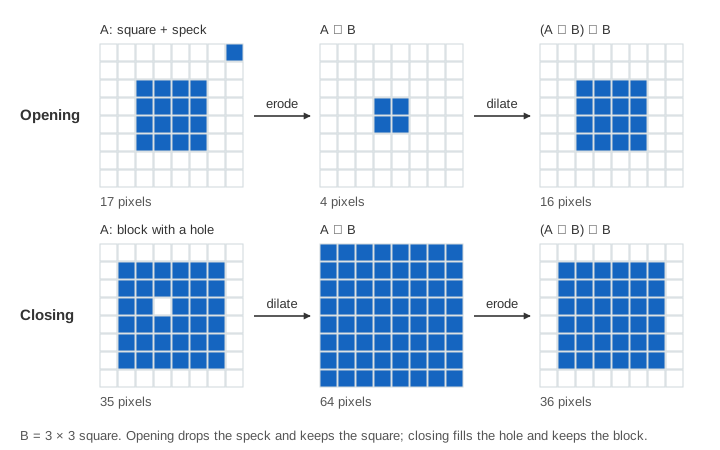
Two useful facts. Opening only removes pixels and closing only adds them: A ∘ B ⊆ A ⊆ A • B. And both are idempotent: opening an opened image again changes nothing, and the same for closing. Opening then closing is a common cleanup filter for a noisy binary mask: remove the specks, then fill the pinholes.
Boundary extraction
The erosion removes exactly the outer layer of each object. So the boundary is the image minus its erosion: β(A) = A − (A ⊖ B). For the two blobs with the bridge, 42 − 12 = 30 pixels: a one-pixel outline of each blob and the bridge, which is all boundary because B fits nowhere on it (Demo 7: boundary = A minus its erosion). With the square B the outline is 4-connected (it steps around corners); with the cross it is thinner, 8-connected. This outline comes from the shape alone. Edges in a grey image, found from the brightness gradient, are on Canny Edge Detection.
How it fits with other image steps
A binary image usually comes from thresholding a grey image, often after histogram equalization. Erosion and dilation slide a window over the image like a convolution, but they take a logical AND (fit) or OR (hit) instead of a weighted sum. After cleanup the pieces are counted or labelled with a flood fill, which is how this page counts its "pieces".
See also Thresholding and Otsu's Method for how a grey image becomes the black-and-white image that erosion and dilation work on.
What the page leaves out
Larger and other structuring elements (disks, lines at an angle, B with the origin off-centre), and B that is not
symmetric. Border rules: OpenCV's erode treats pixels outside the image as 1 by default, so objects touching the
border are not eaten from outside; this page uses 0 for both. Grey-scale morphology (erosion = local minimum,
dilation = local maximum), the morphological gradient, top-hat, hit-or-miss transform, thinning, skeletons,
reconstruction and the distance transform are not shown.