The idea: one event, one path, three phases
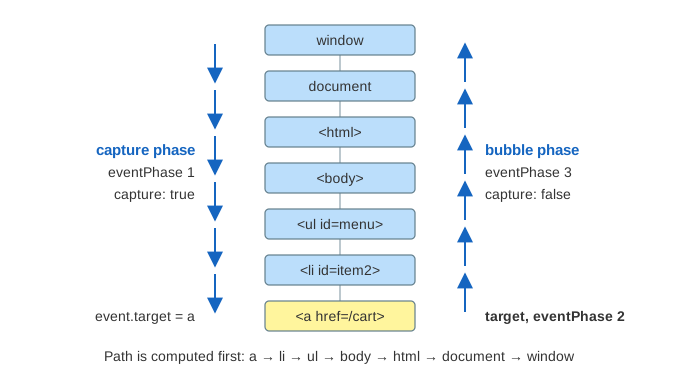
When you click a link, the click does not belong to the link alone. The link sits inside a list item, the list item inside a list, and so on up to the page. Every one of those elements can listen for the click. The DOM standard fixes the order in which they hear it. The event goes down the tree from window to the clicked element (the capture phase), it arrives at the element (the target phase), and then it goes back up (the bubble phase). This trip is called propagation.
The page has one small document: <ul id="menu"> with three items, and the second item holds <a href="/cart">. Each listener set is a short list of addEventListener calls, numbered in the order they were made. Press Dispatch Event and the event box walks the path: on the left of each node on the way down, on the right on the way up. Each listener that runs lights up and writes a line to the console. When the event task itself runs is the job of the event loop, shown on How the Browser Runs JavaScript: the Event Loop; this page starts the moment the browser dispatches the event.
The event path
Before any listener runs, the browser builds the event path: the target (the element that was clicked), its parent, the parent's parent, and so on, then document and finally window. For a click on the link the path has 7 entries: a → li#item2 → ul#menu → body → html → document → window. For a click on li#item3 it has 6. The path is fixed at this point. If a listener moves or removes an element during the dispatch, the event still visits the nodes of the old path.
Capturing, target, bubbling
The browser then walks the path twice. On the way down it calls only the listeners added with {capture: true}; on the way up only the others (the default). event.eventPhase says where the event is:
| eventPhase | name | where | which listeners run |
|---|---|---|---|
| 1 | CAPTURING_PHASE | window down to the target's parent | capture: true |
| 2 | AT_TARGET | the target itself | capture ones first, then the others |
| 3 | BUBBLING_PHASE | the target's parent up to window | capture: false |
On one node, listeners of the same kind run in the order they were added. event.target stays the clicked element the whole time; event.currentTarget (and this in a normal function) is the node whose listener is running now. In Demo 1: capture down, bubble up seven listeners are added in the order #1 to #7, and they run in the order 1, 2, 4, 3, 5, 6, 7: window and body capture (phase 1), then at the link #4 before #3, because #4 is the capture listener, even though #3 was added first (phase 2), then li, body and document on the way up (phase 3). Older browsers ran the target's listeners purely in the order they were added; the current standard and current browsers run the capture ones first.
Some events do not bubble: focus, blur, mouseenter, mouseleave and load on an element have event.bubbles false. They still go through the capture phase and the target, but the walk stops there. That is why focusin and focusout exist: they are the bubbling versions.
Stopping the walk
event.stopPropagation() sets a flag. The listeners still left on the current node run, then the walk ends: every later node on the path is skipped. event.stopImmediatePropagation() sets that flag and a second one, so even the rest of the current node's listeners are skipped.
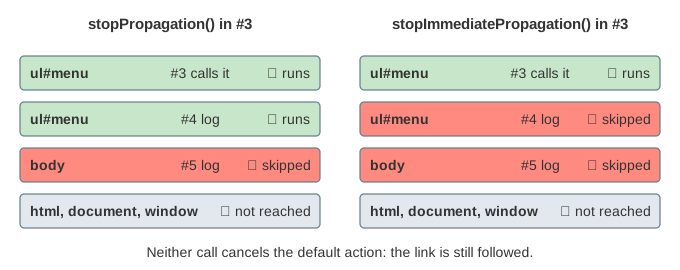
In Demo 2: stopPropagation on the <ul> the calls are #1, #2, #3, #4: listener #3 stops the event on ul#menu, #4 on the same ul still runs, and body, html, document and window never see the bubble. Demo 3 uses stopImmediatePropagation() instead: only #1, #2, #3 run. In Demo 4: stop in the capture phase, body's capture listener #2 stops the event on the way down, so the link itself never gets it: only 2 calls. This is how a capture listener on window or document can block a click for the whole page, and why stopping propagation is risky: an analytics script or a "close the menu on outside click" listener higher up stops working too.
preventDefault and the default action
Many events have a default action, something the browser does by itself once the dispatch is over: a click on a link follows it, a click on a checkbox toggles it, a submit sends the form, a wheel scrolls. event.preventDefault() cancels that action; it sets event.defaultPrevented to true. It does not stop the propagation. In Demo 5: preventDefault cancels the link only the link's listener #1 calls it, yet #2 on the li and #3 on body still run (3 calls), and #2 can read defaultPrevented: true. At the end the browser sees the flag and does not follow the link. The opposite also holds: in Demos 2 to 4 propagation is stopped but nobody canceled, so the link is still followed.
| call | other listeners | default action |
|---|---|---|
stopPropagation() | later nodes skipped | still happens |
stopImmediatePropagation() | later listeners and nodes skipped | still happens |
preventDefault() | all still run | canceled (if cancelable) |
A passive listener, added with {passive: true}, promises not to cancel. If it calls preventDefault() anyway, the call is ignored. The point is speed: for wheel, touchstart and touchmove the browser would otherwise have to wait for the listener before it may scroll. In Demo 6: a passive listener cannot cancel the ul's passive wheel listener calls preventDefault(), defaultPrevented stays false, and the list scrolls. Browsers make wheel and touch listeners on window, document and body passive by default for this reason.
Event delegation
Because clicks bubble, one listener on a parent can handle clicks on all its children. This is event delegation. The listener uses event.target to find out what was clicked, usually with event.target.closest("li"):
menu.addEventListener("click", function (event) {
    var item = event.target.closest("li");
    if (item) select(item);
});
In Demo 7: event delegation on the list the same listener #1 on ul#menu runs twice. The first click lands on the link, so target is the a and closest("li") is li#item2. The second click lands on li#item3 itself. Both times currentTarget is ul#menu and the phase is 3. One listener instead of one per item uses less memory, and items added later work with no extra code. Frameworks such as React attach their own delegated listeners at the root for the same reason; the DOM changes they make are on Virtual DOM diffing.
once
A listener added with {once: true} is removed just before its first call. In Demo 8: once runs one time the link is clicked twice: the first click runs #1 and #2, the second only #2, because #1 is gone. It does the same as calling removeEventListener at the start of the handler. The standard also allows {signal}, an AbortSignal that removes the listener when it is aborted.
See also How the Browser Runs JavaScript: the Event Loop: the click arrives as a task, and the whole dispatch on this page runs inside that one task, with microtasks after each listener. See also The CSS Cascade, which picks the styles of the same kind of small document, and The Observer Pattern vs Publish–Subscribe: addEventListener is the observer pattern built into the DOM.
What the page leaves out
Shadow DOM (retargeting of event.target, composed events and composedPath()), the signal option, the activation behaviour details of links, checkboxes and forms, synthetic events made with new Event() and dispatchEvent (they are not isTrusted), the legacy onclick property and return false, cancelBubble, the event loop's microtask checkpoint between listeners, and how the browser hit-tests the pointer to find the target in the first place.