The idea: from bytes to pixels
A browser gets a page as text: HTML and CSS. To show it, the main thread parses the HTML into the DOM (a tree of nodes) and the CSS into the CSSOM (the rules). Then every frame runs the same steps. Style works out each element's final CSS. Layout works out where each box goes and how big it is. Paint records how each box looks and turns it into pixels, one layer at a time. Composite stacks the layers into the picture on screen; the compositor thread does this part.
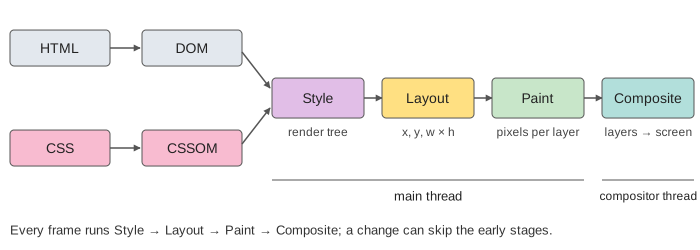
The page on the canvas loads a tiny document: an h1, a paragraph, a script, a hidden ad, a card and a footer, one stylesheet and one script. Every step costs a few milliseconds of a made-up but fixed clock, so you can compare the runs.
DOM, CSSOM and the render tree
The parser reads the HTML top to bottom and adds one DOM node per tag. When it meets <link rel="stylesheet"> it asks the network for the CSS and keeps going. The CSS file is parsed into the CSSOM once it has fully arrived; a half-read stylesheet is useless, because a later rule can override an earlier one.
Style then walks the DOM and matches the CSSOM rules to each element. The result is the render tree: only the boxes that will be drawn. <head>, <link> and <script> are not drawn, and neither is anything with display: none (here the ad). An element with visibility: hidden would still be there: it takes up space, it is just not painted.
Layout, paint and layers
Layout (Firefox calls it reflow) goes through the render tree and gives each box its x, y, width and height. Boxes in normal flow stack top to bottom, so a box that gets taller pushes every box after it down. Paint does not draw on the screen. It records drawing commands ("fill this rectangle, draw this text") and rasterizes them into the pixels of a layer.
Most of a page lives in one root layer. Some elements get a layer of their own: here the card, because of will-change: transform. Videos, canvases, fixed elements and running transform or opacity animations often get one too. The compositor can then move, scale or fade that layer without the main thread painting anything again.
Render-blocking CSS, parser-blocking JS
CSS blocks rendering. Without the CSSOM the browser does not know what anything looks like, so it draws nothing until the stylesheet has arrived and been parsed. The alternative would be a flash of unstyled content.
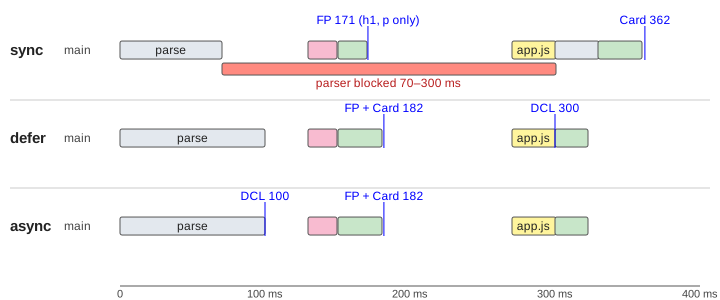
A plain script blocks the parser. A script can call document.write or read the DOM it sits in, so the parser stops at <script src> until the file has downloaded and run. The script itself waits for pending stylesheets, because it may ask for computed styles. Everything below the script waits too (Demo 1: the card shows up only at 362 ms).
| script | downloads | runs | on the canvas |
|---|---|---|---|
<script src> | parser stops and waits | at once, then parsing goes on | first paint 171 ms (half the page), card 362 ms |
defer | in parallel | after parsing, in order, before DOMContentLoaded | first paint 182 ms (whole page), DCL 300 ms |
async | in parallel | as soon as it arrives, in any order | first paint 182 ms (whole page), DCL 100 ms |
So keep CSS small and early, put scripts at the end of <body> or mark them defer, and use async for scripts that do not touch the page, such as analytics (Demos 1–3).
Reflow vs repaint vs composite only
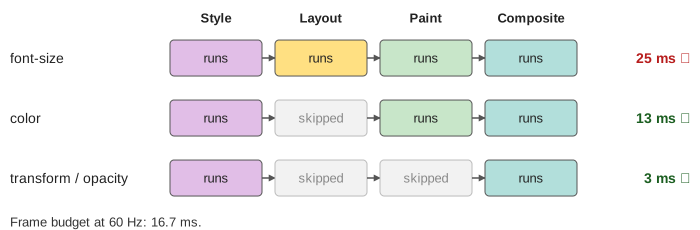
After the load, every change from JavaScript or CSS runs a frame, but not every frame runs every stage. A change to geometry (width, font-size, adding a node) needs layout again: a reflow, then paint and composite. A change that only alters looks (color, background) skips layout: a repaint. A change to transform or opacity on an element with its own layer skips both: the compositor just draws the layer somewhere else or more see-through.
| change | stages | frame on the canvas |
|---|---|---|
h1 font-size: 48px | style, layout, paint, composite | 25 ms ✗ over 16.7 ms (Demo 4) |
.intro color: red | style, paint, composite | 13 ms ✓ (Demo 5) |
.box transform / opacity | style, composite | 3 ms ✓ (Demo 6) |
At 60 Hz a frame has 16.7 ms. A frame that takes longer drops: the animation stutters. That is why smooth animations use transform and opacity, not top, left or width. One more trap: reading offsetHeight or getBoundingClientRect() right after a write forces layout to run at once, inside your script. Doing that in a loop (write, read, write, read) runs layout many times in one frame; this is called layout thrashing. Batch the reads, then the writes.
See also the browser event loop: where in a turn of the loop the rendering steps run, and why a long task delays the next frame. Virtual DOM diffing is how React keeps the number of DOM changes, and so the reflows, small. HTTP caching decides whether style.css and app.js need the network at all, and server-side vs client-side rendering decides whether the first HTML already holds the content.
What the page leaves out
The preload scanner (real browsers find style.css and app.js early and fetch them while the parser is blocked), incremental and streamed parsing, rendering in the middle of a long parse, fonts and images (which also block or shift the layout), the layer tree and paint invalidation at finer grain than a whole layer, tiling and GPU rasterization, the commit from the main thread to the compositor, requestAnimationFrame and the vsync clock, scrolling on the compositor, content-visibility and contain, and the real costs, which depend on the page size and the device.