The idea: who turns data into HTML
A web page has to become HTML before the browser can show it. With server-side rendering (SSR) the server does it: it fetches the data, renders the components to an HTML string and sends a page that already shows the product. With client-side rendering (CSR) the server sends an almost empty shell, and JavaScript in the browser fetches the data and builds the page. The page loads the same product page both ways, on the same network and device, and steps both lanes in lockstep.
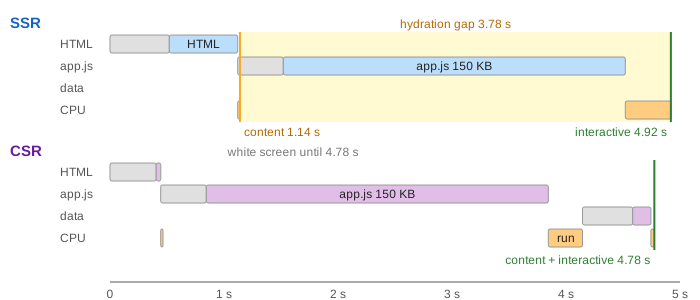
Each lane has a browser, a server, a picture of what the user sees and a timeline with one row per download (HTML, app.js, data) and one for CPU work on the device. Grey is waiting (the round trip plus server time), the light colour is downloading, orange is the device's CPU. Two markers matter: content visible (the user can read the product) and interactive (a tap on Add to cart works).
The model: a fetch takes one round trip plus the server's time plus size ÷ bandwidth. Slow 3G + budget phone is 400 ms RTT, 50 KB/s and 2 ms of CPU per KB of JavaScript; Fast 4G + laptop is 100 ms, 1000 KB/s and 0.4 ms/KB. Both lanes use the same 150 KB app.js.
Server-side rendering
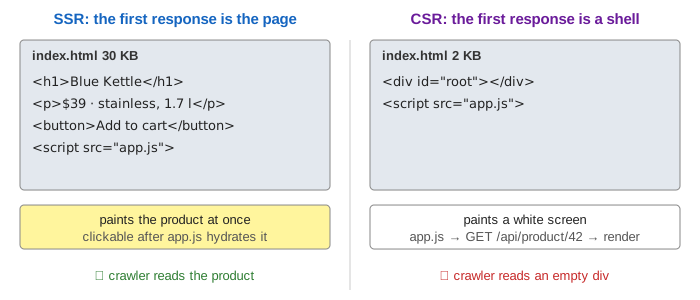
For every request the server queries the database (40 ms) and runs renderToString (80 ms). The 30 KB of HTML it returns contains the product, so the browser can paint it as soon as it arrives: on slow 3G the product is visible at 1.14 s (Demo: first visit on slow 3G). The page is not usable yet. The same app.js still has to download and run, and then hydrateRoot walks the existing HTML and attaches the event handlers. Only then, at 4.92 s, does the button work.
Client-side rendering
The server is a CDN that returns the same 2 KB index.html for every URL: a <div id="root"></div> and a script tag. It arrives fast, but it paints a white screen. Then three things happen one after another: download app.js (3.4 s on slow 3G), run it (0.3 s), and fetch the product as JSON from the API (0.6 s). The product appears at 4.78 s, and because React built the page itself, it is interactive at the same moment. This chain of requests, each waiting for the one before, is the waterfall that makes CSR slow on a slow network.
The hydration gap
Between "content visible" and "interactive" an SSR page looks ready but is not. In Demo: a tap in the hydration gap the user taps Add to cart at 2 s. On the SSR side the button is on screen, but no click handler exists yet, so the tap does nothing: a dead tap. On the CSR side there is nothing to tap; the screen is still white. Neither is good, but SSR's failure is a trap, because the page looks finished. The gap is the time to download, parse and run the JavaScript, so it grows with the bundle size and shrinks with a faster phone.
Navigation, crawlers and server cost
Once a CSR app is running, its client-side router changes the URL without loading a new page and fetches only the 8 KB of JSON for the next product. In Demo: navigate after the first load the next product is ready in 0.63 s. A classic SSR site loads a whole new HTML page: 30 KB, a new render on the server and a new hydration, so the content shows at 1.14 s and works at 1.54 s, even with app.js in the HTTP cache.
Search engines and link-preview bots read the HTML. In Demo: a crawler that does not run JavaScript the SSR HTML holds the name, price and description; the CSR HTML is an empty div. Google does run JavaScript, but in a second, later rendering pass; many other crawlers and the bots that build link previews in chat apps never do.
SSR is not free for the server: every page view costs a database query and a render (120 ms of server time here, against 45 ms for a static file plus an API call). On a fast network the user barely notices either way (Demo: fast 4G on a laptop): content at 0.27 s vs 0.57 s, interactive at 0.58 s vs 0.571 s.
Which one?
| demo | SSR | CSR | better here |
|---|---|---|---|
| first visit, slow 3G | content 1.14 s, interactive 4.92 s | content and interactive 4.78 s | SSR (content 3.6 s sooner) |
| tap at 2 s | button drawn, tap lost ✗ | white screen, nothing to tap | neither; SSR's gap misleads |
| navigate after load | 1.14 s / 1.54 s, 30 KB | 0.63 s, 8 KB | CSR |
| crawler without JavaScript | product text ✓ | empty div ✗ | SSR |
| fast 4G, laptop | 0.27 s / 0.58 s, 120 ms server | 0.571 s, 45 ms server | about the same |
| SSR | CSR | |
|---|---|---|
| first response | the finished page | an empty shell |
| first content | after one round trip + render | after HTML, JS, run, data, render |
| interactive | after hydration (a gap) | when the content appears |
| next page | a full page load (unless the app hydrates into a client router) | one JSON request |
| crawlers, link previews | see everything | see an empty div |
| server | renders every request; needs Node (or similar) servers | static files on a CDN + an API |
| good for | content sites, shops, landing pages, slow devices | dashboards and apps behind a login, long sessions |
Most modern frameworks mix the two. Next.js, Nuxt, Remix and SvelteKit render the first page on the server, hydrate it, and from then on navigate on the client like a CSR app. Static site generation renders pages once at build time, so they come from a CDN with no per-request render. Streaming SSR sends the HTML in chunks as data arrives, and islands or React Server Components send less JavaScript, which shrinks the hydration gap.
See also Virtual DOM Diffing for what React does when it renders, the browser event loop for why a long script blocks taps (and how defer scripts load), CDN routing for where the static shell comes from, and HTTP versions for how requests share one connection.
What the page leaves out
The browser starts downloading app.js while the HTML is still arriving (the preload scanner, <link rel="preload">), and HTTP/2 shares the bandwidth between parallel downloads; the page runs requests one after another to keep the timeline readable. Also left out: CSS and images, TCP and TLS set-up, TTFB beyond the server's work, code splitting, caching of the HTML or API responses, the cost of serialising the data into the HTML for hydration, React 18's selective hydration and event replay (which can rescue some early taps), hydration mismatches, the Core Web Vitals definitions (LCP, INP), and server load under many users.