The idea: many events, one expensive handler
A browser fires an input event for every key, a scroll event for every frame of scrolling, and a mousemove or resize event dozens of times a second. If each event runs an expensive handler (a search request, a layout read, a re-render), most of that work is thrown away a moment later. Debounce and throttle are two small wrappers that decide which events actually reach the handler. The page plays the same burst of events on three timelines, so you can count the calls.
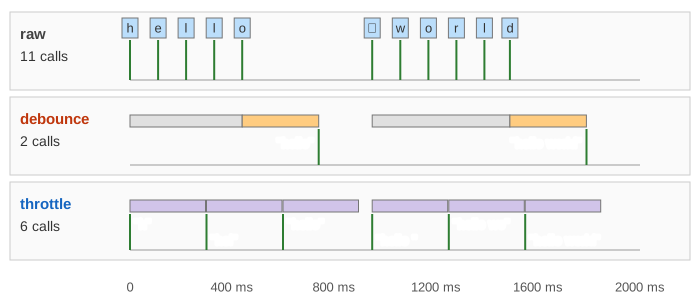
Each row has a timeline (keys or scroll events on top, timers and windows in the middle, green numbered handler calls below with the value they got) and a handler panel on the right that counts the calls and says when the final value (what the user ended on) reached the handler. Both wrappers take one number, wait, as lodash names it: 300 ms by default.
Debounce: wait for a pause
A trailing debounce starts a timer of wait ms on each event. If another event comes first, the old timer is cancelled (grey) and a new one starts (orange). Only when the input has been quiet for wait ms does the timer fire, and the handler runs once with the last value. In Demo 1: search box, trailing debounce the user types "hello", pauses 510 ms, then types " world": two searches, at 740 ms for "hello" and at 1790 ms for "hello world", instead of eleven.
The price is lag: the final value reaches the handler wait ms after the last key. And if the input never pauses for wait ms, debounce never runs at all until the end. In Demo 5: input that never pauses a key every 230 ms with a 300 ms wait gives one call, at 1910 ms. Lodash's maxWait option exists for this: it forces a call at least every maxWait ms (and lodash's throttle is just debounce with maxWait = wait).
Leading, trailing or both
The edge decides which event of a burst runs the handler. Trailing (the default) runs after the burst with the last value. Leading runs at once on the first event and ignores the rest until things have been quiet for wait ms. That feels instant, but for a search box it is wrong: Demo 2 searches for "h" and "hello " and never for "hello world". Leading fits a button that must not be double-submitted. Leading + trailing runs at both ends of each burst, and the trailing call only if more events came after the leading one: four calls in Demo 3.
Throttle: at most once per interval
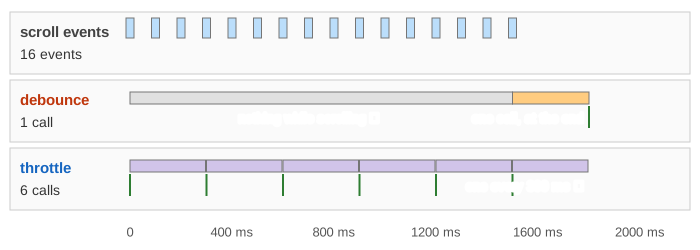
A throttle runs the handler at once if wait ms have passed since its last call, and then opens a window (lavender). Events inside the window are not lost: the latest value waits and is sent when the window ends (the trailing call). So during a long burst the handler runs steadily, about once per wait. In Demo 4: scrolling, throttle keeps updating 16 scroll events in 1.5 s give 6 throttled calls, one every 300 ms, while debounce makes no call until the scroll has stopped: a sticky header or a progress bar driven by it would freeze while the user scrolls.
Neither wrapper helps when events are already further apart than wait: in Demo 6: wait shorter than the gaps keys come every 230 ms with a 200 ms wait, and both run 8 times for 8 keys.
Which one?
| demo | raw | debounce | throttle |
|---|---|---|---|
| 1: typing, trailing, 300 ms | 11 | 2, final value +300 ms | 6, final value +60 ms |
| 2: typing, leading | 11 | 2, final value never sent ✗ | 6 |
| 3: typing, leading + trailing | 11 | 4, final value +300 ms | 6 |
| 4: scrolling | 16 | 1, nothing while scrolling | 6, steady |
| 5: never pauses | 8 | 1, at the very end | 7, steady |
| 6: wait < gap | 8 | 8 | 8 |
| use | pick | why |
|---|---|---|
| search-as-you-type, autosave, validate a field | trailing debounce | only the final value matters |
| submit or "like" button | leading debounce | act on the first click, drop double clicks |
| scroll position, drag, mousemove, resize | throttle | steady feedback while it happens |
| something drawn on screen every frame | requestAnimationFrame | at most once per frame, in step with paint |
The code
A trailing debounce fits in a few lines; the rest of lodash's version handles leading, maxWait, cancel and flush.
function debounce(fn, wait) {
  let timer;
  return (...args) => {
    clearTimeout(timer);                       // grey bar: restarted
    timer = setTimeout(() => fn(...args), wait); // orange bar
  };
}
input.addEventListener("input", debounce(e => search(e.target.value), 300));
window.addEventListener("scroll", _.throttle(() => updateHeader(scrollY), 300));
The timers are ordinary setTimeout tasks, so they run on the main thread between other tasks. See the browser event loop for when a timer callback actually runs, and the Node.js event loop for the same timers on the server.
What the page leaves out
Real timers are late when the main thread is busy, and browsers clamp timers in background tabs; the page fires them exactly on time. It uses a few hand-made events instead of a real scroll (about one event per frame, 60 a second), and handles an event before a timer due at the same millisecond. Also left out: maxWait, cancel() and flush(), passive event listeners, cancelling a search request that is already in flight (AbortController) and responses arriving out of order.