The idea: translation is not linear, so add a coordinate
Rotating, scaling, shearing and reflecting are linear maps: each one is a 2×2 matrix, and each one keeps the origin where it is, because a matrix times (0, 0) is always (0, 0). Translation T(tx, ty) moves every point by the same amount, (x, y) → (x + tx, y + ty), so it moves the origin too. No 2×2 matrix can do that. A map that is "a linear map, then a shift" is called affine.
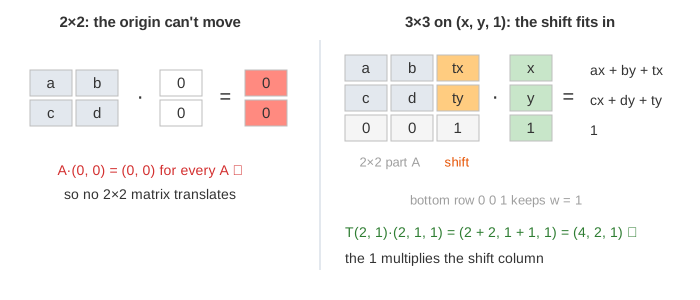
The trick is to give every point a third coordinate equal to 1: (x, y) becomes (x, y, 1). These are homogeneous coordinates. Now a 3×3 matrix can multiply the 1 by the shift:
The top-left 2×2 block [a b; c d] is the linear part, the third column is the shift, and the bottom row 0 0 1 keeps the third coordinate equal to 1. A pure translation is [1 0 tx; 0 1 ty; 0 0 1]. With t = (2, 1) and p = (2, 1, 1), row 1 gives 1·2 + 0·1 + 2·1 = 4 and row 2 gives 0·2 + 1·1 + 1·1 = 2, so p lands at (4, 2) (Demo: add a 1: translation as a 3×3 matrix).
Why translation is not linear
A linear map L has L(u + v) = L(u) + L(v). Take T = T(2, 1), u = (1, 0), v = (0, 1). Then T(u + v) = T(1, 1) = (3, 2), but T(u) + T(v) = (3, 1) + (2, 2) = (5, 3): the sum counts the shift twice. The canvas puts both answers on the plane as two teal dots (Demo: translation moves the origin: not linear). In three dimensions the 3×3 matrix is linear; the next-to-last section shows how.
The three columns
As for every matrix, the columns tell where the basis goes. Columns 1 and 2 are where î and ĵ point, as arrows; column 3 is M·(0, 0, 1), where the origin lands. The canvas colours them red, green and purple, draws î and ĵ starting at the moved origin, and marks the moved origin with a purple dot.
A chain of moves is one matrix, and order matters
Do S1 first, then S2: the point goes to S2·(S1·p) = (S2S1)·p. So a whole pipeline of moves is one matrix, the product with the last step on the left. This is how graphics programs and game engines work: every object carries one 3×3 (in 3D, 4×4) matrix, and drawing it is one matrix product per point. The matrix panel on the canvas shows each step as step · before = after.
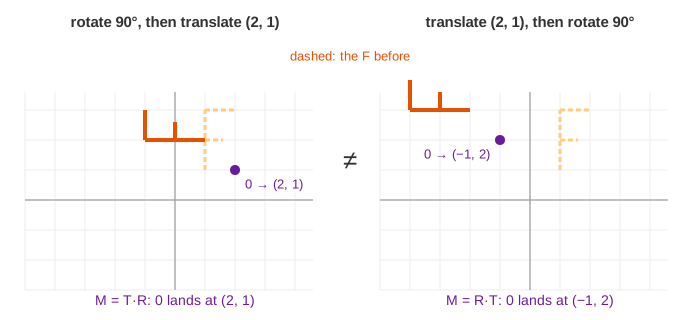
Matrix products do not commute, and with a translation that is easy to see. Rotate 90° then translate by (2, 1): T·R = [0 −1 2; 1 0 1; 0 0 1]. Translate first, then rotate: R·T = [0 −1 −1; 1 0 2; 0 0 1]. The 2×2 part is the same, but in R·T the rotation also turns the shift (2, 1) into (−1, 2), so the F ends up somewhere else (Demo: rotate then translate vs translate then rotate).
Rotate about a point: T(P)·R·T(−P)
R(θ) turns everything about the origin. To turn about another point P, the classic graphics recipe is three steps: move P to the origin with T(−P), rotate, move back with T(P). As one matrix, M = T(P)·R(θ)·T(−P). For P = (1, 1) and θ = 90°:
Check that P stays put: row 1 gives 0·1 − 1·1 + 2 = 1 and row 2 gives 1·1 + 0·1 + 0 = 1. The orange F on the canvas has its corner at P, so it spins about its own corner (Demo: rotate about a corner: T·R·T⁻¹; the step menu also has the whole thing as one step). Scaling about a point works the same way: T(P)·S·T(−P).
Points and vectors: w = 1 and w = 0
A point is a place; a vector is an arrow, a displacement, with a length and a direction but no place. Moving the whole picture by (2, 1) moves every point, but the arrow from one point to another stays the same arrow. Homogeneous coordinates handle this for free: give vectors a third coordinate w = 0. Then the shift column is multiplied by 0, and only the 2×2 part acts: T(2, 1)·(2, 1, 0) = (2, 1, 0) while T(2, 1)·(2, 1, 1) = (4, 2, 1) (Demo: vectors (w = 0) ignore translation). The rules match: point − point = vector (1 − 1 = 0), point + vector = point (1 + 0 = 1), and point + point (w = 2) is not a point. In computer graphics, normals and directions get w = 0 and positions get w = 1.
What affine maps keep
| Property | Kept? | Why |
|---|---|---|
| straight lines | ✓ yes | the line a + t(b − a) goes to Ma + t·(the 2×2 part)(b − a) |
| parallel lines | ✓ yes | same direction vector before, same one after |
| midpoints, ratios along a line | ✓ yes | the t in the line above is unchanged |
| area ratios | ✓ yes | every area is multiplied by the determinant of the 2×2 part |
| the origin | ✗ no | it goes to the shift (tx, ty) |
| lengths and angles | only if the 2×2 part is a rotation or reflection | a scale or shear changes them |
The teal segment from (−2, −2) to (2, 0) has its midpoint at (0, −1). After S(2), R(90°) and T(2, 1) the ends are at (6, −3) and (2, 5) and the midpoint at (4, 1), still exactly halfway (Demo: lines, parallel lines, midpoints stay).
The 3D picture: a shear of the plane z = 1
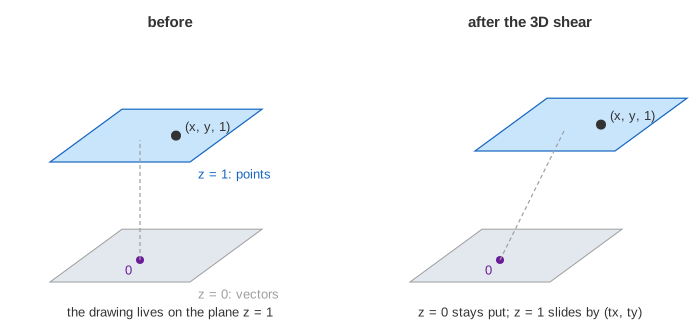
Why does adding a coordinate work? Put the drawing on the plane z = 1 in 3D, so the point (x, y) sits at (x, y, 1). The 3×3 translation matrix is a 3D shear: it slides each horizontal slice by z·(tx, ty). The floor z = 0, which holds the origin, does not move, so the map is linear in 3D. But the plane z = 1 slides by exactly (tx, ty): seen inside that plane, it is a translation. Vectors live in the floor z = 0, which is why they don't move.
See also Linear Transformations (the 2×2 part), the single maps Rotation Matrix, Scaling Matrix, Shear Matrix and Reflection Matrix, Composing Transforms (products of 2×2 maps), Inverse Matrix, Matrix Multiplication, the older page Rotate and Translate 2D (a shape's local frame moved in the world), Changing Coordinates 2D, and Perspective Projection, where the fourth coordinate w stops being 1.
Four affine maps like these, picked at random again and again, draw a whole fern: see The Barnsley Fern.
What the page leaves out
The step menu only has a few steps (translations, ±90° turns, scaling ×2 and ×½), so every entry stays an exact fraction and the picture stays in the panel. The inverse of an affine map ([A t; 0 1]−1 = [A−1 −A−1t; 0 1]), shears and reflections inside the 3×3, the 4×4 matrices of 3D graphics, projective maps (a bottom row other than 0 0 1, which turns squares into general quadrilaterals), and fitting an affine map to matched points by least squares are not shown.