The idea: find what can go wrong while it is still a drawing
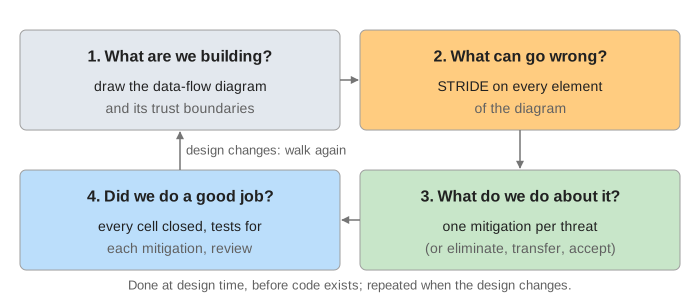
Threat modelling is a design review with one question in mind: what could an attacker, a careless user or a broken part do to this system, and what will we do about it? It is done on a diagram, before the code exists, because a missing control is cheap to add to a drawing and expensive to add to a running product. The page models a small photo-sharing site and goes through the four questions of the Threat Modeling Manifesto.
Reading the canvas: the data-flow diagram is at the top left, the STRIDE grid (one row per element, one column per category) at the top right, and the attack tree below them. Orange marks what the current step is about. In the grid, red is an open threat, green its mitigation and grey a category that does not apply.
Four element types and trust boundaries
A data-flow diagram (DFD) uses only four kinds of element (Demo 1: read the DFD):
| Element | Drawn as | On this page |
|---|---|---|
| External entity: people or systems we do not control | box | E1 User |
| Process: our code that takes input and acts | circle | P1 Web app |
| Data store: data at rest | two lines | D1 Database, D2 Audit log |
| Data flow: data in motion | arrow | F1 request, F2 SQL, F3 log write |
A trust boundary is a line where data passes between places with different privilege: from the Internet into the app server, from the app server into the data tier. Anything that crosses one must be checked by the side that receives it. Threats gather at these crossings, so F1 and F2 are looked at first; F3 stays inside the app server.
STRIDE: six categories, six properties
STRIDE (from Microsoft, 1999) names six kinds of threat. Each one breaks one security property, so the mitigation is a control that restores that property:
| Threat | Breaks | Typical mitigation |
|---|---|---|
| Spoofing: pretending to be someone else | authentication | MFA, certificates |
| Tampering: changing data or code | integrity | TLS, signatures, HMAC, permissions |
| Repudiation: denying an action, with nothing to show otherwise | non-repudiation | audit logs, signed or chained entries |
| Information disclosure: data seen by the wrong party | confidentiality | encryption, access control, generic errors |
| Denial of service: making it unavailable | availability | rate limits, quotas, pools |
| Elevation of privilege: doing more than allowed | authorization | a server-side check on every request |
STRIDE per element
Asking all six questions of every element gives many cells that make no sense: a network flow cannot log in, and a user's browser is not ours to protect from denial of service. STRIDE per element keeps only the categories that apply to each element type:
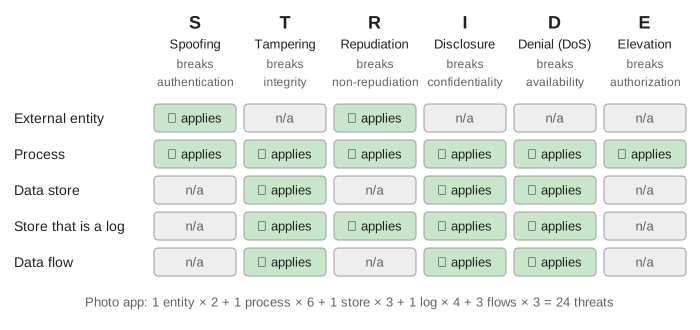
The user gets 2 threats (Demo 2), the web app all 6 (Demo 3), flow F1 3 (Demo 4) and the audit log 4, because repudiation applies to a store that is a log: the log is the proof of who did what (Demo 5). The whole model has 2 + 6 + 3 + 4 + 3 + 3 + 3 = 24 threats and 18 grey cells (Demo 6). Each threat is written at the level of its category (“someone else logs in as the user”), which is enough to pick a control.
From threat to mitigation
Every threat leaves the model with a decision. Usually it is a mitigation: a control that restores the broken property (MFA for spoofing the user, TLS for tampering with F1, an append-only store and a hash chain for the audit log). The other answers are to eliminate the feature, transfer the risk (a payment provider holds the card numbers) or accept it in writing. The model is done when no cell is open. One control often answers several threats: TLS covers T and I on F1, and the audit log covers R for both the user and the web app.
Each mitigation should become something testable: a test that an error page shows no stack trace, a check that the database account cannot alter tables, an alert when the log disk fills. That is question 4: did we do a good job?
Attack trees: AND, OR and the cheapest path
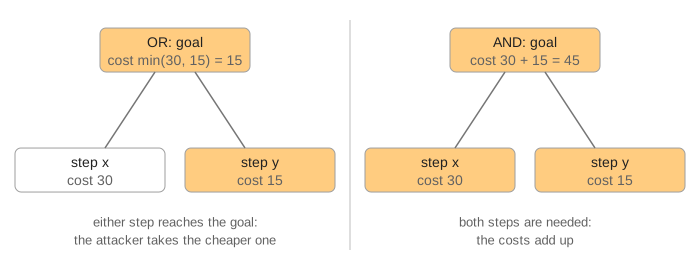
STRIDE finds threats one element at a time. An attack tree (Schneier, 1999) looks at one attacker goal and how steps combine to reach it. The goal is the root. An OR node is reached through any one child; an AND node needs all of them. Give each leaf a cost (effort, money, skill; here an abstract number) and the tree tells you the cheapest attack:
The page's goal is “read Bob's private photo”, with three branches: log in as Bob, ask the server for the photo directly, or read a database copy. At the start the cheapest path costs 5: learn the photo id (5, ids count up) and a server with no owner check (0) (Demo 7). That is an elevation-of-privilege threat on the web app, the kind OWASP A01 Broken Access Control animates.
Fixing a leaf off the cheapest path changes nothing; fixing one on it moves the path (Demo 8). The owner check blocks branch B, and the cheapest path becomes a leaked password with no second factor: 15. MFA raises that branch to 15 + 80 = 95, so the backup copy is cheapest: 40. Encrypting backups blocks it, and the cheapest attack now costs 95. The root never reaches ∞ in a real system; the tree tells you where the next unit of effort buys the most.
When to do it
- When a feature is designed, on its own DFD, and again whenever a new flow, store or boundary appears.
- With the people who build it: developers know the flows, testers know the edge cases.
- Keep the result next to the design: the threat list, the mitigations and who owns each one.
See also OWASP A06 Insecure Design (the design flaws a threat model is meant to catch), Bell-LaPadula and Biba (formal rules for disclosure and tampering between levels), OWASP A09 Logging and Alerting Failures (the audit log and repudiation), TOTP two-factor login (the MFA mitigation) and an HTTPS connection (the TLS mitigation on F1).
See also Fault Tree Analysis: Gates, Minimal Cut Sets and P(top), the safety-engineering form of AND/OR trees, with minimal cut sets and probabilities.
What the page leaves out
- Other methods: PASTA, LINDDUN for privacy, DREAD and CVSS for ranking threats, and STRIDE per interaction, which looks at each flow together with its two ends.
- Ranking: real models score each threat (likelihood × impact) and fix the worst first; here every threat gets a mitigation.
- Bigger diagrams: a real DFD has several levels (a context diagram, then one per subsystem) and many more flows, often drawn with a tool such as the Microsoft Threat Modeling Tool or OWASP Threat Dragon.
- Real attack-tree costs: leaves can carry money, skill, time or probability, and AND/OR can be combined with “needs special equipment” flags. The page uses one abstract number.
- How each mitigation is built: MFA, TLS, rate limits and audit logging have their own pages (see above).