The idea: one shared secret, two clocks
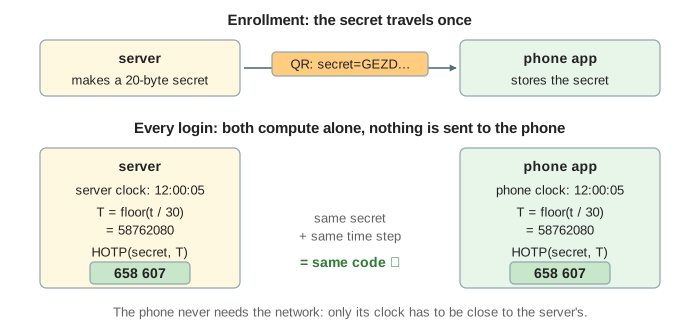
An authenticator app (Google Authenticator, Microsoft Authenticator, 1Password, …) shows a 6-digit code that changes every 30 seconds. The phone does not ask the server for it. When you turn on two-factor login, the server and the app agree on a shared secret once. From then on both sides compute the code on their own from two inputs: the secret and the current time. Same secret and same 30-second time step give the same code, so the phone works in flight mode. The standard is TOTP (Time-based One-Time Password, RFC 6238), built on HOTP (RFC 4226).
The canvas has five regions. On the left Alice's phone with the stored secret, its clock, the time step T, a bar with the seconds left in the step and the current code. In the middle the browser (the login page and the code field) and an attacker panel. On the right the server with its own clock, the three codes it accepts and the last used T. Underneath, the HOTP computation the phone just did, byte by byte. The HMAC is real: with the RFC 6238 test secret, the codes on the canvas are the ones a real app would show at that time.
Enrollment: the QR code
When Alice turns on two-factor login, the server makes a random secret (20 bytes for SHA-1) and stores it with her
account. It shows it as a QR code holding an otpauth:// URI:
otpauth://totp/example.com:alice?secret=GEZDGNBVGY3TQOJQGEZDGNBVGY3TQOJQ
    &issuer=example.com&algorithm=SHA1&digits=6&period=30
The secret is written in base32 (letters A–Z and digits 2–7) so it can also be typed by hand. The app scans the QR code and keeps the secret. This is the only moment the secret is sent anywhere, which is why the QR code must not be shared or screenshotted. Many sites then ask for one code to confirm the app works. (Demo: Enroll: scan the QR code)
From the time to T
Both sides read their clock as Unix time t (seconds since 1970-01-01 UTC) and divide by the
period: T = floor(t / 30). At 12:00:05 UTC on 2025-11-11, t = 1762862405 and T = 58762080. T stays the same for 30
seconds and then goes up by one, so the code changes every 30 seconds without any message. Time zones don't matter: Unix
time is the same everywhere. (Demo: A new code every 30 s)
HOTP: HMAC, dynamic truncation, mod 106
- Write T as an 8-byte big-endian number:
00 00 00 00 03 80 a3 60. - Compute HMAC-SHA1 with the secret as the key: 20 bytes. Without the secret nobody can compute them, and seeing old codes does not reveal the secret.
- Dynamic truncation: the low 4 bits of the last byte give an offset (0 to 15). Take the 4 bytes from there and clear the top bit, giving a 31-bit number.
- Keep the last 6 decimal digits:
number mod 10^6, padded with leading zeros.
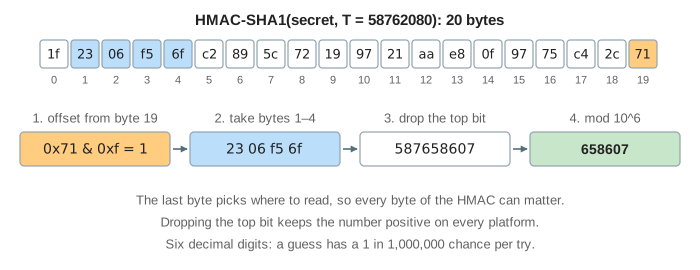
HOTP itself takes any counter. TOTP is just HOTP with the counter set to the time step. The older HOTP tokens used a counter that went up on each button press, which got out of step when the button was pressed without logging in.
The window and clock drift
The code Alice reads at 12:00:25 may reach the server at 12:00:33, in the next step. So the server computes the codes for T-1, T and T+1 of its own clock and accepts any of them (RFC 6238 recommends at most one step back for network delay). The same window covers a phone clock that is a few seconds off. A clock minutes off falls outside it and every code is rejected. Phones normally set their clock from the network, so this is rare; some servers also remember a user's measured drift. (Demos: Typed as the code changed; Phone clock 20 s vs 2 min slow)
| phone clock | phone T vs server T | result |
|---|---|---|
| correct, typed in time | same | accepted (T) |
| correct, step changed while typing | one behind | accepted (T-1) |
| 20 s slow | one behind | accepted (T-1) |
| 2 min slow | 4 behind | rejected |
Single use and replay
A code is valid for up to 90 seconds with the window, so an attacker who sees it (a keylogger, someone looking over a shoulder) could try it right away. RFC 6238 says the server must not accept the same code twice: after a successful login it stores the last used T and rejects any code for that step or an earlier one. Rate limiting (a few tries per minute) stops guessing the 1-in-a-million code. (Demo: Replay a captured code)
Phishing: why TOTP is not enough
The code proves that whoever typed it has the secret right now. It says nothing about which site it was typed into.
A phishing page at examp1e.com asks for the password and the code and passes both to the real site within the
30 seconds, then keeps the session cookie. Tools that do this automatically are common. Passkeys stop it because the browser
puts the page's origin into what the key signs; see How Passkeys Sign You In. Other weaknesses of
login forms are on OWASP A07:2025 Authentication Failures.
(Demo: Phishing site relays the code)
| attack | TOTP | passkey |
|---|---|---|
| stolen password alone | ✓ blocked | ✓ blocked |
| replay of a used code | ✓ blocked (last used T) | ✓ blocked (one-time challenge) |
| real-time phishing relay | ✗ works | ✓ blocked (origin) |
| stolen server database | ✗ secrets let anyone make codes | ✓ only public keys |
HMAC is related to the hashes on AES and SHA-256; the secret has to be stored so the server can use it, unlike a password, which is only hashed (see Password Hashing).
What the page leaves out
- SHA-256 and SHA-512 variants, 8-digit codes and other periods (the URI can ask for them; most apps use SHA-1, 6, 30).
- Rate limiting and lockout after wrong codes, and backup/recovery codes.
- How the server encrypts stored secrets, and moving the secret to a new phone (cloud backup of the app).
- Push approval and SMS codes, the other common second factors.
- Per-user drift tracking and resynchronisation after a phone clock was off.
See where this page fits on the Web & Security mind map.