The idea: four delays at every hop
A packet does not jump from sender to receiver. It crosses a chain of links and routers, and at every hop it loses time in four ways. Add them up over all hops and you get the end-to-end delay.
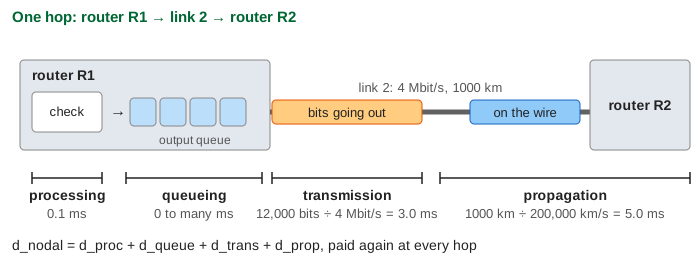
- Processing dproc: the router reads the header, checks it and picks the output link. Microseconds in real routers; 0.1 ms here.
- Queueing dqueue: the packet waits in the output queue while the link sends the packets ahead of it. Zero on an idle link, large on a busy one.
- Transmission dtrans = L / R: the time to push all L bits onto a link of rate R. 12,000 bits at 12 Mbit/s take 1.0 ms.
- Propagation dprop = d / s: the time for a bit to travel the wire of length d at signal speed s (about 2×10⁸ m/s in fibre or copper, 5 µs per km).
The page sends packets of 1500 bytes (12,000 bits) from host A to host B over three links: 12 Mbit/s and 20 km, then a middle link you pick, then 12 Mbit/s and 20 km again. On the path, orange means the sender is still pushing the packet's bits out (transmission); blue means every bit is on the wire (propagation).
Transmission is not propagation
The two are easy to mix up. Transmission depends on the packet and the link rate, not the distance. Propagation depends on the distance, not the rate or the packet. A faster link shortens the first; only a shorter wire shortens the second.
| Link 2 | dtrans | dprop | one packet A → B |
|---|---|---|---|
| 4 Mbit/s, 1000 km | 3.0 ms | 5.0 ms | 10.4 ms |
| 4 Mbit/s, 20 km | 3.0 ms | 0.1 ms | 5.5 ms |
| 40 Mbit/s, 1000 km | 0.3 ms | 5.0 ms | 7.7 ms |
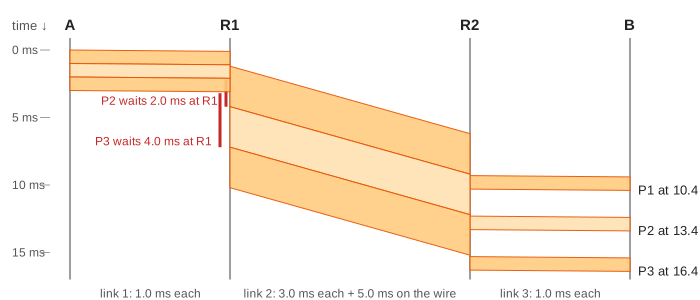
One packet over the default path takes 10.4 ms: transmission 1.0 + 3.0 + 1.0 = 5.0 ms, propagation 0.1 + 5.0 + 0.1 = 5.2 ms, processing 0.2 ms, no queueing (Demo 1: one packet, four kinds of delay). With a 20 km middle link, propagation drops to 0.3 ms and the packet arrives in 5.5 ms; now pushing bits out is almost all of the delay (Demo 2: short middle link).
Watch the shape of the packet on a link. On link 1 the transmission (1.0 ms) is ten times the propagation (0.1 ms), so the first bit reaches R1 long before the last one leaves A: the bits fill the whole wire. On link 2 the 3.0 ms packet covers 60% of the 5.0 ms wire. The number of bits a link holds at once is R × dprop, the bandwidth-delay product: 4 Mbit/s × 5 ms = 20,000 bits on link 2.
Store-and-forward
A router must have the whole packet before it can check it and send it on, so it stores the packet until the last bit has arrived, then forwards it. Each hop therefore adds a full transmission time. Sending one packet of L bits over N equal links of rate R takes N × L / R plus the propagation, not L / R.
Several packets still overlap, like a pipeline: while link 2 sends P1, link 1 already sends P2. Three packets arrive at 10.4, 13.4 and 16.4 ms, not at 10.4, 20.8 and 31.2 (Demo 3: three packets). But link 1 hands R1 a packet every 1.0 ms and link 2 needs 3.0 ms for each, so P2 waits 2.0 ms and P3 waits 4.0 ms in R1's queue: that is queueing delay.
The bottleneck link sets the throughput
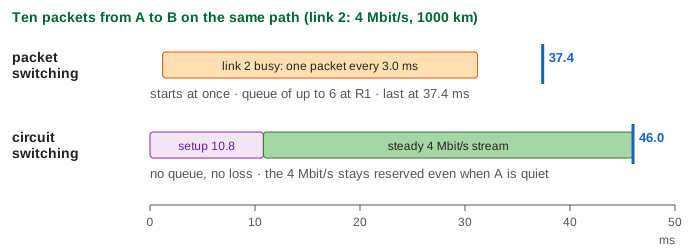
Throughput is how many bits per second actually reach the receiver. With ten packets the queue at R1 grows to 6 packets, and packets reach B exactly one every 3.0 ms: 12,000 bits / 3.0 ms = 4.0 Mbit/s, the rate of link 2. The 12 Mbit/s links before and after it cannot make that faster (Demo 4: ten packets). The slowest link on the path is the bottleneck, and a long transfer gets throughput min(R1, R2, R3).
Make link 2 40 Mbit/s and the bottleneck moves: now link 1 is the slowest, packets arrive one every 1.0 ms (12.0 Mbit/s), no queue forms at R1, and the last packet arrives at 16.7 ms instead of 37.4 (Demo 5: a faster middle link). Upgrading a link that is not the bottleneck would change nothing.
For the whole transfer the average is lower than the bottleneck rate, because the first packet also pays the path delay: 120 kbit in 37.4 ms is 3.2 Mbit/s. The bigger the file, the closer the average gets to the bottleneck rate. On the real Internet the bottleneck is often the access link (home uplink, Wi-Fi) or a busy link shared with many other flows.
A full buffer means loss
A router's queue has room for a limited number of packets. When a packet arrives and the queue is full, the router drops it. With room for only 2 waiting packets, R1 drops P5, P6, P8 and P9; only 6 of the 10 packets reach B (Demo 6: a 2-packet buffer overflows). The packets that do arrive still come every 3.0 ms, because the bottleneck stays busy, but 40% of what A sent is gone and must be sent again by a protocol such as TCP. Which packet to drop, and how big the buffer should be, is the subject of router queues and AQM.
Queueing delay grows quickly as a link gets busy. If packets arrive at rate a and the link sends at rate R, the traffic intensity a / R tells the story: well below 1, queues are short; near 1, the wait grows without bound; above 1, as here (link 1 feeds link 2 three times faster than it can send), the queue grows until the buffer overflows. Latency vs throughput shows the same curve for a server.
Packet switching vs circuit switching
The telephone network used circuit switching: before talking, the call sets up a circuit, and every switch on the way reserves a share of its links (a time slot or a frequency) for this call alone. The page's SETUP message reserves 4 Mbit/s on all three links and the CONNECT reply comes back: 10.8 ms before any data moves. Then the bits flow as a steady stream at exactly 4 Mbit/s, with no store-and-forward, no queue and no loss; the last bit reaches B at 46.0 ms (Demo 7: circuit switching). Packet switching sent the same ten packets by 37.4 ms because it needed no setup.
| Packet switching | Circuit switching | |
|---|---|---|
| Before data | nothing: send at once | setup round trip (10.8 ms here) |
| Link capacity | shared, used by whoever has packets | reserved per call, idle when the call is silent |
| Delay | varies with the queues | fixed after setup |
| Loss | possible when a buffer is full | none once the call is accepted (a call can be refused) |
| Each node | store-and-forward per packet | passes bits on as they come |
Why the Internet uses packet switching: most traffic comes in bursts. Say a 1 Mbit/s link and users who each need 100 kbit/s, but are active only 10% of the time. Circuit switching can admit 10 users. Packet switching can serve 35: the chance that more than 10 of them are active at the same moment is below 0.0004, so the link is almost never overloaded. Sharing (statistical multiplexing) wins when traffic is bursty.
In practice
pingshows the round trip; the minimum over many pings is about twice the propagation plus transmission, and the spread above it is queueing.- Traceroute shows the delay hop by hop; a jump between two hops usually means a long link (an ocean) or a busy queue.
- Light in fibre covers about 200 km per millisecond: Hanoi to Ho Chi Minh City is about 1,140 km in a straight line, so a packet can never cross it in less than 5.7 ms one way, however fast the links are.
- A speed test measures the bottleneck: a 1 Gbit/s LAN behind a 100 Mbit/s home uplink gives 100 Mbit/s to the Internet.
See also router queues and AQM, latency vs throughput on a server, traceroute, TCP congestion control, how a router forwards a packet and hubs, switches and routers.
See also BitTorrent and the DHT for why a P2P swarm spreads a file faster than one server as the number of peers grows.
What the page leaves out
Packets of different sizes and other flows sharing the links; retransmission of lost packets (TCP would resend P5, P6, P8 and P9 and slow down, see ARQ protocols); cut-through switches that forward before the whole frame has arrived; the ACKs on the way back; real processing times (micro- to nanoseconds in hardware); time-division and frequency-division slots of a real circuit, and calls being refused when no slot is free.