The idea: network bits and host bits
An IPv4 address is 32 bits, written as four bytes: 192.168.1.10. The first part of the address names
a network (a subnet), the rest names a host on it. Where the split falls is not in
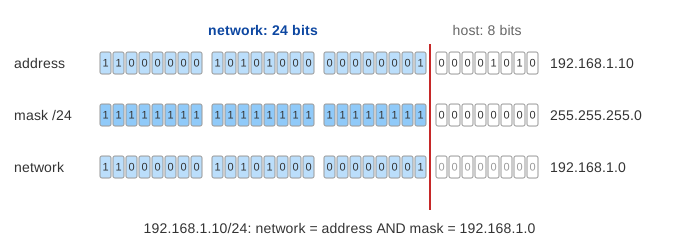
the address itself. It is given by the prefix length: 192.168.1.10/24 means the first
24 bits are the network. This way of writing it is CIDR (Classless Inter-Domain Routing).
The page has one laptop, 192.168.1.10, whose default gateway is the router 192.168.1.1,
and four places to send a packet: a printer, a NAS, a server at 192.168.7.5 and a DNS server at
8.8.8.8. The mask is the plan for the whole LAN: when you change it, the router and every host use the
new one, and each destination moves to the laptop's subnet or behind the router.
The subnet mask and the prefix length
The subnet mask is the prefix length written as an address: a 1 for each network bit, then 0s.
/24 and 255.255.255.0 say the same thing. The ones are always on the left, so only these
values are possible in each byte: 0, 128, 192, 224, 240, 248, 252, 254, 255.
| Prefix | Mask | Host bits | Addresses | Usable hosts |
|---|---|---|---|---|
/8 | 255.0.0.0 | 24 | 16 777 216 | 16 777 214 |
/16 | 255.255.0.0 | 16 | 65 536 | 65 534 |
/24 | 255.255.255.0 | 8 | 256 | 254 |
/26 | 255.255.255.192 | 6 | 64 | 62 |
/28 | 255.255.255.240 | 4 | 16 | 14 |
/30 | 255.255.255.252 | 2 | 4 | 2 |
/32 | 255.255.255.255 | 0 | 1 | one host route |
Network address, broadcast address and host count
The network address is the address AND the mask: the host bits become 0.
192.168.1.10 AND 255.255.255.0 = 192.168.1.0. Setting all host bits to 1 gives the
broadcast address, 192.168.1.255. Those two are reserved, so a prefix with
h host bits has 2h − 2 usable host addresses: 254 for a /24, 14 for a
/28. The line under the subnet panel's title shows the range for the current mask.
Same subnet? ARP for it. Otherwise, the router
Before a host can send a packet it must choose the next hop, because the Ethernet frame needs a MAC address. It ANDs its own address and the destination with its own mask and compares the two networks:
- Equal: the destination is on-link, on the same wire. The host ARPs for the destination itself and sends the frame straight to it. (Demo: Same subnet)
- Different: ARP can't reach it, because ARP broadcasts stay on one LAN. The host ARPs for the default gateway and sends the frame to the router's MAC, with the final destination still in the IP header. (Demo: Internet address)
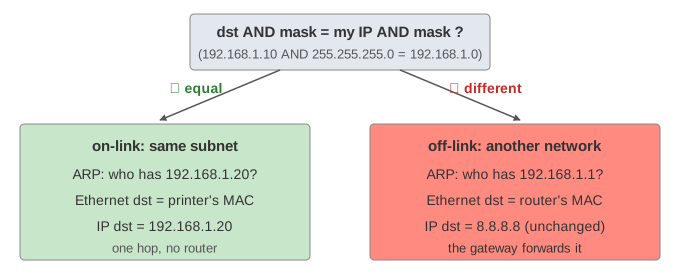
In Linux this is just the routing table: ip route shows 192.168.1.0/24 dev eth0 scope link
(the connected route, made from the address and mask) and default via 192.168.1.1. The longest match
wins, which is the same AND-and-compare. More on that in
How a Router Forwards a Packet.
The mask, not the address, decides
192.168.7.5 looks close to 192.168.1.10, but with a /24 the third byte is a
network byte, and 7 ≠ 1, so it is another network. (Demo: 192.168.7.5 on a /24) With a /16 only
the first two bytes count, and it becomes a neighbour reached by ARP. (Demo: Wider mask /16) The mask has to
match the real wiring: a host with a wrong mask ARPs for addresses that are not on its wire (and gets no answer), or
sends local traffic through the router.
Subnetting: splitting a /24
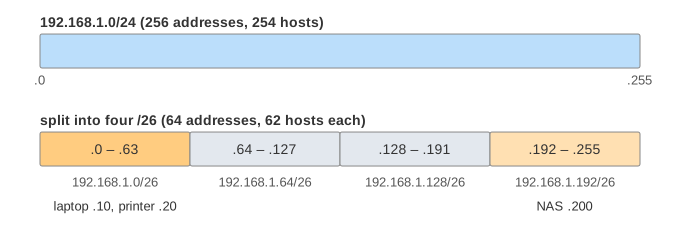
Taking more bits for the network splits one block into smaller ones. Two more bits turn
192.168.1.0/24 into four /26s of 64 addresses each. The laptop .10 stays in the
first one, so the NAS at .200 is now on a different subnet and needs the router.
(Demo: Split the /24 into /26s) A /28 leaves only 14 hosts, .1 to
.14, so even the printer at .20 is remote. (Demo: A /28 has 14 hosts)
The reverse, joining blocks into one shorter prefix (four /24s into a /22), is
supernetting or route aggregation: a router upstream needs one route instead of four.
Private and special ranges
| Range | Use |
|---|---|
10.0.0.0/8, 172.16.0.0/12, 192.168.0.0/16 | private addresses (RFC 1918), not routed on the Internet; reached from outside through NAT |
127.0.0.0/8 | loopback, never leaves the host |
169.254.0.0/16 | link-local, picked by a host when DHCP gives no answer |
/31 | point-to-point links: two addresses, no network or broadcast (RFC 3021) |
Before CIDR (1993), the split was fixed by the first bits of the address: class A (/8), B
(/16) and C (/24). Classes wasted addresses and made routing tables grow, so prefixes of
any length replaced them. IPv6 uses the same prefix idea with 128-bit addresses; a LAN there is almost always a
/64 (see IPv4 vs IPv6).
See also How ARP Finds a MAC Address (the request and reply in detail, and the ARP cache), How a Router Forwards a Packet and How a Device Gets an IP Address (DHCP), which hands out the address, mask and gateway.
What the page leaves out
The ARP cache (every send ARPs here), IPv6 prefixes and Neighbor Discovery on the canvas, variable-length subnet masks inside one site (VLSM), several interfaces or routes on the laptop, secondary addresses, proxy ARP, ICMP redirects, a wrong mask on a single host, and what the router does after the first hop.
See where this page fits on the Networking mind map.