The idea: the same job, two versions of IP
IPv4 and IPv6 do the same job: they carry a packet from one host to another across many routers. They differ in the size of an address (32 bits vs 128 bits) and in what that size forces around them. IPv4 ran out of addresses, so a home gets one public address and hides its devices behind NAT. IPv6 has enough for every device to have its own global address, so there is no NAT, and the header was cleaned up while it was being redesigned. This page runs the same laptop, the same home router, the same ISP router and the same server on both, one step of each lane at a time.
IPv4: 32-bit addresses, DHCP and NAT
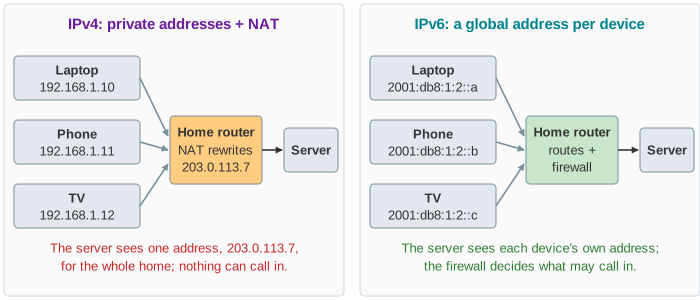
An IPv4 address is 32 bits, written as four bytes: 192.168.1.10. That gives about 4.3 billion addresses, fewer than the devices online. A home network uses a private range (RFC 1918: 10/8, 172.16/12, 192.168/16). A DHCP server in the router hands the addresses out with four messages (DISCOVER, OFFER, REQUEST, ACK) and keeps a lease row for each device (Demo: home network gets an address).
Private addresses cannot be used on the Internet, so the home router does NAT: on the way out it replaces the source 192.168.1.10:51000 with its own public 203.0.113.7:40001 and remembers the pair; on the way back it puts the private address back (Demo: laptop talks to a server). Nothing outside can start a connection to the laptop, because 203.0.113.7 stands for the whole home (Demo: outside host connects in).
IPv6: 128-bit addresses and SLAAC
An IPv6 address is 128 bits, written as eight groups of 16 bits in hex, with one run of zero groups shortened to ::: 2001:db8:1:2:11:22ff:fe33:4455. The first 64 bits are the network's prefix; a home typically gets a whole /64 or more, so the last 64 bits can be anything the host picks.
With SLAAC (stateless address autoconfiguration, RFC 4862) the host builds its own address. It asks with a Router Solicitation, the router answers with a Router Advertisement carrying the prefix, and the host adds an interface ID. Before using the address it runs Duplicate Address Detection: a Neighbor Solicitation for the new address; if nobody answers, it is unique. The router stores nothing about the host.
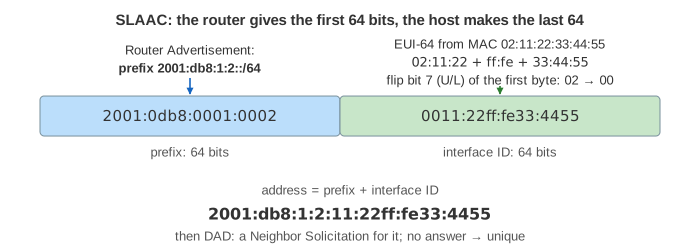
EUI-64 puts the MAC address into every address the laptop uses, so it can be tracked from network to network. Modern systems use a random-looking but stable interface ID instead (RFC 7217) and add short-lived temporary addresses for outgoing connections (RFC 8981).
The headers, field by field
The IPv6 header is twice as long, because the two addresses alone take 32 bytes. But it has fewer fields and a fixed size (Demo: header layouts):
| IPv4 (20 bytes + options) | IPv6 (40 bytes, fixed) | What changed |
|---|---|---|
| Version 4 | Version 6 | same place, so a receiver can tell them apart |
| IHL (header length) | — | removed: the header is always 40 bytes |
| DSCP / ECN | Traffic class | renamed, same use |
| — | Flow label (20 bits) | new: marks the packets of one flow, used for load balancing |
| Total length | Payload length | counts only what follows the header |
| Identification, Flags, Fragment offset | — | moved to a Fragment extension header, used only when the source fragments |
| TTL | Hop limit | renamed; it always counted hops, not seconds |
| Protocol | Next header | also chains extension headers (44 = Fragment, 58 = ICMPv6) |
| Header checksum | — | removed (see below) |
| Source, Destination: 32 bits | Source, Destination: 128 bits | 4 times as long |
| Options (0–40 bytes) | extension headers | chained after the header, skipped by most routers |
No header checksum
Every IPv4 router decrements TTL, so the header changes, so every router must recompute the header checksum (a 16-bit one's-complement sum of the header). IPv6 dropped it: Ethernet and Wi-Fi already check each frame with a CRC, and TCP and UDP checksum their data together with the addresses. An IPv6 router only decrements Hop limit. In Demo: laptop talks to a server the IPv4 routers rewrite 12 fields, 4 of them checksums; the IPv6 routers rewrite 4 Hop limits. (Because of this, UDP's checksum, optional over IPv4, is mandatory over IPv6.) See How a Router Forwards a Packet for the rest of a router's work.
Fragmentation: routers vs the source
Each link has an MTU, the largest packet it carries. When a 1500-byte IPv4 packet with DF = 0 meets a 1400-byte link, the router splits it into fragments, each with its own header, and the destination puts them back together. IPv6 routers never fragment. They drop the packet and send ICMPv6 Packet Too Big with the MTU back to the source, which remembers the path MTU and sends smaller packets, or fragments them itself with a Fragment header (Demo: 1500 B over an MTU 1400 link).
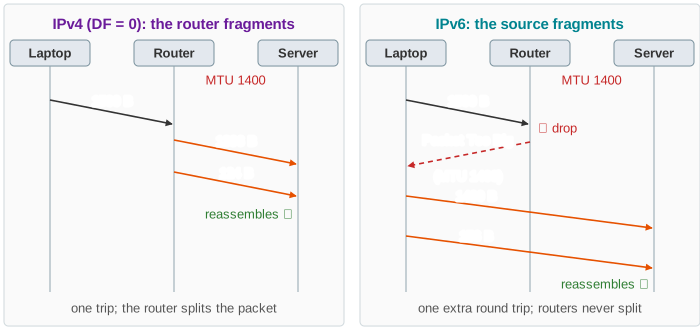
This only works if Packet Too Big gets through. A firewall that drops all ICMPv6 creates a black hole: small packets work and big ones vanish with no error (Demo: ICMPv6 blocked). RFC 4890 lists the ICMPv6 types a firewall must let through. IPv4 has the same trap whenever DF = 1, which is how TCP sends.
Side by side
| IPv4 | IPv6 | |
|---|---|---|
| Address | 32 bits, about 4.3 × 10⁹ | 128 bits, about 3.4 × 10³⁸ |
| Header | 20–60 bytes, 13 fields | 40 bytes, 8 fields |
| Getting an address | DHCP (4 messages, lease in the server) | SLAAC (RS, RA, DAD; no state), or DHCPv6 |
| Finding a neighbour's MAC | ARP broadcast | Neighbor Discovery over ICMPv6 multicast |
| Home network | private addresses + NAT | global addresses + a stateful firewall |
| Incoming connections | need port forwarding | reach the device if the firewall allows |
| Fragmentation | by any router (if DF = 0) | only by the source |
| Header checksum | recomputed at every hop | none |
| Minimum MTU | 68 bytes (576 to reassemble) | 1280 bytes |
Common mistakes
- "NAT is a firewall." NAT blocks unsolicited traffic only as a side effect of not knowing where to send it. An IPv6 home router needs a real stateful firewall that blocks unsolicited traffic by default, as RFC 6092 recommends.
- "IPv6 is faster because the header is simpler." Hardware routes both at line rate. The gain is less work and no NAT state, not speed you can measure on one packet.
- Blocking all ICMPv6. It breaks path MTU discovery and Neighbor Discovery, so IPv6 stops working in confusing ways.
- Reading the 40-byte header as overhead that doubles. It is 20 more bytes per packet: about 1.3% of a 1500-byte packet.
See also How NAT Shares One Public Address, How a Device Gets an IP Address, How ARP Finds a MAC Address and How a Router Forwards a Packet.
What the page leaves out
The page has one laptop, two routers and one server, and both lanes run the same scenario. It leaves out DHCPv6 and prefix delegation (how the home router gets its /64 from the ISP), privacy and stable addresses, link-local scopes and zone IDs, multicast and Neighbor Discovery beyond DAD, extension headers other than Fragment, IPv4 options, and the ways the two versions live together: dual stack, Happy Eyeballs, NAT64/DNS64, 464XLAT and tunnels.