The idea: one loop, once per frame
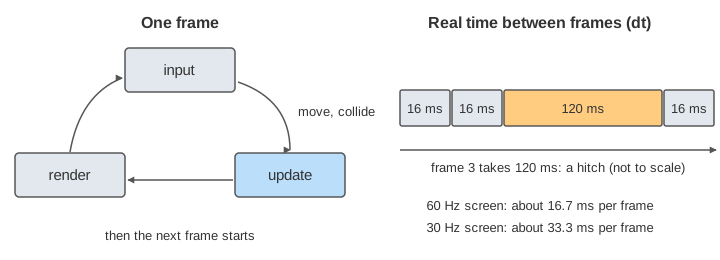
A game is a loop. Each turn of the loop is one frame: read the input, update the game state (move things, test collisions), then render a picture of it. The hard part is time. Frames do not all take the same time, so the loop must decide how much game time each update covers. This page runs the same loop on two machines side by side, with a simulated clock, so you can compare the choices.
On the canvas, orange ticks are frames in real time. Blue blocks are updates, drawn at the game time they cover. Under each track, small purple marks show where each frame drew the ball. The ball moves right at v = 0.5 units per ms.
Frame time is not constant
A screen at 60 Hz shows a new picture about every 16 ms; at 30 Hz every 33 ms. A slow machine takes longer. And sometimes one frame takes much longer: the system loads a file, collects garbage, or the window is dragged. The loop measures the real time since the last frame, called dt (delta time). Here lane A has 16 ms frames and lane B 33 ms frames.
Moving a fixed amount per frame
The simplest loop moves the ball 8 units every frame. That is 0.5 units per ms only if each frame is 16 ms. At 200 ms, lane A ran 12 frames and the ball is at x = 96. Lane B ran only 6 frames and the ball is at x = 48: the 30 fps machine plays the game at half speed (Demo 1). Old games that did this ran too fast on newer computers.
Variable delta time
The fix that looks obvious: multiply by dt, x += v * dt. Now both lanes move at the same speed: at 192 ms lane A is at 96, at 198 ms lane B is at 99, both 0.5 × T (Demo 2).
But each update is now as big as the frame. In Demo 3 lane A's frame 8 takes 120 ms, so one update moves the ball 0.5 × 120 = 60 units, from x = 56 to x = 116. The wall stands at x 100 to 110. Before the update the ball was left of it, after it the ball is right of it, and no check ever saw them touch: the ball tunnelled. Lane B, with smaller 16.5-unit moves, hits the wall at 198 ms. Swept tests can catch such a jump; they are on Collision Detection.
Variable dt also makes the results depend on the frame rate. With gravity or friction, a bigger step gives a different path, because each step uses the speed at its start. A jump goes a little higher on one machine than on another, and a replay or a network game drifts. How the step size changes the error of a simulation is on Runge–Kutta vs Euler; the motion itself is on Projectile Motion.
A fixed timestep with an accumulator
A fixed timestep always updates in the same step, here DT = 10 ms. Each frame adds its real time to an accumulator, then runs updates while the accumulator holds at least DT. What is left waits for the next frame.
acc += now - last;  last = now
while acc >= DT:
    prev = x;  x += v * DT;  collide(x, wall)
    acc -= DT
render(x)
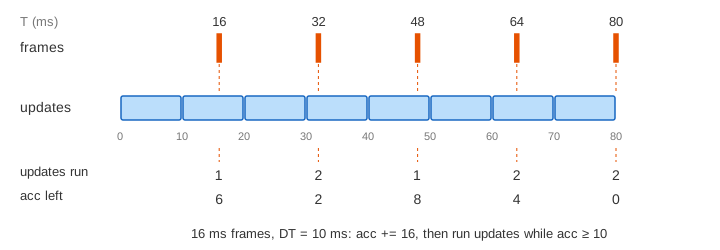
A 16 ms frame runs 1 or 2 updates; a 33 ms frame runs 3 or 4. The long 120 ms frame runs 12 updates of 5 units each, and one of them lands in the wall: lane A hits the wall at game time 190, exactly when lane B does (Demo 4). The game now does the same thing on every machine: with the steady frames, at 200 ms both lanes have run 19 updates and the ball is at x = 95 in both.
Render interpolation
A fixed step has a new problem. Lane A draws after 1, 2, 1, 2, 2 updates, so the ball moves 5, 10, 5, 10, 10 units between frames. The eye sees a stutter (Demo 5). The fix is to draw between the last two states. The accumulator says how far the clock is past the last update: α = acc / DT. Draw at prev + α · (x − prev) (Demo 6).
| lane A frame | T (ms) | updates | acc left | α | drawn x, no interpolation | drawn x, interpolated |
|---|---|---|---|---|---|---|
| 1 | 16 | 1 | 6 | 0.6 | 5 | 3 |
| 2 | 32 | 2 | 2 | 0.2 | 15 | 11 |
| 3 | 48 | 1 | 8 | 0.8 | 20 | 19 |
| 4 | 64 | 2 | 4 | 0.4 | 30 | 27 |
| 5 | 80 | 2 | 0 | 0 | 40 | 35 |
With interpolation the ball moves 3, 8, 8, 8, 8: an even 0.5 units per ms. The price is a delay of one step: the drawn ball is always 0.5 × (T − 10), where the game was 10 ms ago. Only the picture is blended; the game state still moves in whole steps.
The spiral of death and MAX_STEPS
A fixed step assumes the machine can run an update faster than DT. In the "slow update" frames, lane B needs 12 ms of real time to compute 10 ms of game. Then every frame owes more updates than the last, and running them makes the next frame longer still. Lane B's frames last 16, 16, 28, 40, 52, 64, 76 and then 100 ms, and the next would be 124 ms: the spiral of death. Lane A, with 2 ms updates, stays at 16 ms (Demo 7).
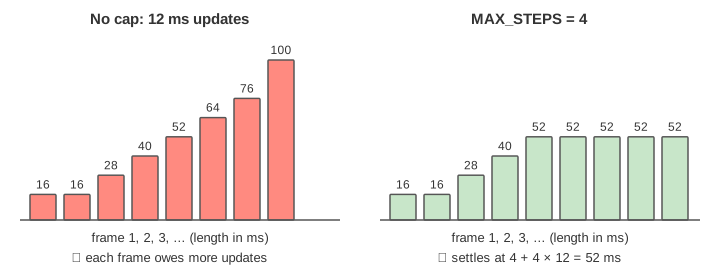
The common fix is a cap: run at most MAX_STEPS updates per frame (here 4) and drop the time still owed. Lane B's frames then settle at 4 + 4 × 12 = 52 ms. Each frame advances the game 40 ms, so at 360 ms of real time the game is at 300 ms: it runs in slow motion at about 77 % speed, but it keeps responding (Demo 8). Engines also clamp a single huge dt (after a pause in a debugger, say) for the same reason.
In real engines
| engine | fixed step | cap |
|---|---|---|
| Unity | FixedUpdate every Time.fixedDeltaTime (default 0.02 s) | Time.maximumDeltaTime (default 0.3333 s) |
| Godot | _physics_process at physics_ticks_per_second (default 60) | max_physics_steps_per_frame (default 8) |
| browser game | own accumulator inside the requestAnimationFrame callback | own cap |
In the browser, requestAnimationFrame calls the loop once per screen refresh and passes a timestamp; the loop computes dt from it. Where that callback runs among tasks and microtasks is on The Browser Event Loop.
See also Boids: Steering Behaviours and Flocking, where a fixed timestep and a seeded start make every flock run the same.
What the page leaves out
The clock here is simulated with round numbers, the ball is one-dimensional and the only cost is a fixed render and update time. Real loops also sleep or wait for vsync, smooth the measured dt, run input and audio on their own threads, and sometimes extrapolate (draw ahead) instead of interpolating. Network games use a fixed step so that every machine computes the same states, then add prediction and rollback. The page also skips variable-rate rendering screens (VRR) and frame pacing.