The idea: a disk is an array of blocks
To a file system, a disk is a row of numbered blocks of the same size (4 KB here). Files, directories and names do not exist on the disk by themselves. The file system builds them by giving each block a job. The simple layout on this page has five parts.
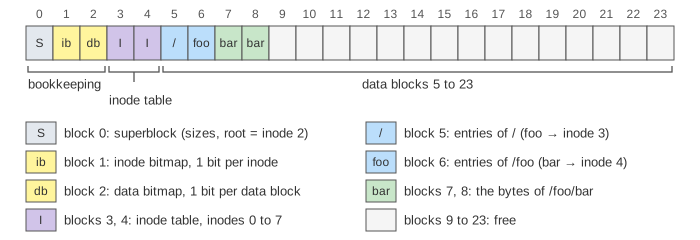
- The superblock (block 0) describes the file system: how many blocks and inodes it has, where the inode table starts, and that the root directory is inode 2. It is read once, at mount.
- The inode bitmap (block 1) has one bit per inode: 1 = in use, 0 = free.
- The data bitmap (block 2) has one bit per data block.
- The inode table (blocks 3 and 4) holds the inodes, four per block. An inode is the record of one file: type, size, times, and the numbers of its data blocks. It does not hold the file's name.
- The data blocks (blocks 5 to 23) hold file contents. A directory is a file too: its
data block is a list of entries
name → inode number.
Part 1 of the canvas is this disk. A grey head box moves to every block that is read or written, and a counter adds them up. Nothing is cached on this page, so you see every access a cold file system would make.
Reading /foo/bar
The file system starts with one fact: the root directory is inode 2. Everything else it must read.
open("/foo/bar") goes:
- Read inode 2 (it is in block 3). It says: directory, data in block 5.
- Read block 5. The entry
foosays inode 3. - Read inode 3. It says: directory, data in block 6.
- Read block 6. The entry
barsays inode 4. - Read inode 4. It says: regular file, 8 KB, blocks 7 and 8.
That is 5 reads before one byte of the file is seen: two per directory in the path,
plus one for the file's own inode. Then each read() of one block reads the inode, reads the data
block, and writes the inode back with a new access time. So cat /foo/bar costs 9 reads and 2
writes for a 2-block file (Demo 1: read /foo/bar block by block).
Creating and writing a file
Creating /foo/baz walks to /foo with 4 reads, then changes four different
places (Demo 2: create /foo/baz):
| Step | Block | Why |
|---|---|---|
| Read, then write the inode bitmap | 1 | Find a free inode (5) and mark it used |
| Write the data of /foo | 6 | Add the entry baz → 5 |
| Read, then write inode 5 | 4 | Fill in the new inode: file, size 0 |
| Write inode 3 | 3 | The directory /foo changed |
In total 6 reads and 4 writes, and still no data block: the file is empty. Appending one block (Demo 3: write the first block of a new file) reads the inode, reads and writes the data bitmap, writes the data block and writes the inode with the new pointer and size: 2 reads and 3 writes for 4 KB of data.
These writes go to different blocks, one after another. If the power fails between them, the bitmap, the inode and the directory no longer agree. How a file system survives that is the topic of How a File System Survives a Crash.
Direct and indirect pointers
An inode has a fixed size, so it has room for only a few block numbers. These are the direct pointers: 3 in this page's inode, 12 in ext2. A bigger file uses an indirect pointer: it names a data block that holds no file data, only more block numbers. With 4 KB blocks and 4-byte block numbers, one indirect block holds 1024 pointers.
In Demo 4: grow past the direct pointers the file baz gets blocks 9, 10 and 11
through its direct pointers. The fourth block needs two free blocks: block 12 becomes the indirect block
and block 13 holds the data. From then on every access beyond the direct pointers costs one extra read,
of the indirect block.
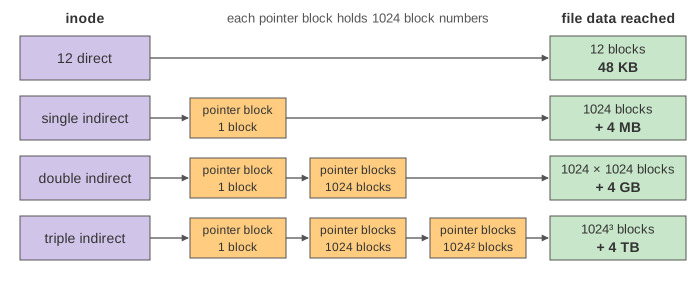
The pointer layout fixes the largest file. For 4 KB blocks:
| Pointers | Blocks reached | Bytes |
|---|---|---|
| 12 direct | 12 | 48 KB |
| 1 single indirect | 1024 | 4 MB |
| 1 double indirect | 1024 × 1024 | 4 GB |
| 1 triple indirect | 1024 × 1024 × 1024 | 4 TB |
The toy inode on the canvas, with 3 direct pointers and one single indirect pointer, reaches 3 + 1024 = 1027 blocks, which is 4108 KB. The design is lopsided on purpose: most files are small, and a small file is found with no extra read at all.
Four allocation methods
The inode with its pointers is one answer to a general question: how does the file system record which blocks belong to a file? Part 2 of the canvas stores the same files, A, B and C with 4 blocks each, in the four classic ways.
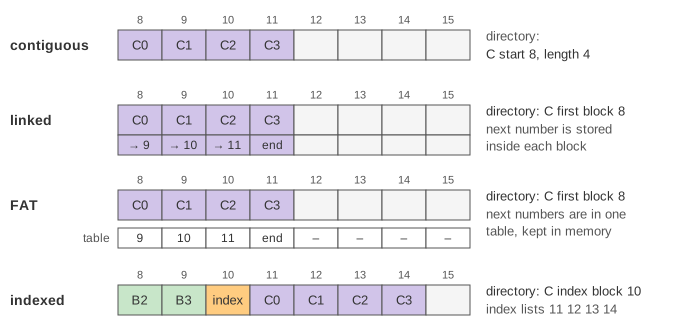
- Contiguous: a file is one run of blocks. The directory holds the start and the length. Block i is simply start + i.
- Linked: the directory holds the first block. Each block ends with the number of the next one, so the blocks can be anywhere.
- FAT (file allocation table): the same chain, but the "next" numbers are taken out of the blocks and put in one table, which is kept in memory. This is the MS-DOS and USB-stick format.
- Indexed: each file has an index block that lists its data blocks. The Unix inode is this method, with the first pointers kept inside the inode.
Demo 5: sequential read vs random access reads file C in order, then only its last block. Demo 6: fragmentation deletes A and creates D with 5 blocks. Contiguous has 8 free blocks but no hole larger than 4, so the create fails: that is external fragmentation. The other three put D in blocks that are far apart, and reading D then needs a jump of the disk head.
| Contiguous | Linked | FAT | Indexed | |
|---|---|---|---|---|
| Read C in order (disk reads) | 4 | 4 | 4 | 5 |
| Read the last block of C | 1 | 4 | 1 | 2 |
| Create D after deleting A | Fails | 0 1 2 3 12 | 0 1 2 3 12 | Index 0, data 1 2 3 4 15 |
| External fragmentation | Yes | No | No | No |
| A file can grow in place | Only if the next block is free | Yes | Yes | Yes, until the index is full |
| Extra space | None | A pointer in every block | The table | An index block per file |
See also How a File System Survives a Crash for the journal that keeps bitmaps, inodes and directories in step, What open() Does: Linux VFS Path Lookup for the kernel's cached path walk, Hard Link vs Symbolic Link for two names on one inode, The Page Cache: read() vs mmap() for why most of these reads never reach the disk, and Disk Scheduling for what a jump of the head costs.
What the page leaves out
Caching: a real kernel keeps inodes, directory entries and blocks in memory, so a warm
open() reads nothing from disk. Block groups, which keep a file's inode near its data.
Extents (ext4, XFS, NTFS), which replace long pointer lists by a few (start, length) pairs, a mix of
contiguous and indexed. Double and triple indirect blocks on the canvas, permissions, link counts,
deleting files in part 1, directories larger than one block, the journal, and internal fragmentation
(the unused tail of a file's last block).