The idea: a file name is only a directory entry
A Unix file has no name inside it. The bytes live in data blocks. Everything else
about the file (type, owner, permissions, size, link count, where the blocks are) lives in
an inode, known by its number. A directory is just a list of
entries, each one name → inode number. Both kinds of link play with that list,
in very different ways.
The canvas runs every command on both sides at once, on the same starting files. The left panel runs the hard-link form, the right panel the symlink form. A grey lookup box walks the path one hop per step (directory entry, inode, data block), so the side that needs more hops finishes later.
Hard link: a second name for the same inode
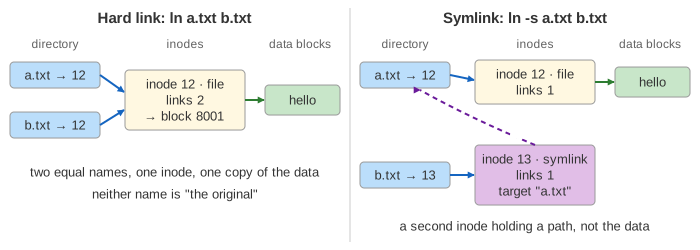
ln a.txt b.txt calls link(). The kernel looks up a.txt, finds inode
12, adds the entry b.txt → 12 and raises the inode's link count from 1 to 2. No data is copied
and no inode is made. After that the two names are equal: neither one is the original, and
ls -li shows the same inode number and a link count of 2 for both.
(Demo 1: make the link and read it.)
Writing through either name changes the one file, so both names read the new bytes
(Demo 5: edit through either name). Hard links to directories are not allowed
(EPERM): they could make loops in the tree.
Symbolic link: a small file that holds a path
ln -s a.txt b.txt calls symlink(). It never looks a.txt up. It
makes a new inode of type symlink whose content is the text a.txt, and an entry
b.txt for it. A target shorter than 60 bytes fits inside the inode itself on ext4 (a
fast symlink), so it needs no data block.
Opening b.txt finds the symlink inode, reads the text and starts the lookup again with it. So
cat b.txt takes 5 hops on the right against 3 on the left. A relative target is resolved from the
directory that holds the link, not from your current directory. After 40 links in a row the kernel stops
with ELOOP.
Deleting or renaming the original
rm calls unlink(): it removes one entry and lowers the link count by one. The
inode and its blocks are freed only when the count reaches 0 and no process has the file open.
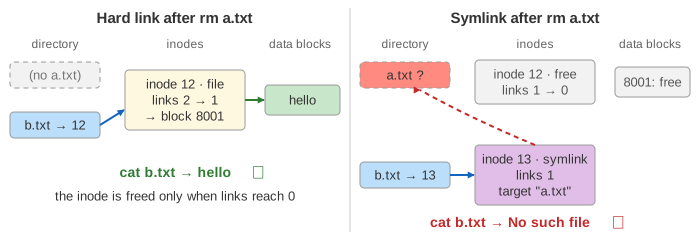
- rm a.txt: on the left inode 12 drops to 1 link and
b.txtstill readshello. On the right inode 12 drops to 0 and is freed with its block; the symlink is now dangling andcat b.txtfails withENOENT(Demo 2: delete the original). - mv a.txt c.txt only changes an entry; the inode does not move. The hard link does not
care. The symlink still says
a.txt, so it dangles too (Demo 3: rename the original). - Recreating a.txt after deleting it makes a new file. The symlink follows the name, so it
now reads the new file (
bye). The hard link still holds the old inode and readshello(Demo 4: delete, then recreate a.txt). - rm b.txt removes the link itself. On the left that is just one name fewer; on the right it
frees the symlink inode and leaves
a.txtalone.
Crossing file systems
An inode number only means something inside its own file system. Inode 12 of /dev/sda1 and
inode 12 of /dev/sdb1 are unrelated files. A directory entry on /mnt/usb can only name
an inode of /dev/sdb1, so ln a.txt /mnt/usb/b.txt fails with EXDEV
(Invalid cross-device link). A symlink stores a path, and a path can point anywhere, so
ln -s /home/alice/a.txt /mnt/usb/b.txt works (Demo 6: link into another file system).
The same rule is why mv across file systems has to copy and delete.
Side by side
| Hard link | Symbolic link | |
|---|---|---|
| What is created | One directory entry | A new inode (type symlink) and an entry |
| Points to | An inode number | A path (text) |
| Link count of the target | Goes up by one | Unchanged |
| Target deleted or renamed | Still works, data kept | Dangling: ENOENT |
| Target recreated | Still the old file | Follows the new file |
| Other file system | No: EXDEV | Yes |
| Directories | No: EPERM | Yes |
| Cost of opening | Same as the original name | One extra lookup per link |
See also How a File System Survives a Crash for inodes and the journal, Linux VFS Path Lookup for how the kernel walks a path and follows symlinks, and Linux file permissions for what the inode's mode bits mean.
What the page leaves out
Open files: an unlinked file whose inode count is 0 stays alive while a process holds it open. Long symlink
targets that need a data block, symlink permissions (always lrwxrwxrwx, never checked),
lstat() vs stat(), O_NOFOLLOW and the protected_symlinks and
protected_hardlinks safety settings, the dentry cache, the journal, and how . and
.. make a directory's own link count.