The idea: who talks to whom, in what order
A class diagram shows what the classes are. It does not show what happens when the program runs. A sequence diagram shows one run of one scenario, such as "the customer checks out a cart". Each object that takes part gets a box at the top and a dashed line going down, its lifeline. Time runs down the page. Each message between two objects is a horizontal arrow. The higher arrow happened first.
The canvas plays one scenario. The Java method checkout(Cart cart) is on the right. The diagram on the left starts empty. Each time a line of code calls another object, one arrow is drawn, and the line is marked in yellow. The cart holds a pen (5), a book (20) and a lamp (30), or only the first one or two. Demo 1: sync calls, returns and new Order.
Messages, returns and activation bars
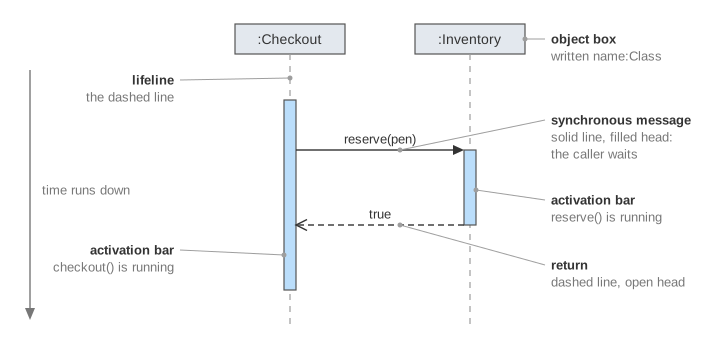
A normal method call is a synchronous message. The caller stops and waits until the method is finished. It is drawn as a solid line with a filled arrowhead, and the label is the method name with its arguments. The return is a dashed line with an open arrowhead that goes back. Its label is the value that comes back, such as true or 55.
While an object is busy with a call, a narrow bar sits on its lifeline. This is the activation bar (UML calls it an execution specification). It starts where the call arrives and ends where the return leaves. The bar of :Checkout is long, because checkout() runs from the first arrow to the last. The bars of :Inventory are short: each reserve() is quick. Calls are always closed in the opposite order: the last one called returns first, like a call stack.
| In the diagram | How it is drawn | In the code |
|---|---|---|
| Synchronous message | solid line, filled arrowhead | inventory.reserve(it) |
| Return | dashed line, open arrowhead | the value the call gives back |
| Asynchronous message | solid line, open arrowhead | executor.execute(() -> mailer.send(o)) |
| Create message | dashed line, open arrowhead, ends at the new box | new Order(cart) |
| Activation bar | narrow box on the lifeline | the time a method is running |
Synchronous or asynchronous
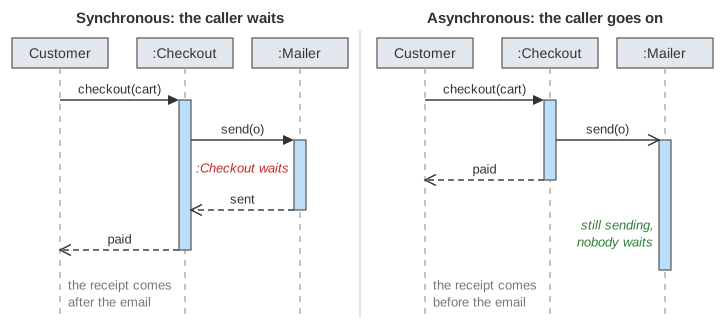
An asynchronous message does not wait. The sender hands the work over and goes on to its next line at once. It is a solid line with an open arrowhead, and it has no return arrow. In Java this is a task given to another thread, or a message put on a queue.
You can see the difference in the bars. With a synchronous mailer.send(o), the bar of :Mailer lies inside the bar of :Checkout, and the customer waits for the email too. With an asynchronous send, the customer gets the receipt first, and the bar of :Mailer ends later, below everything else. Demo 2: asynchronous email, nobody waits.
Fragments: loop and alt
Code has loops and branches, and a diagram needs a way to show them. A combined fragment is a frame around some messages, with a small tag in the top left corner that says what kind it is. A condition in square brackets is called a guard.
- loop: the messages inside repeat while the guard holds. It stands for a
fororwhile. On the canvas,reserve()and its return are drawn once per item. Demo 3: loop fragment, 3 items. - alt: the frame is split by dashed lines into compartments, one per branch of an
if / else. Each has its own guard, and the last one is often[else]. Only the compartment whose guard is true runs. Demo 4: alt fragment, out of stock takes [else].
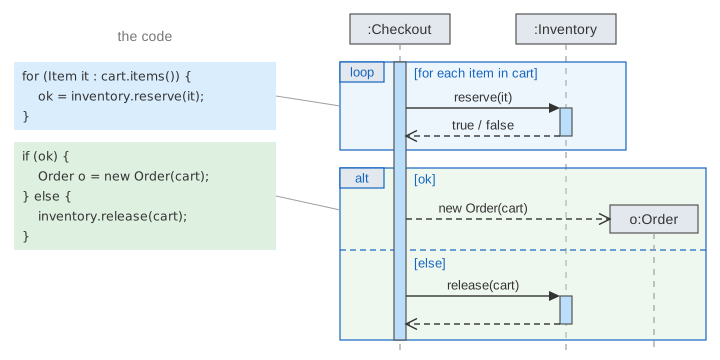
A diagram on paper shows the messages of every compartment, because it describes all the runs at once. The canvas draws one run, so it fills only the compartment that ran and marks the other as not taken. A loop can also end early: when an item is out of stock, the code breaks out after that round. Demo 5: the loop stops early at item 2 of 3.
Creating an object
Most objects exist before the scenario starts, so their boxes are at the top. An object made during the scenario is different. The create message is a dashed arrow with an open arrowhead that points at the object's box, and the box sits at that height, not at the top. Its lifeline starts there. On the canvas o:Order appears only when line 9 runs. When an item is out of stock, line 9 never runs, and the diagram has no o:Order lifeline at all.
The names in the boxes follow the pattern name:Class. o:Order is an Order that the code calls o. :Checkout is some Checkout object whose name does not matter. The Customer is an actor: a person or system outside the software.
From code to diagram, and back
To draw a diagram from code, walk through the method line by line. A call on another object is an arrow to that object's lifeline. When the call finishes, draw the return. A for becomes a loop frame, an if / else becomes an alt frame, and new becomes a create message. Lines that only work on local variables, such as boolean ok = true, draw nothing.
The numbers on the canvas follow from this. With all n items in stock and a synchronous email there are n + 3 calls, n + 3 returns and 1 create: 2n + 7 arrows. An asynchronous email removes one return. Teams also work the other way round: they draw the diagram first, to agree on which object calls which, and then write the code.
See also Spring MVC Request Flow (one long chain of synchronous calls inside a web framework), Hexagonal Architecture: Ports and Adapters (which objects are allowed to call which), The Observer Pattern vs Publish–Subscribe (synchronous notify next to asynchronous delivery) and Thread Pool (where an asynchronous task runs).
See also UML Class Diagram: Every Line Next to Its Java Code for the static side: which classes there are and how each field, extends or implements becomes a line.
See also UML State Machine and Activity Diagrams, which show the life of one object and the steps of a whole process instead of one run of messages.
What the page leaves out
UML has more fragments than these two: opt (an if with no else), break (leave the enclosing fragment, which is what line 5 does), par (parallel parts), ref (a link to another diagram) and others. The page also leaves out the destruction of an object (an X at the end of its lifeline), self-messages and nested activation bars on one lifeline, found and lost messages, gates, time and duration constraints, and the frame around the whole diagram. The create message here has no activation bar for the constructor. Tools differ in small points, for example some draw lifelines as solid lines, and many people leave out the return arrows when they are obvious.