The idea: every setting guards against one incident
A connection pool keeps database connections open and lends them to request threads. Its settings look like a list of numbers, but each one exists because of a specific way things go wrong: a burst after a quiet night, a pool that is used up, a proxy or a NAT gateway that silently kills connections, code that forgets to give a connection back, or a database that vanishes in the middle of a query.
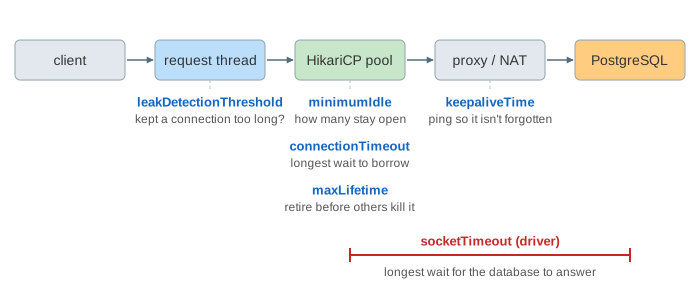
The page shows a client, four request threads (T1–T4), a HikariCP pool, whatever sits in the network path (a plain link, a database proxy or a NAT gateway) and PostgreSQL. Pick a setting and a value and press Run. Each run plays the same short story, so run the bad value and then the recommended one: the results lines under the canvas keep both outcomes. The clock jumps over quiet minutes; the timeline shows where each event happened. Costs: a query 3 ms, opening a connection 30 ms (TCP, TLS, login, a new backend process).
The size of the pool, maximumPoolSize, has its own page: Connection Pool Sizing.
minimumIdle: keep the pool full
minimumIdle is the number of idle connections the pool tries to keep. When it is lower than maximumPoolSize, connections idle longer than idleTimeout (10 min) are closed. After a quiet night the pool is empty, and the first burst of the morning pays for a full connect on every request: 33 ms instead of 3 ms here, and 100 ms or more over TLS to another zone. HikariCP recommends a fixed-size pool: leave minimumIdle unset, so it equals maximumPoolSize (setting: minimumIdle).
A lower value makes sense only when many services share one database and idle connections are the scarce thing.
connectionTimeout: fail fast when the pool is empty
When every connection is in use, getConnection() waits up to connectionTimeout (default 30 s) and then throws SQLTransientConnectionException: HikariPool-1 - Connection is not available, request timed out after 30000ms. In the scenario two slow reports hold both connections for 20 s. With 30 s, the two quick requests wait 19 s; their client already got 504 Gateway Timeout after 10 s, so the threads work for nobody, and under real load every thread ends up waiting. With 3 s they fail at 3 s, the app returns 503, and the threads are free (setting: connectionTimeout).
Rule: well under the HTTP timeout of whoever calls you, typically 1–5 s.
maxLifetime: retire connections before someone else kills them
Something between the app and the database may close connections that are too old: a load balancer, a cloud database proxy, a firewall, or MySQL’s wait_timeout. The pool does not read from an idle socket, so it does not notice. HikariCP checks a connection with isValid() before lending it (if it was idle for more than 500 ms); a closed one fails, and the log says:
WARN HikariPool-1 - Failed to validate connection org.postgresql.jdbc.PgConnection@3e2f
     (This connection has been closed.). Possibly consider using a shorter maxLifetime value.
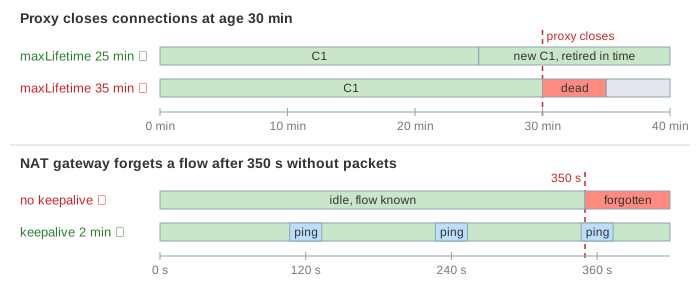
The request still works, but it waits for the check of every dead connection and then for a new one (35 ms instead of 4 ms here). A connection killed while a query runs on it is worse: that query fails. HikariCP asks for maxLifetime “several seconds shorter than any database or infrastructure imposed connection time limit”. With it a few minutes below the limit (25 min for a 30 min limit) the pool closes each connection when it is idle (or when it is returned) and opens a replacement in the background (setting: maxLifetime). HikariCP spreads the retirements with a small random variance, so the whole pool is not replaced at once.
keepaliveTime: keep idle connections visible to the network
A NAT gateway or a stateful firewall keeps one table entry per TCP flow and forgets flows that send nothing for a while (an AWS NAT gateway after 350 s). It does not tell anyone: no FIN, no RST. The next packet on that connection is dropped. When the pool validates such a connection, nothing answers, and the check waits validationTimeout (5 s) before the pool gives up on it, once per dead connection: 10 s for the scenario’s two (setting: keepaliveTime).
With keepaliveTime the pool sends a tiny query on each idle connection at that interval, which resets the idle timers along the path. Rule: shorter than the shortest idle timeout on the path and shorter than maxLifetime; the minimum is 30 s, and 1–5 min is common. Since HikariCP 6.2.1 the default is 2 min; older versions have it off, so set it explicitly.
leakDetectionThreshold: find the code that never returns a connection
A connection that is never closed stays “in use” forever, and the pool silently has one connection fewer. After a few leaks every request waits connectionTimeout and fails, while the database is idle. With leakDetectionThreshold set, HikariCP logs a WARN with the stack trace of the code that borrowed a connection and has kept it longer than the threshold:
WARN Connection leak detection triggered for org.postgresql.jdbc.PgConnection@1b7e
     on thread http-nio-8080-exec-1, stack trace follows
java.lang.Exception: Apparent connection leak detected
    at com.example.ExportController.export(ExportController.java:42)
The threshold must be longer than your slowest legitimate use of a connection; at 2 s the scenario’s 5 s report raises a false alarm, followed by an “unleaked” message when it returns (setting: leakDetectionThreshold). The real fix is try-with-resources, or letting the framework (Spring’s JdbcTemplate, JPA) close connections.
socketTimeout: don't wait forever for a dead host
socketTimeout is a property of the PostgreSQL JDBC driver (in seconds; default 0 = no timeout), set in the URL or through dataSourceProperties. When the database host disappears without closing the connection (a failover, a dead switch), a thread waiting for rows has nothing to wake it. Linux retransmits the unacknowledged data 15 times (net.ipv4.tcp_retries2) before it gives up, about 15.5 minutes. All that time the thread and its pooled connection are stuck (setting: socketTimeout). With 30 s the read throws SocketTimeoutException, HikariCP evicts the broken connection and the thread is free.
Rule: longer than your longest legitimate query, so a slow report is not cut off. Use PostgreSQL’s statement_timeout to limit how long a query may run on the server.
Summary
| Setting | Incident it prevents | Recommended | Default |
|---|---|---|---|
minimumIdle | a burst after a quiet period pays for new connections | = maximumPoolSize | = maximumPoolSize |
connectionTimeout | threads pile up waiting for a starved pool | 1–5 s | 30 s |
maxLifetime | the pool lends connections that a proxy or firewall has closed | a few minutes under the shortest limit | 30 min |
keepaliveTime | a NAT or firewall silently forgets idle connections | 1–5 min, under every idle timeout | 2 min since HikariCP 6.2.1, before that 0 (off) |
leakDetectionThreshold | connections that are never returned go unnoticed | above the slowest legitimate use | 0 (off) |
driver socketTimeout | a thread waits ~15 min on a dead host | above the longest query | 0 (none) |
The same settings in a Spring Boot application.yml are in A common production configuration. See also A TCP Socket in Linux for FIN, RST and retransmissions, and The N+1 Query Problem for code that holds a connection longer than it needs to.
What the page leaves out
validationTimeout,initializationFailTimeoutandconnectionTestQuery(only for old drivers withoutisValid()).- TCP keepalive in the operating system (
tcpKeepAlive=truein the driver), which works likekeepaliveTimebut with kernel timers of two hours by default. - The random variance HikariCP adds to
maxLifetimeandkeepaliveTime, and its housekeeper that runs every 30 s. - PgBouncer between the app and PostgreSQL, which has its own lifetime and idle settings for its server connections.
- Metrics: the pool’s Micrometer gauges (
hikaricp.connections.pending,.timeout,.usage) are how these incidents show up in production.