The idea: a chain of stages, one document at a time
db.orders.aggregate([...]) takes a list of stages. Each stage gets
documents from the stage before it, does one job (filter, reshape, group, sort, join) and hands its
results to the next. The last stage's output is what the client's cursor returns. Nothing is
computed as a whole table: every stage asks the one before it for the next document,
and that request goes all the way down to the collection scan or the index scan at the bottom.
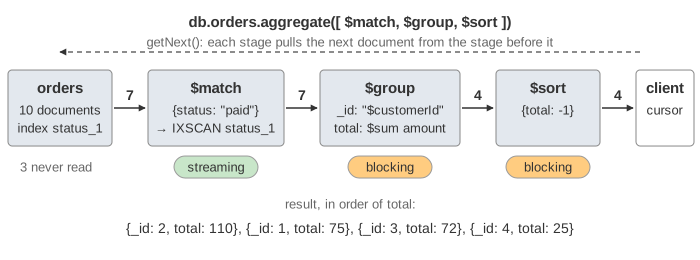
The canvas uses a small orders collection (10 documents with customerId,
status, amount and an items array) and a customers
collection with Ann, Bob, Cid and Dan, the same people as on
How MongoDB Runs a Command. Pick stages with Add stage and press
Run, or run a demo. A document lights up on the row it comes from, then moves into the next stage
while the following document lights up.
Streaming stages and blocking stages
A streaming stage can answer as soon as it gets one document: $match
keeps it or drops it, $unwind makes one document per array element, $lookup
adds the matching documents of another collection, $limit counts. A
blocking stage cannot return anything until it has seen all of its input:
$group does not know a customer's total until the last order is in, and $sort
does not know which document comes first. Blocking stages keep their input in memory, which is why the
canvas draws a memory meter under them.
| Stage | Kind | Keeps in memory |
|---|---|---|
$match, $project, $set | streaming, 1 in → 0 or 1 out | nothing |
$unwind | streaming, 1 in → n out | the current document |
$lookup | streaming, one query per document | the matches of one document |
$limit | streaming, stops the pipeline when full | a counter |
$group | blocking | one accumulator per group |
$sort | blocking | every input document (or k with a limit) |
Demo: $match → $group → $sort sums the paid orders per customer. $group builds
4 groups while the 7 paid orders stream in (48 MB on the scaled meter), and only at the end of the input
does it hand them to $sort: Bob 110, Ann 75, Cid 72, Dan 25.
Only the first $match can use an index
The pipeline runs on top of the ordinary query engine. A $match at the very start
(and a $sort right after it) is pushed down into that engine, which can
use an index. With the index {status: 1}, $match {status: "paid"} becomes
an IXSCAN that reads only the 7 keys "paid" and fetches those 7
documents: keysExamined: 7, docsExamined: 7 in explain().
Orders 103, 105 and 109 are never read.
A $match later in the pipeline filters documents that the pipeline made itself.
total exists only after $group, so no index has it.
Demo: $match after $group has to start with a COLLSCAN of all 10 orders,
group them all (Bob 125, Ann 95, Cid 72, Dan 35) and then throw Dan away in memory. That is the SQL
difference between WHERE and HAVING, see
How a SELECT Runs.
The optimizer rewrites the pipeline first
Before running, MongoDB reorders and merges stages when the result stays the same. Two rewrites
happen on this page (explain() shows the pipeline after them):
$sort+$match: the$matchmoves in front. Filtering first means sorting fewer documents, and a$matchat the front can use an index.$sort+$limit: the two become one$sortwith alimit, a top-k sort (next section).
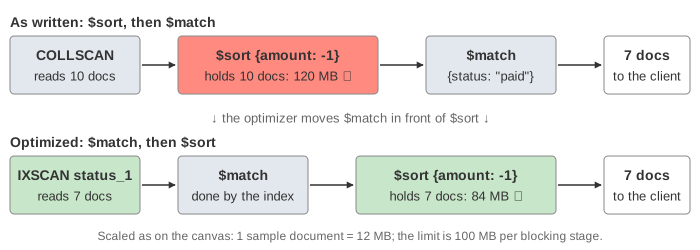
Demo: $sort then $match is written in the slow order. As written, the sort would have to hold
all 10 orders (120 MB on the canvas, over the limit). After the swap the IXSCAN feeds it only the 7 paid
orders (84 MB). Other rewrites exist too: $project or $set + $match
(the $match moves first when it doesn't use the computed fields), $match +
$match, $limit + $limit, and $lookup +
$unwind.
$unwind, then $group
$unwind: "$items" turns one order with an array of 3 items into 3 documents with one
item each; all other fields are copied. It is how you group or count by the elements of an array.
Demo: $unwind items turns the 7 paid orders into 13 documents, groups them by item with
count: {$sum: 1}, and sorts: pen 5, mug 4, cup 2, ink 2 (the tie broken by
_id: 1). Grouping by "$items" without the $unwind groups
by the whole array: [pen,ink] and [ink,pen] would be different groups.
$lookup is a query per document
$lookup is MongoDB's left outer join. For every document that reaches
it, it runs a query on the other collection, foreignField == localField, and stores the
matches as an array (here customer). An input document with no match still comes out, with
an empty array. In Demo: $lookup 4 groups mean 4 queries on customers; each uses
the _id_ index and reads one document.
That is a nested-loop join. With an index on foreignField each lookup is one B-tree
search. Without one, each lookup is a collection scan of the other collection:
4 inputs × 4 customers = 16 documents here, and 1 million × 1 million on real data. Index the
foreignField, and put $match and $group before
$lookup so it runs for as few documents as possible. (Since 6.0 $lookup can
run on sharded collections and, in some cases, uses a hash join in the slot-based engine.) Compare the
SQL joins on How MySQL Executes JOIN, GROUP BY and ORDER BY.
The 100 MB limit and allowDiskUse
Each blocking stage may use 100 MB of memory (104857600 bytes, the server
parameters internalQueryMaxBlockingSortMemoryUsageBytes for $sort and
internalDocumentSourceGroupMaxMemoryBytes for $group). The limit is per
stage, not per pipeline. When a stage needs more:
- with
allowDiskUse: falsethe aggregate fails with error 292QueryExceededMemoryLimitNoDiskUseAllowed: "Sort exceeded memory limit of 104857600 bytes, but did not opt in to external sorting." - otherwise the stage spills: it sorts what it holds, writes it as a sorted run to a
temporary file in
dbPath/_tmp, frees the memory and goes on. At the end it merges the runs.$groupspills partial groups sorted by key and adds up equal keys when merging.
Before MongoDB 6.0 a spill needed allowDiskUse: true in every command. Since 6.0 the
server parameter allowDiskUseByDefault is true, so a pipeline
without the option spills, and only an explicit allowDiskUse: false (or the parameter set
to false) gives the error. explain("executionStats") reports usedDisk: true
and the number of spills.
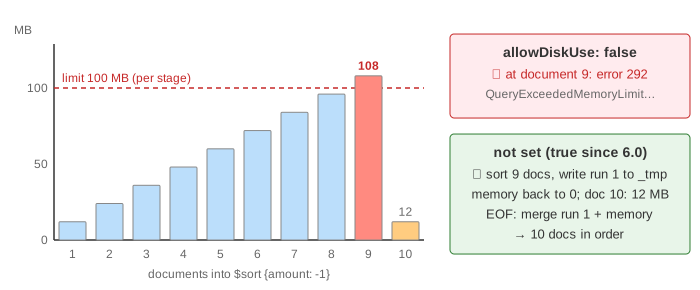
The sample data is tiny, so the canvas scales it: each sample document (or group)
stands for 12 MB of real state, as if it were about 120 000 documents. A $sort {amount: -1} of
all 10 orders crosses 100 MB at the 9th document (108 MB). Demo: big $sort, allowDiskUse: false
stops there with error 292; Demo: big $sort, default writes a run of 9 documents to
_tmp, keeps the 10th in memory, and merges them at the end. A spill works, but disk is
much slower than memory, so a spill is a hint to filter earlier, add an index that gives the order, or
add a limit.
$sort + $limit: a top-k sort
"The 3 biggest orders" does not need all orders sorted. After the optimizer merges
$sort {amount: -1} and $limit: 3, the sort keeps a buffer of only 3 documents: a
new document either takes a place (pushing the worst one out) or is dropped at once. Memory is bounded by
k documents, not by the input. Demo: $sort + $limit 3 reads all 10 orders with
allowDiskUse: false and never goes above 36 MB, returning 110 (60), 102 (50) and 108 (45).
A $limit without a sort before it is even cheaper: when it is full it stops asking for
documents, and the scan below it stops too. Indexes and B-tree scans are on
B+ Tree as a Database Index.
What the page leaves out
- The slot-based execution engine (SBE), which since 6.0/7.0 runs the leading
$match,$group,$lookupand more in a different engine. The stage model and the memory limits are the same. - Sharded clusters: the pipeline is split into a shard part and a merge part on
mongosor one shard. $project,$facet,$bucket,$graphLookup,$merge/$out,$setWindowFieldsand pipeline$lookupwithlet.- A
$sortthat an index already provides (no blocking sort at all), and$groupturned into aDISTINCT_SCAN. - Cursor batches (101 documents or 16 MB in the first batch, then
getMore) and the 16 MB limit on a single document, which a big$lookuparray can hit. - Real memory sizes: the meter uses 12 MB per sample document so the limit can be reached with 10 documents.