The idea: declare everything in Git, keep the secret value out of it
A service on Kubernetes needs three kinds of input: how to run it (image, replicas, ports, memory), what to configure (page sizes, URLs, profiles) and credentials (a database password). The setup on this page puts the first two in Git, in one Helm chart, and lets Argo CD apply it. The password stays in AWS Secrets Manager. Git holds only an ExternalSecret that says where the password is, and the External Secrets Operator (ESO) copies it into a Kubernetes Secret. The pods get the ConfigMap and the Secret when they start, and Spring Boot turns them into properties.
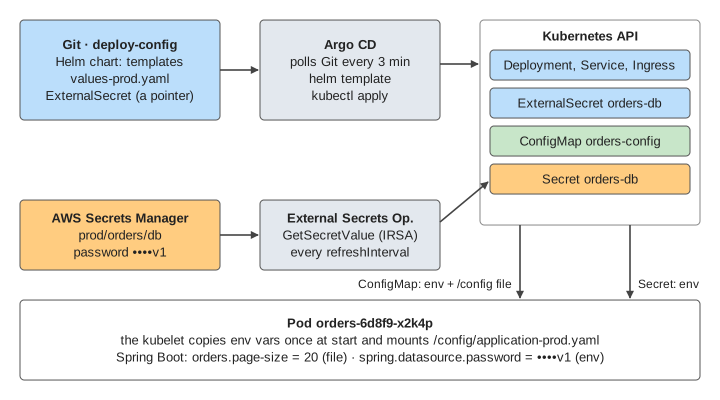
Who does what:
| Step | Who | What it makes |
|---|---|---|
| Render and apply the chart | Argo CD | Deployment, Service, Ingress, ConfigMap, ExternalSecret |
| Read the password from AWS | External Secrets Operator | Secret orders-db |
| Turn the pod template into pods | Deployment controller, then the scheduler | ReplicaSet, pods |
| Start the container | kubelet | env vars, the mounted /config file |
| Build the configuration | Spring Boot | its Environment: one value per property |
Try it: Demo 1: first deploy plays these steps in order, then sends a request through the Ingress.
The Helm chart: templates plus values
A chart is a folder of YAML templates and a values.yaml with defaults. Each environment gets its own values file. helm template orders charts/orders -f values-prod.yaml fills the templates and prints plain manifests. Argo CD runs this step itself, so nobody runs helm install by hand.
# values-prod.yaml
image:
  tag: 1.4.2
replicas: 2
resources:
  requests: {cpu: 500m, memory: 768Mi}
  limits:   {memory: 1Gi}
config:
  pageSize: 20
The resources block matters as much as the config. requests is what the scheduler reserves on a node. limits.memory is the most memory the container may use before the kernel kills it.
GitOps with Argo CD: Git is the source of truth
An Argo CD Application points at a repo path and a values file. Argo CD checks Git (every 3 minutes by default, or at once on a webhook), renders the chart and compares it with what runs in the cluster:
- Synced: the cluster matches Git. OutOfSync: something differs.
syncPolicy.automatedapplies a new commit without a human.prunedeletes objects that were removed from Git.selfHealre-applies Git's version when someone changes the cluster by hand. Argo CD watches the live objects, so this happens within seconds.
So a change goes through a commit and review, and the history of the cluster is the Git log. A hand edit with kubectl edit is drift. With selfHeal it is undone. Without it the edit stays, and the next pod restart picks up a value that is in no commit (Demo 4: kubectl edit is drift).
ConfigMap: env var or mounted file
A ConfigMap holds plain key/value config. A pod can use it in two ways, and they behave differently when the ConfigMap changes:
| How the pod uses it | When the ConfigMap changes |
|---|---|
env / envFrom | Never updated. The value was copied when the container started. |
volume (a file under /config) | The kubelet rewrites the file after a minute or so (its sync period plus a cache delay). |
volume with subPath | Never updated. |
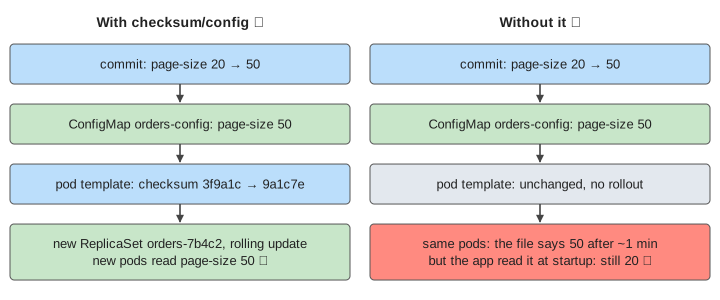
Even an updated file does not help if the app read it only at startup, and Spring Boot does exactly that. Spring Cloud Kubernetes can reload properties, but most teams restart the pods instead (Demo 3: without the checksum).
External Secrets: a pointer in Git, the value in AWS
A Secret in Git would put the password in every clone and in the history for ever. So the chart contains an ExternalSecret instead:
apiVersion: external-secrets.io/v1beta1
kind: ExternalSecret
metadata: {name: orders-db}
spec:
  refreshInterval: 1h
  secretStoreRef: {kind: ClusterSecretStore, name: aws-sm}
  target: {name: orders-db}
  data:
  - secretKey: SPRING_DATASOURCE_PASSWORD
    remoteRef: {key: prod/orders/db, property: password}
ESO calls GetSecretValue with the IAM role of its service account (IRSA on EKS: a web-identity token, no access keys stored in the cluster). It writes the Secret and reads AWS again every refreshInterval. If the role lacks secretsmanager:GetSecretValue, the ExternalSecret shows SecretSyncedError. No Secret is written, and pods that need it stop at CreateContainerConfigError (Demo 7: ESO access denied).
The Kubernetes Secret itself is only base64, not encrypted. Turn on encryption at rest for etcd, and limit with RBAC who may read Secrets in the namespace.
How Spring Boot reads them
The Deployment hands both objects to the container:
env:
- name: SPRING_PROFILES_ACTIVE
  valueFrom: {configMapKeyRef: {name: orders-config, key: SPRING_PROFILES_ACTIVE}}
- name: SPRING_CONFIG_ADDITIONAL_LOCATION
  value: /config/
envFrom:
- secretRef: {name: orders-db}          # SPRING_DATASOURCE_USERNAME, _PASSWORD
volumeMounts:
- {name: config, mountPath: /config}    # application-prod.yaml from the ConfigMap
Spring Boot collects every property source into one Environment. When two sources set the same property, the higher one wins. Relaxed binding maps the env var SPRING_DATASOURCE_PASSWORD to spring.datasource.password, so the app's code never sees where a value came from.
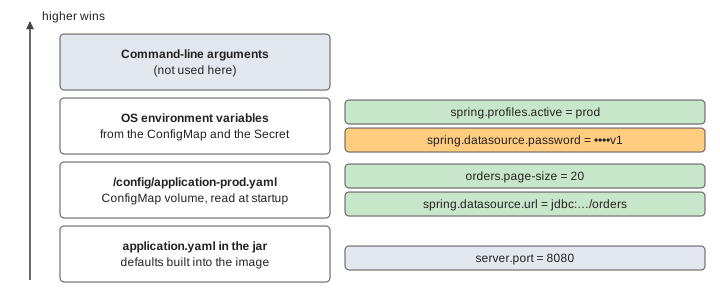
Spring Boot can also read a whole Secret mounted as files with spring.config.import=configtree:/etc/secrets/. Each file name becomes a property name.
Rolling out a change
Kubernetes restarts pods only when the Deployment's pod template changes. A ConfigMap is a separate object, so changing it alone does nothing to running pods. The Helm fix is an annotation that changes whenever the config does:
template:
  metadata:
    annotations:
      checksum/config: {{ include (print $.Template.BasePath "/configmap.yaml") . | sha256sum }}
A new page-size gives a new hash. The template changes, the Deployment controller makes a new ReplicaSet and replaces the pods one at a time. With maxSurge: 1, maxUnavailable: 0 a new pod must be Ready before an old one goes (Demo 2: config change in Git).
A password rotated in AWS never passes through Git, so no checksum sees it. ESO updates the Secret at its next refresh (up to an hour later), and then something must restart the pods: Stakater Reloader (annotation secret.reloader.stakater.com/reload: orders-db) or kubectl rollout restart. Until then the pods keep logging in with the old password. Once the connection pool replaces its connections, requests fail (Demos 5 and 6: password rotation). Real rotations avoid this window with two database users or by keeping the old password valid for a while.
Resource limits and the JVM
A modern JVM sizes its heap from the container's limit. With -XX:MaxRAMPercentage=75 and limits.memory: 1Gi the heap can grow to 768Mi. Metaspace, thread stacks, the JIT's code cache and direct buffers come on top, here about 190Mi, so 958Mi fits. With a 512Mi limit the heap may reach 384Mi, and 384 + 190 = 574Mi is more than 512Mi. The kernel kills the container: OOMKilled, exit code 137. The kubelet restarts it with growing back-off (CrashLoopBackOff). With maxUnavailable: 0 the old pods keep serving while the new one crashes. The fix is a revert in Git, and Kubernetes reuses the old ReplicaSet because its template matches again (Demo 8: memory limit 512Mi).
What goes wrong, and where it shows
| Problem | Where you see it | Fix |
|---|---|---|
| Config changed, pods did not | The ConfigMap has the new value; the app logs the old one | checksum/config, or restart |
| Hand edit in the cluster | Argo CD: OutOfSync | selfHeal, or commit the change |
| ESO cannot read AWS | ExternalSecret: SecretSyncedError; pods: CreateContainerConfigError | IAM policy for the IRSA role |
| Rotated password, old pods | DB: password authentication failed; app: 500 | Reloader, or restart after the refresh |
| Memory limit too low | Pod: OOMKilled, exit 137, CrashLoopBackOff | Raise the limit or lower MaxRAMPercentage |
See also: Kubernetes Cluster Architecture (Deployment → ReplicaSet → pods), The Life of a Kubernetes Pod (probes, OOMKilled, CrashLoopBackOff), Canary, Blue/Green and Rolling Deployments, Kubernetes Service Types, Spring Core, Connection Pool and etcd, where the Secret is stored.
What the page leaves out
One environment and one cluster: real setups have an Argo CD ApplicationSet per environment, sync waves and hooks to order the objects, and PodDisruptionBudgets and HPAs next to the Deployment. Other ways to keep secrets out of Git (Sealed Secrets, SOPS, HashiCorp Vault, the Secrets Store CSI driver) are not shown. AWS rotation really runs a Lambda through the AWSPENDING and AWSCURRENT stages, and a careful one keeps the old password working. The pod's startup is one step here: init containers, startup probes, image pulls and the scheduler's choice of node are on the Kubernetes pages linked above.