The idea: three copies of every file
Git keeps each tracked file in three places. The HEAD commit holds the version you last committed. The index (the staging area) holds the version the next commit will contain. The working tree is the file on disk that your editor changes. git add copies working tree → index, and git commit turns the index into a new commit and moves the branch. The "undo" commands go the other way, and they differ only in which of these copies they overwrite, and whether they move the branch.
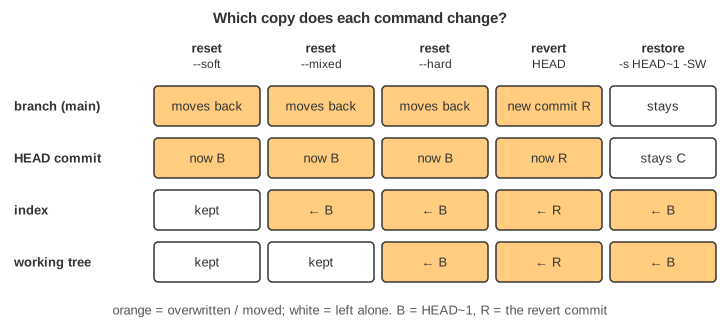
The canvas runs five commands on five copies of the same repository: A ← B ← C, with app.txt = v1, v2, v3, and C already pushed (origin/main points at it). Each command tries to undo C. The rows of each column are the commits, then the three copies of app.txt, then what git status and git push would say.
git reset: move the branch, then maybe more
git reset <commit> always starts the same way: it moves the branch HEAD points to (here main) to the given commit. HEAD~1 means "the parent of HEAD". The mode says how far it goes after that:
| Mode | Branch | Index | Working tree |
|---|---|---|---|
--soft | moves | kept | kept |
--mixed (default) | moves | overwritten | kept |
--hard | moves | overwritten | overwritten |
After --soft the index still holds v3, so git status shows C's change as staged: commit again and you have rewritten C, for example with a better message (Demo: soft reset + commit rewrites C). --mixed unstages it but leaves the file on disk alone. --hard makes all three copies equal to B. Any edit that was never committed is gone: no reflog entry points at it (Demo: uncommitted edit — who keeps it?). With a staged edit you see the difference most clearly: soft keeps it staged, mixed keeps it on disk only, hard drops it (Demo: staged edit).
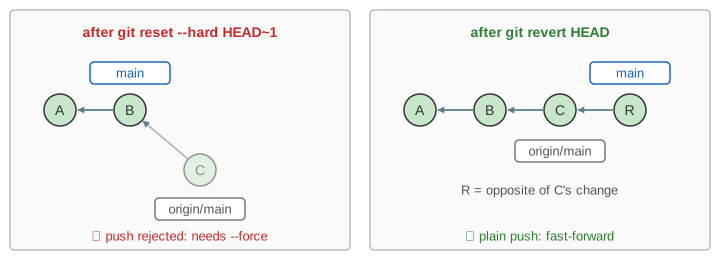
The dropped commit is not deleted. C is still on origin/main, so it drops to the faded lane. A commit nobody pushed is reachable only from the reflog (git reset --hard HEAD@{1} brings it back) until git gc prunes it.
git revert: undo by adding a commit
git revert HEAD works out the change C made (v2 → v3) and commits the opposite change (v3 → v2) as a new commit R on top of C. Then it updates the index and working tree to match R. The files end up the same as after reset --hard, but nothing left the history: C and R are both there. Because a revert needs to write app.txt, it refuses to start when you have uncommitted changes to it: error: your local changes would be overwritten by revert.
git restore and git checkout -- file
git restore (Git 2.23+) copies a file from somewhere into the index (--staged, -S) and/or the working tree (--worktree, -W, the default). Without --source it takes the working tree from the index (discard unstaged edits) and the index from HEAD (unstage). With --source=HEAD~1 it takes B's version. It never moves HEAD or a branch. The older spelling is git checkout HEAD~1 -- app.txt, which writes both index and working tree. Commit the result and you have made a revert by hand (Demo: restore + commit). Like --hard, restore overwrites an uncommitted edit without asking.
Shared history: why revert is safe after a push
Once C is on the server, other people may have built on it. After a reset, your main no longer contains C, so it is behind origin/main; a plain push is rejected and git push --force would remove C from the server. Everyone who pulled C now has a history the server disagrees with. After a revert, your main contains C plus R: it is ahead, and a normal push fast-forwards the server.
See Git Merge vs Rebase for the same rule with rebase, and Git Branches and HEAD for how a branch is just a file holding a commit hash, which is all that reset changes in --soft mode. Git Objects shows the index and the blobs git add writes.
Which one to use
| You want to… | Use |
|---|---|
| undo a commit that is already pushed | git revert <commit> |
| redo the last local commit (message, more files) | git reset --soft HEAD~1 or git commit --amend |
| unstage a file | git restore --staged file (= git reset file) |
| throw away edits to one file | git restore file |
| throw away everything since the last commit | git reset --hard (careful: uncommitted work is lost) |
| get an old version of one file | git restore -s <commit> file |
What the page leaves out
The repository has one file and a straight history, so every revert applies cleanly and every reset target is HEAD~1. Real commits have hashes (shown here as letters), many files and merges, where revert needs -m 1 and can conflict. The page leaves out git reset <commit> -- path, --keep and --merge, git switch, detached HEAD, git stash, ORIG_HEAD, and recovering a lost staged edit as a dangling blob with git fsck --lost-found.