The idea: two ways to bring feature into main
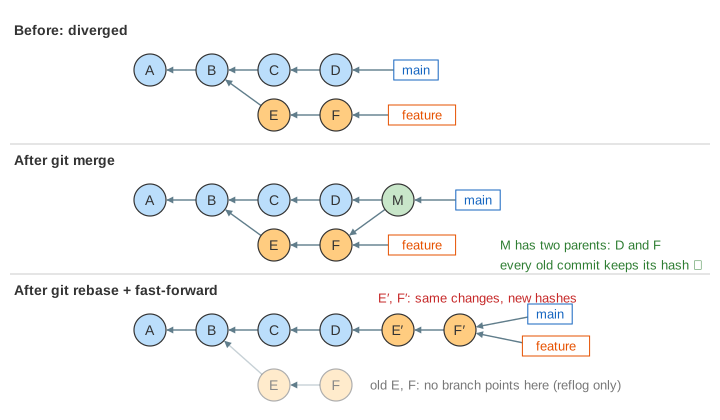
You branched feature off main at commit B and made commits E and F. Meanwhile main got C and D. The histories have diverged. To combine them you can merge (join the two lines with a new commit) or rebase (copy your commits onto the new tip of main, so history looks as if you started later). Both end with the same files. They leave very different histories behind. The canvas runs both on the same starting repository: panel 1 merges, panel 2 rebases.
Branches are labels, commits point to parents
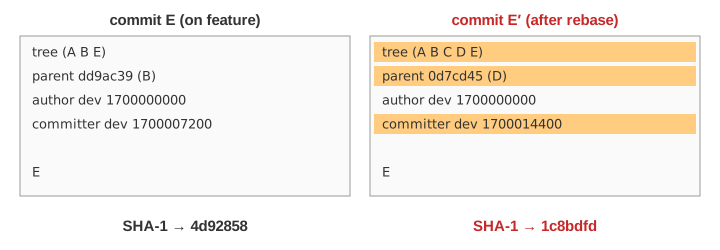
A commit stores a snapshot of the files (its tree), the hash of its parent commit(s), the author, the committer with a date, and a message. Its ID is the SHA-1 hash of all of that. The arrows on the canvas point from each commit to its parent, because that is the only link a commit stores. A branch is just a small file holding one commit hash: a label that moves forward when you commit. HEAD says which branch you are on (the box marked HEAD →). GitObjects and GitRefsHead in this series look at these two ideas closely.
git merge: a merge commit with two parents
git switch main
git merge feature        # Merge made by the 'ort' strategy.
Git finds the merge base, the newest commit both tips share (B). It compares B with D and with F and applies both sets of changes; this is the three-way merge (ThreeWayMerge in this series shows it line by line). The result is a new merge commit M whose parents are D (the first parent, the branch you were on) and F. main moves to M. Nothing else changes: C, D, E, F keep their hashes, so anyone who already has them is unaffected (Demo: merge).
git rebase: replay the commits, get new hashes
git switch feature
git rebase main          # Successfully rebased and updated refs/heads/feature.
Git lists the commits on feature that main does not have (main..feature: E, F). It moves to main's tip D and, oldest first, takes each commit's change (its diff against its old parent) and applies it again, making a new commit. The copy E′ has the same message and the same change as E, but its parent is D instead of B, and its tree now also contains C and D. Different contents, so a different hash: E′ is a brand-new commit (Demo: rebase). Then the feature label moves to F′.
The originals E and F are not deleted. They are orphaned: no branch reaches them, so git log no longer shows them, but git reflog does, and git reset --hard ORIG_HEAD undoes the rebase. git gc prunes unreachable commits once the reflog entries expire (30 days by default).
Fast-forward and --ff-only
When main is an ancestor of feature (main has nothing feature lacks), a merge needs no new commit: Git just moves the main label forward. That is a fast-forward, and the history stays one straight line. It happens after a rebase, and also when main never moved at all (Demo: main never moved). git merge --ff-only refuses to do anything else: on diverged branches it stops with fatal: Not possible to fast-forward, aborting. (Demo: fast-forward refused). git merge --no-ff does the opposite and makes a merge commit even when a fast-forward was possible, to keep a record of the branch.
Side by side
| git merge | git rebase (+ fast-forward) | |
|---|---|---|
| New commits | one merge commit M | one copy per feature commit (E′, F′) |
| Existing hashes | unchanged | feature's commits get new hashes |
| History shape | fork and join, as it happened | one straight line |
| Conflicts | resolved once, in M | resolved per replayed commit |
| Safe on shared branches | yes | no: others still hold the old commits |
| Undo | git reset --hard HEAD~1 (before pushing) | git reset --hard ORIG_HEAD or the reflog |
The golden rule
Do not rebase commits that other people already have. After a rebase, your feature has E′ and F′; a teammate still has E and F. Pushing needs git push --force-with-lease, and when they pull, Git sees two different sets of commits with the same changes. Rebase freely on your own local branch, before you share it. If you keep working, merges pile up merge commits while rebase keeps a line (Demo: keep working).
Which one to use
- Merge when the branch is shared, or when you want the history to show that work happened in parallel. Many teams merge pull requests with
--no-fffor this. - Rebase your own branch onto the latest main before opening a pull request, for a clean linear history that is easy to read and to bisect.
git pull --rebasedoes this for every pull. - Squash merge is a third option: all feature changes become one ordinary commit on main.
GitPackfiles in this series shows how all these commits, including the orphaned ones, are stored on disk.
What the page leaves out
Hashes on the canvas are short made-up hashes computed from the tree, parents, time and message, not real SHA-1 of real objects. The page leaves out merge conflicts and how each replayed commit can stop for one, interactive rebase (git rebase -i: reorder, squash, edit), --onto, rebasing merge commits (--rebase-merges), octopus merges, merge strategies other than ort, remote branches and pushing, and cherry-pick (rebase is a series of cherry-picks).