The idea: load the sales, and decide what to do when a customer moves
A data warehouse gets its data from other systems. A job called ETL (extract, transform, load) runs every night or every hour. It reads the new rows from each source, cleans them, and loads them into the warehouse tables. Sales go into a fact table. The things sales are grouped by, such as the customer and the customer's city, sit in a dimension table.
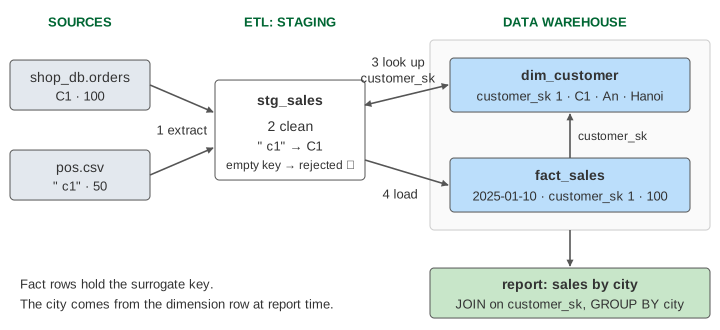
Sales only get added. Customers change: An lives in Hanoi, then moves to Da Nang. The source database just overwrites the city. The warehouse has to choose: forget Hanoi, or remember it? A dimension whose rows change now and then is a slowly changing dimension (SCD). The three classic answers are called type 1, type 2 and type 3. Each one gives a different report.
On the page, press Run ETL Batch, then Customer Moves, then Run ETL Batch again. Pick the SCD type in the dimension menu. The colour of a row is its city. The report table has a column at sale time: the city the customer really lived in when each sale happened. A number with ✓ agrees with it; a number with ✗ does not.
The four steps of a batch
| step | what it does | on the page |
|---|---|---|
| 1 extract | copy the new rows of every source into a staging table, as they are | shop_db.orders (a query) and pos.csv (LOAD DATA INFILE) into stg_sales |
| 2 clean | make the values comparable; set aside rows that cannot be used | UPPER(TRIM(customer_id)): " c1" becomes C1; the row with an empty key is rejected |
| 3 look up keys | replace each source key by the warehouse's own key | C1 → customer_sk 1 |
| 4 load | insert the fact rows | INSERT INTO fact_sales … SELECT … FROM stg_sales |
The staging table is the ETL's workbench. Sources with different formats land there first, so the cleaning rules are written once. A rejected row is not thrown away: it goes to a reject file or table, so somebody can fix the source and load it later. In batch 1 the till sent a sale of 30 with no customer. It is extracted, rejected and never reaches fact_sales (Demo 1: one ETL batch: 5 rows extracted, 1 cleaned, 1 rejected, 4 loaded).
Surrogate keys
The source calls the customer C1. That is the natural key (or business key). The warehouse gives every dimension row its own number, customer_sk, an AUTO_INCREMENT column. That is the surrogate key. Fact rows store only the surrogate key.
Why not store C1 in the fact row? Because one customer may need more than one dimension row. With type 2, An in Hanoi and An in Da Nang are two rows with the same customer_id and two different customer_sk. The surrogate key is what lets a fact point to one version. Two sources may also use the same id for different customers; a surrogate key keeps them apart.
SELECT customer_sk FROM dim_customer
WHERE customer_id = 'C1' AND is_current = 1;
The lookup takes the current row. So sales loaded after the move get the new key by themselves.
A customer moves
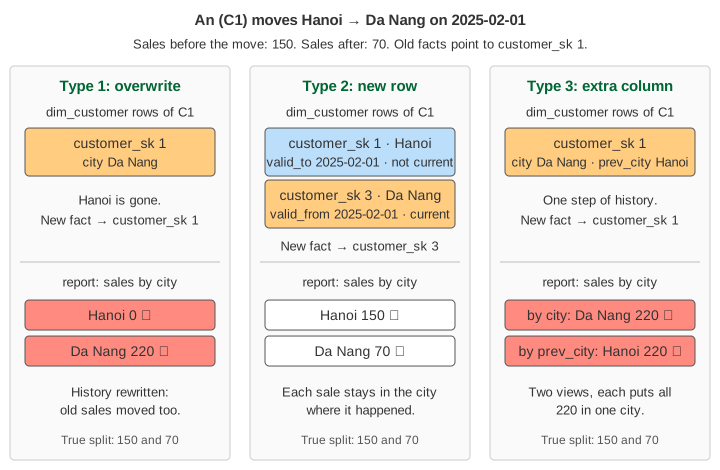
Batch 1 loads An's sales of 100 and 50 (Hanoi) and Binh's 40 and 60 (Hue). On 2025-02-01 An moves to Da Nang. Batch 2 loads 70 for An and 20 for Binh. What really happened: Hanoi 150, Da Nang 70, Hue 120.
Type 1: overwrite
UPDATE dim_customer SET city = 'Da Nang' WHERE customer_id = 'C1';
One row per customer. The old city is gone. Every old fact row of An still points to customer_sk 1, and that row now says Da Nang, so the old sales move too: the report shows Da Nang 220 and no Hanoi at all (Demo 2: type 1 overwrite). On the page the old fact rows change colour. Type 1 is right when the old value was simply wrong (a typo in a name), or when nobody needs the history.
Type 2: a new row
UPDATE dim_customer SET valid_to = '2025-02-01', is_current = 0
WHERE customer_id = 'C1' AND is_current = 1;

INSERT INTO dim_customer (customer_id, name, city, valid_from, valid_to, is_current)
VALUES ('C1', 'An', 'Da Nang', '2025-02-01', '9999-12-31', 1);
The current row is closed and a new row is added with a new surrogate key (3). Old facts keep key 1 = Hanoi. New facts get key 3 = Da Nang. The report shows Hanoi 150, Da Nang 70, Hue 120: the truth (Demo 3: type 2 new row). Each further move adds one more row (Demo 5: type 2, two moves: keys 1, 3 and 4). The price is a bigger dimension, and queries that want "customers today" must filter on is_current = 1. The open end date 9999-12-31 stands for "still valid"; it keeps BETWEEN filters simple.
Type 3: an extra column
UPDATE dim_customer SET prev_city = city, city = 'Da Nang'
WHERE customer_id = 'C1';
One row, two columns: the current city and the one before. (In MariaDB the assignments of a single-table UPDATE run left to right, so prev_city must come first.) The report can group by either column. By city: Da Nang 220. By prev_city: Hanoi 220. Each view puts all of An's sales in one city; neither splits them 150 and 70 (Demo 4: type 3 extra column). And there is room for only one old value: when An moves again, to Can Tho, prev_city becomes Da Nang and Hanoi is lost (Demo 6: type 3, two moves). Type 3 fits a planned, one-time change, such as a new sales region map, where people want to compare "old map" and "new map" for a while.
The three types side by side
| type 1 | type 2 | type 3 | |
|---|---|---|---|
| change made | overwrite the column | close the row, insert a new one | copy to prev_city, then overwrite |
| rows per customer | 1 | 1 + number of changes | 1 |
| history kept | none | all of it | one step back |
| old facts are shown | in the new city ✗ | in the city at sale time ✓ | all in the new city, or all in the old one |
| report after the move and batch 2 | Da Nang 220, Hue 120 | Hanoi 150, Da Nang 70, Hue 120 | by city: Da Nang 220, Hue 120; by prev_city: Hanoi 220, Hue 120 |
The type is chosen per column, not per table. A real customer dimension often overwrites the name (type 1) and versions the city (type 2).
See also Change Data Capture for a way to extract changes from the database log instead of querying the tables, Row Store vs Column Store for how a warehouse stores its fact table, Normalization for why the source keeps the city in one place, and MVCC for row versions inside the database engine, which are a different thing from type 2 versions.
What the page leaves out
The star schema itself, more dimensions (date, product) and cube operations: see Star Schema and OLAP Cube. New customers that appear in a batch before they are in the dimension, and late facts that must be matched to the dimension row valid on the sale date, not the current one. Removing duplicate rows that both sources send. Incremental extraction by timestamp or by log. Hashing a row to detect changes. Types 0, 4 and 6. Loading in one transaction and restarting a failed batch. MariaDB has no MERGE statement; an upsert is written with INSERT … ON DUPLICATE KEY UPDATE. MariaDB's system-versioned tables (WITH SYSTEM VERSIONING) keep old row versions by themselves, but by the time of the change in the warehouse, and without a new surrogate key.