The idea: a few inputs stand in for all of them
A function that takes one integer has billions of possible inputs. Nobody can test them all. A tester must pick a handful, and pick them so that a bug is likely to show. Equivalence partitioning and boundary value analysis are the two basic ways to pick. Both are black-box techniques: they read only the specification, never the code.
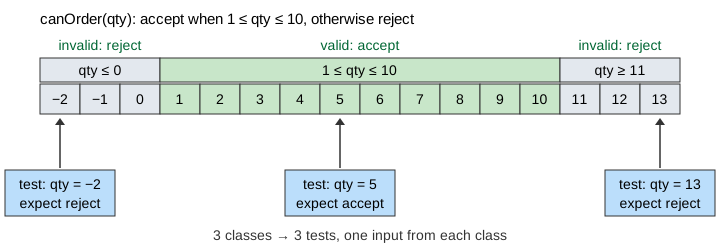
The page tests canOrder(qty). The spec says: accept an order when
1 ≤ qty ≤ 10, otherwise reject it. The canvas shows every integer from −2 to 13, the
code, and a table of tests. Each test flies to its input on the number line and gets a ✓ or a ✗.
Equivalence classes
An equivalence class is a set of inputs that the spec treats in the same way. If the program handles one member of the class correctly, it very likely handles the others too. Here there are three:
| Class | Inputs | Expected result |
|---|---|---|
| invalid, too small | qty ≤ 0 | reject |
| valid | 1 ≤ qty ≤ 10 | accept |
| invalid, too large | qty ≥ 11 | reject |
The classes must cover every input and must not overlap. Invalid classes count: much real damage comes from input the programmer did not expect.
One test per class
Equivalence partitioning takes one input from each class: −2, 5 and 13. Three tests replace billions. Demo 1: one test per class, correct code.
This is enough to find a bug that breaks a whole class. If the programmer forgot the upper limit
and wrote qty >= 1, then every input above 10 is accepted. The test with 13 fails.
Demo 2: missing upper limit, a class test finds it.
Boundary values
Many bugs are wrong for only one input, and that input sits at the edge of a class. Typing
< for <=, or 0 for 1, is the classic off-by-one
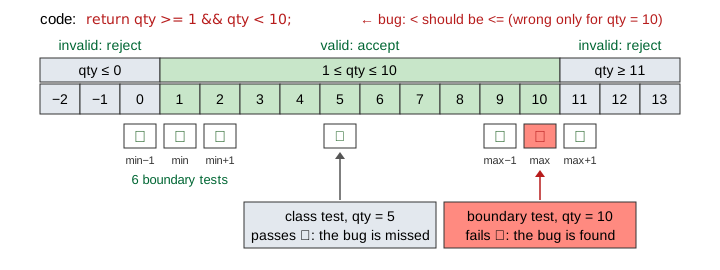
error. With qty < 10 the code is wrong for 10 and right for every other integer.
A test with 5 passes. Demo 3: off-by-one, class tests miss it.
Boundary value analysis puts tests on the edges. For a valid range from min to
max it uses six values:
| Test | min − 1 | min | min + 1 | max − 1 | max | max + 1 |
|---|---|---|---|---|---|---|
qty | 0 | 1 | 2 | 9 | 10 | 11 |
| expected | reject | accept | accept | accept | accept | reject |
The test with 10 expects accept and gets reject. The bug is found.
Demo 4: off-by-one, the boundary test catches it. The same six tests catch
qty >= 0, which wrongly accepts 0. Demo 5: accepts 0, caught at min − 1.
What each suite finds
| Code | Wrong for | One per class (−2, 5, 13) | Boundary values (0, 1, 2, 9, 10, 11) |
|---|---|---|---|
qty >= 1 | 11 and above | ✓ found at 13 | ✓ found at 11 |
… qty < 10 | 10 | ✗ missed | ✓ found at 10 |
qty >= 0 … | 0 | ✗ missed | ✓ found at 0 |
… && qty != 7 | 7 | ✗ missed | ✗ missed |
The last row is the limit of both techniques. Nothing in the spec says 7 is special, so no test picks it. Demo 6: bug at 7 only, both techniques miss it. To find such a bug you must look inside the code. That is white-box testing: see Control-Flow Coverage.
In practice the two techniques are used together: first find the classes, then test their edges. The six boundary values already contain a member of every class, so the mid-class tests add little here. They matter when the code treats the middle differently.
Two inputs: a grid
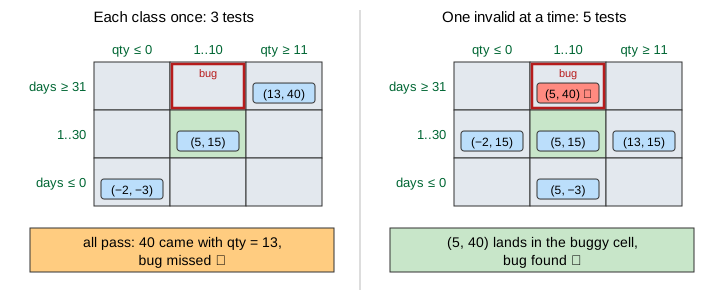
canBook(qty, days) accepts when 1 ≤ qty ≤ 10 and
1 ≤ days ≤ 30. Each input has three classes, so the pairs form a 3 × 3 grid of nine
cells. Only the middle cell is valid. The code on the page forgot the check
days <= 30, so it is wrong in one cell: valid qty, days too large.
Three tests can use every class once: (5, 15), (−2, −3) and (13, 40). All three pass. The value 40 appears only next to qty = 13, and the qty check rejects the pair first. One invalid value masks the other. Demo 7: two inputs, each class once, bug masked.
The fix is a rule: one invalid value per test. Keep the other input valid, so only one check can cause the reject. That takes five tests, and (5, 40) fails. Demo 8: two inputs, one invalid at a time.
| Suite | Tests | Cells used | Finds the missing check? |
|---|---|---|---|
| each class once | 3 | 3 of 9 | ✗ no, masked |
| one invalid at a time | 5 | 5 of 9 | ✓ yes, at (5, 40) |
| every cell | 9 | 9 of 9 | ✓ yes, at (5, 40) |
Testing every cell grows fast: with n inputs of three classes each it needs 3n tests. One invalid value at a time needs only 2n + 1.
See also Test Doubles for how a unit test replaces the collaborators of the code under test, and Searching a Sorted List, where binary search is a classic place for off-by-one errors at the ends of a range.
See also Control-Flow Coverage for white-box testing: statement, branch and path coverage on a control-flow graph.
See also Condition Coverage and MC/DC for a white-box way to pick tests from the truth table of a decision.
See also Mutation Testing, where a boundary mutant survives until a test at the boundary value kills it.
See also a Scrum Sprint and its burndown chart, where an item counts only when it meets the Definition of Done, tests included.
What the page leaves out
Boundary tests on two inputs at once (each input at its six values while the other stays in the
middle), classes of outputs, classes of strings, dates and other non-numbers, decision tables,
state-transition testing, pairwise testing for many inputs, and the two-value variant of
boundary analysis (only min − 1, min, max, max + 1) are left out. The page also never runs real
code: the five variants of canOrder are fixed.