The idea: a VPN is a network interface that encrypts
A VPN (virtual private network) gives your computer a second network interface, here wg0. Packets the routing table sends to wg0 are not put on the wire. Instead the VPN encrypts the whole packet, addresses included, and sends it as the payload of an ordinary UDP packet to the VPN server. The server decrypts it and sends the original packet on, as if your computer were plugged into the server's network. This wrapping of one packet inside another is called encapsulation, or tunnelling.
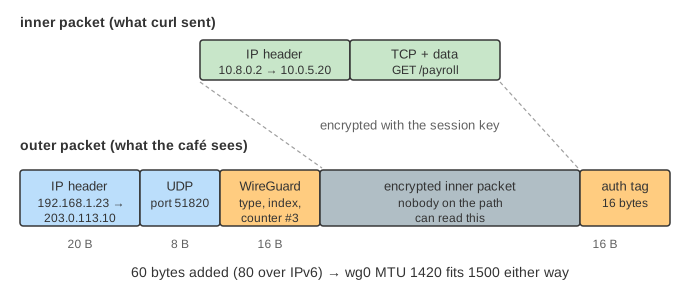
On the canvas a laptop on café Wi-Fi uses WireGuard, the VPN built into the Linux kernel. It reaches a company wiki (10.0.5.20) that only exists behind the VPN server, and the public site example.com. Each hop is drawn. The panel at the bottom lists what anyone on the café Wi-Fi can see.
The routing table decides what enters the tunnel
The application doesn't know about the VPN. curl just sends a packet; the kernel looks up the destination in the routing table, and the longest matching prefix decides the interface. The peer's AllowedIPs setting is turned into routes by wg-quick:
| Mode | AllowedIPs | Goes through the tunnel |
|---|---|---|
| Full tunnel | 0.0.0.0/0 | everything, except the VPN server's own address and the local subnet |
| Split tunnel | 10.0.0.0/16 | only company addresses; the web goes straight out |
The exception for the server's address matters: the encrypted UDP packets themselves must leave over wlan0, or they would loop back into wg0 (Demo: full tunnel — handshake, then the wiki; Demo: split tunnel).
The handshake and the counter
Each side has a static key pair, and each knows the other's public key from its config file. Before the first data packet, WireGuard does a one-round-trip handshake (the Noise IK pattern): a Handshake Initiation of 148 bytes and a Handshake Response of 92 bytes. Each carries a fresh ephemeral public key; both sides combine four Diffie-Hellman results into two session keys, one per direction. Keys are replaced every 2 minutes, so a key stolen later doesn't open old traffic.
- Every data packet carries a counter. The receiver remembers which counters it has accepted and drops any repeat, so a captured packet can't be replayed (Demo: replay attack — the counter stops it).
- A server that can't verify an Initiation sends nothing back. With a wrong key the client just sees silence and retries every 5 s (Demo: wrong key — the server stays silent). To a port scanner the server looks closed.
At the server: decrypt, check, forward, NAT
The server decrypts the packet and checks that its inner source address is one the peer may use (AllowedIPs = 10.8.0.2/32): WireGuard calls this cryptokey routing. Then it forwards the inner packet like a router (net.ipv4.ip_forward = 1). Company servers see the VPN address 10.8.0.2. For the internet, the server applies MASQUERADE, the same source NAT a home router does (see How NAT Shares One Public Address), so example.com sees the VPN server's address and the reply comes back to it (Demo: full tunnel — example.com through the VPN server).
What a VPN hides, and what it doesn't
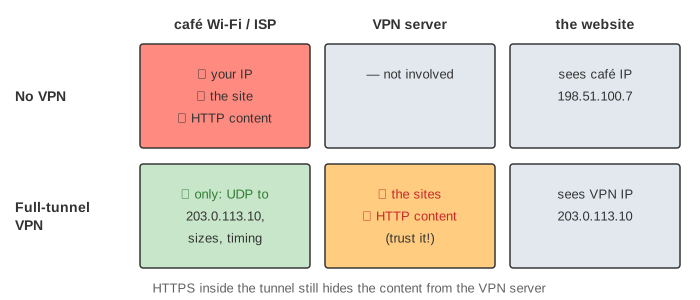
The café still sees that you use a VPN, which server, when and how much. The VPN server sees everything the café used to see, and HTTPS still matters inside the tunnel because the VPN only protects the path up to the server (Demo: no VPN — what the café sees).
DNS leaks, MTU and keepalive
- DNS leak: if the laptop keeps the café's DNS server 192.168.1.1, its lookups go to an address on the local subnet, which the routing table sends over
wlan0, outside the tunnel. The café learns every name you look up, and private company names don't resolve at all.DNS = 10.8.0.1in the config fixes it (Demo: DNS leak — lookups go to the café). - MTU: the outer headers add 60 bytes (IPv4 20, UDP 8, WireGuard 16, authentication tag 16), so 1440 would fit in 1500 bytes;
wg0uses MTU 1420 so that it also fits when the outer header is IPv6 (40 bytes instead of 20, 80 in all). - Keepalive: NAT routers forget idle UDP mappings, after which the server can't reach the laptop.
PersistentKeepalive = 25sends a tiny packet every 25 s to keep the café router's mapping alive.
WireGuard, IPsec and OpenVPN
| WireGuard | IPsec (IKEv2 + ESP) | OpenVPN | |
|---|---|---|---|
| Where it runs | Linux kernel module | kernel (ESP) + daemon (IKE) | user space, TUN device |
| Carried in | UDP | ESP (IP protocol 50) or UDP 4500 through NAT | UDP or TCP, over TLS |
| Handshake | 1 round trip, fixed ciphers | IKE_SA_INIT + IKE_AUTH, negotiable ciphers | TLS handshake |
| Keys | static public keys | certificates or pre-shared keys | certificates |
All three do the same thing on the canvas: a virtual interface, encapsulation, a server that decrypts and forwards. The same wrapping idea, without encryption, is how Kubernetes nodes carry pod traffic in VXLAN (see The Life of a Packet in Kubernetes). See also Router Forwarding, Internet Protocol Layers and How an HTTPS Connection Is Established.
A forward proxy hides your address in a similar way, but only for the traffic sent to it; see Forward proxy vs Reverse proxy.
What the page leaves out
IPv6, roaming (the server learns the laptop's new address from the next valid packet), cookie replies when a server is under load, the counter's sliding window for packets that arrive out of order, kill switches, site-to-site VPNs, VPNs that look like HTTPS to get past firewalls, and how wg-quick uses policy routing and a firewall mark instead of a plain route.