The idea: one buffer, many ways to read it
A NumPy array is two things: a flat buffer of numbers in memory, and a little metadata that says how to read it: the shape, the strides and where to start. Many arrays can share one buffer. Such an array is a view: it has its own metadata but no numbers of its own. When NumPy cannot describe a result with metadata alone, it makes a copy: a new buffer.
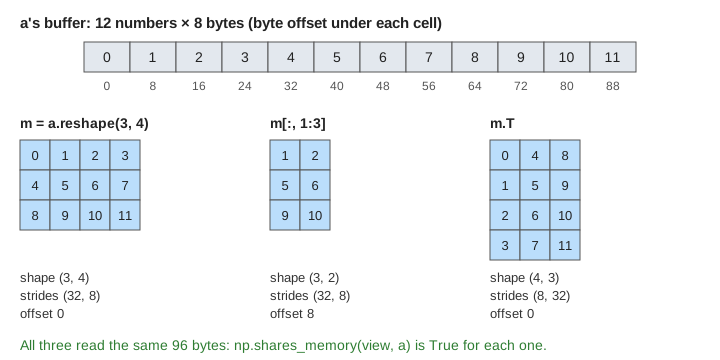
The page uses a = np.arange(12) (int64, 8 bytes per number, 96 bytes) and m = a.reshape(3, 4). The Memory panel shows a's buffer with the byte offset under each cell, and a second row when a copy exists. The result v shows what you get when you index v. Metadata shows what NumPy stores for v. Pick an expression in the v = menu (it runs at once), then press Write v[1, 0] = 99 to see where a write lands.
Strides and the address formula
A stride is the number of bytes to move for one step along an axis. For m, shape (3, 4), the strides are (32, 8): one step down a row skips 4 numbers × 8 bytes, one step along a row skips 8 bytes. The byte address of an element is
address of v[i, j] = offset + i·strides[0] + j·strides[1]So m[2, 1] is at 0 + 2·32 + 1·8 = byte 72, which is a[9] (Demo 1: reshape is a view). a.reshape(3, 4) moved no number at all: it only wrote new metadata. Try m.strides in Python: it prints (32, 8).
Slicing returns a view
Basic slicing (start:stop:step and single integers) never copies. It changes the metadata:
- A start moves the offset.
m[:, 1:3]starts at column 1, so the offset is 8 bytes; the strides stay (32, 8) and the shape is (3, 2). v[2, 1] is at 8 + 2·32 + 1·8 = byte 80, a[10] (Demo 2). - A step multiplies the stride.
m[::2, ::3]has strides (32·2, 8·3) = (64, 24) and reads 0, 3, 8, 11 (Demo 3: a step multiplies the stride). - An integer drops the axis.
m[1]starts at byte 32, shape (4,), strides (8,).
Each of these is a view: np.shares_memory(v, a) is True and v.base is a. NumPy points .base at the array that owns the memory, not at m.
Transpose swaps the strides
m.T does not move numbers either. It swaps the shape to (4, 3) and the strides to (8, 32): one step down v now moves 8 bytes, one step across moves 32. v[3, 1] is at 3·8 + 1·32 = byte 56, a[7], which is m[1, 3] as it should be (Demo 4: transpose swaps the strides).
The flags tell you the order of the bytes. flags['C_CONTIGUOUS'] is True when the last axis moves 8 bytes and each earlier stride is the next stride times the next size: row-major order with no gaps. flags['F_CONTIGUOUS'] is the same from the first axis: column-major order.
| v | shape | strides | offset | C | F |
|---|---|---|---|---|---|
| m | (3, 4) | (32, 8) | 0 | True | False |
| m[:, 1:3] | (3, 2) | (32, 8) | 8 | False | False |
| m[::2, ::3] | (2, 2) | (64, 24) | 0 | False | False |
| m.T | (4, 3) | (8, 32) | 0 | False | True |
| m.reshape(2, 6) | (2, 6) | (48, 8) | 0 | True | False |
A non-contiguous view still works for every operation, but it reads memory with jumps. Why jumps cost time on real hardware is the topic of CPU Cache; np.ascontiguousarray(v) makes a contiguous copy when that matters.
Reshape: a view when it can, a copy when it must
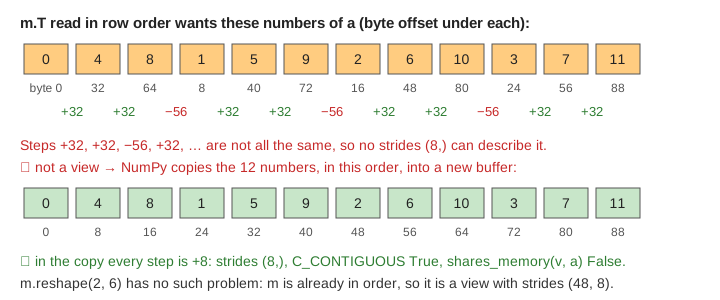
m.reshape(2, 6) is a view with strides (48, 8): m's numbers are already in order, so 2 rows of 6 are just new metadata. m.T.reshape(12) is different. Read in row order, m.T is 0, 4, 8, 1, 5, 9, … and the byte steps are +32, +32, −56, … . A 1-D array has one stride, so no metadata can describe that. NumPy copies the 12 numbers, in that order, into a new buffer (Demo 5: reshape, view or copy).
The same rule is behind ravel() (a view when it can be, a copy otherwise) and flatten() (always a copy). If you need to know, check with np.shares_memory.
Fancy and boolean indexing always copy
Indexing with a list or array of integers (fancy indexing) or with a boolean mask always returns a copy. m[[0, 2]] could name rows in any order, even the same row twice; m[m > 6] picks a number of values that depends on the data (here 5: 7, 8, 9, 10, 11). Neither fits one stride per axis, so NumPy does not try (Demo 6: fancy and boolean indexing copy).
| expression | kind | result | shares memory with a |
|---|---|---|---|
| m[:, 1:3], m[1], m[::2, ::3] | basic slicing | view | yes |
| m.T, m.reshape(2, 6) | new metadata | view | yes |
| m.T.reshape(12) | reshape of non-contiguous data | copy | no |
| m[[0, 2]] | fancy indexing | copy | no |
| m[m > 6] | boolean mask | copy | no |
Writing through a view
Because a view has no numbers of its own, writing into it writes into the shared buffer. With v = m[:, 1:3], v[1, 0] = 99 lands at 8 + 1·32 = byte 40: a[5] and m[1, 1] become 99. With v = m[[0, 2]], v[1, 0] = 99 lands in the copy, and a[8] is still 8 (Demo 7: write through a view vs a copy).
This is the source of many surprises: a function that changes a slice it was given changes the caller's array. Call .copy() when you want your own numbers. The same split, sharing versus owning, appears for plain variables in Pass by Value vs Pass by Reference. Assigning through an index on the left side, m[[0, 2]] = 0, does write into m: only reading with fancy indexing makes a copy.
How to tell which one you have
np.shares_memory(v, a): True for a view of a.v.base: the array that owns the memory for a view,Nonefor an array that owns its buffer. (A reshape copy may have an internal temporary as its base, soshares_memoryis the safer test.)v.stridesandv.flags: the metadata itself.
Stride 0, the trick that lets broadcasting reuse one row without copying it, is shown in NumPy Broadcasting. Pandas builds on these arrays; its split-apply-combine step is in Pandas GroupBy.
See also Cache-Friendly Loops: Traversal Order, Interchange and Tiling for what walking memory with a large stride costs in cache misses.
What the page leaves out
Arrays with more than 2 axes (the address formula just gets one more term per axis); negative strides such as m[::-1]; dtypes other than int64 (a float32 array has strides in steps of 4); np.lib.stride_tricks.as_strided and sliding_window_view; read-only views and the WRITEABLE flag; the order='F' argument of reshape; Pandas copy-on-write; and how PyTorch tensors use the same idea (.view() fails on a non-contiguous tensor and .contiguous() copies).