The idea: a graph of units, not a boot script
Once the kernel has started systemd as PID 1 (that part is on How Linux Boots),
systemd does not run a list of scripts one after another. It reads unit files, each of which
says two separate things about other units: what to pull in (Requires=,
Wants=) and what to wait for (After=, Before=).
From these, it works out which jobs to run and which of them can run at the same time.
The canvas has five units. multi-user.target is the goal of a server boot.
myapp.service is a web app that needs postgresql.service and the network
(network-online.target). myapp.socket is a listening socket on port 8080 that systemd
holds for myapp. On the right are systemd's job queue and the journal. The clock
is in seconds since boot: postgresql takes 3 s to be ready, the network 2 s, myapp 1 s.
Units and unit files
A unit is anything systemd manages, named with a type suffix: .service (a process),
.socket (a socket systemd listens on), .target (a named group with no process of its own),
plus .mount, .timer, .path and others. The unit file of myapp is in the panel
under the graph. Its [Unit] section holds the dependencies, [Service] how to run it, and
[Install] what systemctl enable does: WantedBy=multi-user.target adds a
Wants= from the target to myapp (a symlink in multi-user.target.wants/).
A unit's state is inactive, activating, active, deactivating or
failed, with a sub-state in brackets such as running, listening,
auto-restart or exit-code. The box colours on the canvas follow these states.
With Type=notify, a service stays activating until its process calls
sd_notify("READY=1").
Jobs, transactions and parallel start
systemctl start multi-user.target does not start anything right away. systemd first follows every
Requires= and Wants= from the target and builds one transaction: a start
job for each unit that is not already active. The jobs go into the job queue
(systemctl list-jobs). A job runs as soon as no unit it is After= still has a job.
So jobs with no ordering between them run in parallel.
In Demo 1, three jobs start at t = 0 s: the socket (ready at once), the network and postgresql.
myapp has After=postgresql.service network-online.target, so it waits until t = 3 s. A target gets
an implicit After= on everything it wants, so multi-user.target is reached at t = 4 s,
when myapp sends READY=1. A shell script would have taken 3 + 2 + 1 = 6 s.
| t | what happens |
|---|---|
| 0 s | 5 start jobs. myapp.socket listening; network-online and postgresql activating |
| 2 s | network-online.target reached |
| 3 s | postgresql READY=1; myapp's job can run now: activating, PID 812 |
| 4 s | myapp READY=1; multi-user.target reached |
Requires= vs Wants= vs After=
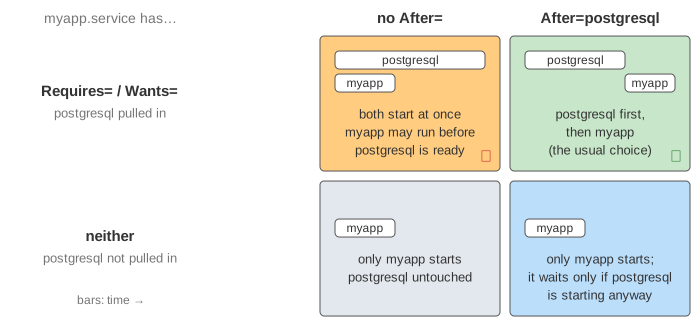
The pull-in and the order are separate settings, and they fail in different ways. Set postgresql to fail (fault: postgresql fails to start) and compare:
- Requires= + After= (Demo 2): postgresql exits with status 1 at t = 3 s. myapp's
start job, which was waiting for it, fails with result
dependency; the journal saysDependency failed for myapp.serviceand myapp never starts. Stopping postgresql later also stops myapp, myapp first (Demo 5): stop jobs run in the reverse of the start order. - Wants= + After= (Demo 3): the failure is ignored. After= only means "wait until postgresql's job has finished", and a failed job is finished, so myapp starts at t = 3 s and has to cope without its database.
- After= alone (Demo 4): nothing is pulled in. At boot postgresql is in the
transaction anyway (multi-user.target wants it), so myapp still waits for it. But stopping postgresql leaves
myapp running, and
systemctl restart myappstarts myapp at once without bringing postgresql back.
| myapp has | postgresql pulled in | myapp waits for it | postgresql fails to start | postgresql is stopped |
|---|---|---|---|---|
Requires= + After= | yes | yes | myapp not started (dependency) | myapp stopped too |
Wants= + After= | yes | yes | myapp starts anyway | myapp keeps running |
After= only | no | only if it is starting | myapp starts anyway | myapp keeps running |
Requires= only | yes | no, both start at once | myapp may already run | myapp stopped too |
The systemd authors recommend Wants= for most dependencies, because one broken service should
not stop the whole boot. Requires= does not stop myapp when postgresql crashes on its own,
only when it is stopped on purpose; BindsTo= covers the crash case too.
Restart= and the start limit
Restart=on-failure makes systemd start a service again after it exits with a non-zero status, is
killed by a signal (see How Linux Delivers a Signal) or times out. It waits
RestartSec= first, and the unit shows activating (auto-restart) meanwhile. A clean exit
or systemctl stop is not restarted.
To stop an endless crash loop, every start is counted. If a unit is started more than
StartLimitBurst= times within StartLimitIntervalSec=, the next start is refused with
Start request repeated too quickly and the unit is failed (Result: start-limit-hit).
In Demo 6 myapp exits 1 one second after each start. It starts at 3, 9, 15, 21 and 27 s; at 33 s the
sixth start is refused, and myapp.socket fails too (service-start-limit-hit).
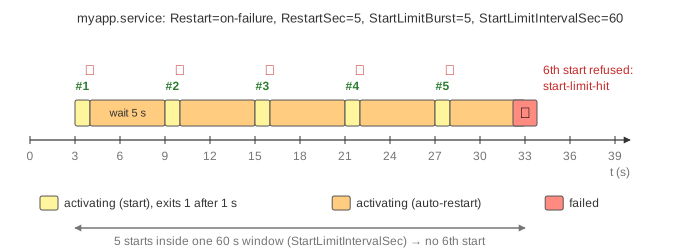
The defaults are StartLimitIntervalSec=10s and StartLimitBurst=5. With
RestartSec=5 only two or three starts fit in 10 s, so the default limit never trips and the service
crashes forever, every 5 s. That is why the unit file here sets the interval to 60 s. Once the limit is hit,
systemctl reset-failed myapp clears the counter; the page does this for you when you restart myapp.
Kubernetes does the same job with a growing back-off instead of a hard limit: see CrashLoopBackOff on
The Life of a Kubernetes Pod.
Socket activation
With socket activation, systemd itself calls socket(), bind() and
listen() for port 8080 early in boot, as myapp.socket says
(ListenStream=8080). The service does not run yet. When the first client connects, the kernel finishes
the TCP handshake and keeps the connection in the listen backlog (see
The Linux Listen Backlog). systemd sees the socket become readable and starts
myapp.service, passing the listening socket as file descriptor 3 with the environment
variables LISTEN_FDS=1 and LISTEN_PID. myapp finds it with sd_listen_fds()
and calls accept().
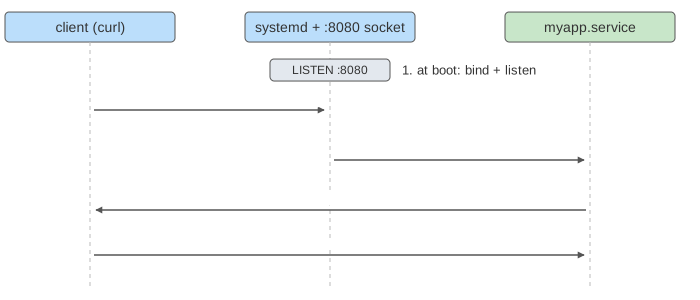
In Demo 7 only myapp.socket is enabled. Boot reaches multi-user.target at t = 3 s without starting myapp.
The first curl pulls in myapp and, through it, network-online.target, so the reply comes at t = 6 s.
The second curl is answered at once by the running myapp; systemd is not involved. Nothing is refused while the
service starts, and services can start in any order, because the sockets they connect to already exist.
Looking at it on a real machine
| command | shows |
|---|---|
systemctl status myapp | state, sub-state, main PID, last journal lines |
systemctl list-dependencies multi-user.target | the Wants=/Requires= tree |
systemctl list-jobs | the job queue during boot or a slow start |
journalctl -u myapp -b | myapp's log lines since boot |
systemd-analyze critical-chain | the chain of After= that set the boot time |
systemctl show myapp -p NRestarts | how often Restart= has fired |
A stopped service's processes are found and killed through its cgroup, so nothing escapes by forking. Orphans are adopted and reaped by PID 1 (see A Linux Process from fork() to Reaping).
What the page leaves out
- Firmware, the kernel and how systemd becomes PID 1: see How Linux Boots.
BindsTo=,PartOf=,Requisite=,Conflicts=,OnFailure=andUpholds=.- Default dependencies (
sysinit.target,basic.target,shutdown.target),sockets.target(which really pulls in myapp.socket), and job modes such as--job-mode=isolate. - Ordering cycles and how systemd breaks them by deleting a job.
Type=simple,exec,forking,oneshot; start and stop timeouts;ExecStartPre=,KillMode=and the SIGKILL afterTimeoutStopSec=.Accept=yessockets (one service instance per connection), D-Bus and path activation, timers, user units.- cgroups, resource limits and sandboxing options (
ProtectSystem=,MemoryMax=).