The idea: the kernel stops the tracee and wakes the tracer
strace and gdb are ordinary programs. They can't reach into another process by themselves. They ask the kernel, through one system call, ptrace(). The program that asks is the tracer; the program being watched is the tracee. The kernel does the real work: it stops the tracee at interesting moments, wakes the tracer, and lets the tracer read and write the tracee's registers and memory while it is stopped.
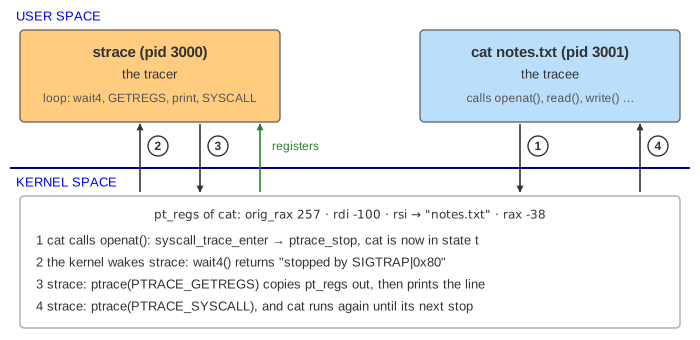
The page has one CPU, a tracer (pid 3000) and cat notes.txt (pid 3001) as the tracee. The file holds 10 bytes, "hi ptrace\n". Each tracer is one choice in the first menu: strace, no tracer at all, gdb with a breakpoint on main, and gdb -p attaching to a process that isn't its child.
Becoming a tracer: TRACEME, ATTACH, SEIZE
There are two ways in. When you run strace cat notes.txt or gdb cat, the tracer forks. The child calls ptrace(PTRACE_TRACEME) ("let my parent trace me") and then execve()s the program. The kernel marks the child PT_PTRACED, and because it is traced, the exec ends with a SIGTRAP stop: the new program is loaded but hasn't run one instruction yet. That gives the tracer time to set options and breakpoints.
The other way is to join a running process: strace -p 3001 uses PTRACE_SEIZE, gdb -p 3001 uses PTRACE_ATTACH, which also sends the target a SIGSTOP. Both go through a permission check (below).
While a process is stopped by ptrace it is in state t ("tracing stop" in ps and /proc/<pid>/status). It doesn't run until the tracer resumes it with PTRACE_CONT, PTRACE_SYSCALL or PTRACE_SINGLESTEP. The tracer learns about each stop from wait4() / waitpid(), the same call a parent uses to see a child exit (A Linux Process from fork).
How strace sees a system call: entry stop and exit stop
PTRACE_SYSCALL means "resume, and stop at the next system call boundary". The kernel sets the SYSCALL_TRACE work flag on the tracee. From then on every system call stops twice:
- syscall-enter-stop:
syscall_trace_entercallsptrace_stopbefore the system call runs; - syscall-exit-stop:
syscall_exit_workstops it again after the call, before returning to user mode.
At each stop the tracer's wait4() returns with "stopped by SIGTRAP | 0x80" (the 0x80 is there because strace set PTRACE_O_TRACESYSGOOD, so it can tell syscall stops from a real SIGTRAP). Then strace calls PTRACE_GETREGS, which copies the tracee's saved pt_regs (the registers saved on entry to the kernel, see A Linux System Call, Step by Step):
| Register | At the entry stop | At the exit stop |
|---|---|---|
orig_rax | the system call number: 257 = openat | the same |
rdi, rsi, rdx, r10, r8, r9 | arguments 1 to 6: -100 (AT_FDCWD), the address of "notes.txt", 0 (O_RDONLY) | usually the same |
rax | -38 (-ENOSYS): nothing has run yet | the return value: 3, the new fd |
Strings and buffers are only addresses in the registers. strace reads the bytes out of the tracee's memory (with process_vm_readv or PTRACE_PEEKDATA), which is how it can print "notes.txt". It prints the call at the entry stop and = result at the exit stop. So when the tracee writes to the same terminal, its output lands in the middle of the strace line (Demo: strace cat notes.txt):
openat(AT_FDCWD, "notes.txt", O_RDONLY) = 3
read(3, "hi ptrace\n", 131072) = 10
write(1, "hi ptrace\n", 10hi ptrace
) = 10
read(3, "", 131072) = 0
close(3) = 0
exit_group(0) = ?
+++ exited with 0 +++
exit_group never returns, so it has no exit stop: strace prints = ?, and then learns from wait4() that the tracee exited.
Why strace is slow: count the context switches
Without a tracer, a system call is a mode switch: the same task goes from user mode to kernel mode and back, and no other task runs. With strace, each stop means the tracee can't run, so the scheduler switches to strace, and when strace resumes it and goes back to sleep in wait4(), it switches back. Two stops per call, two switches per stop:
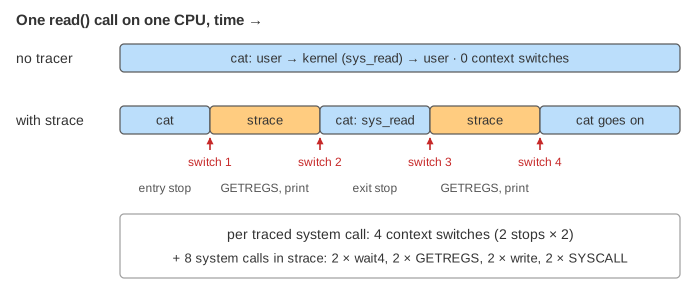
| cat notes.txt (its 6 own calls) | cat's system calls | context switches | tracer's system calls |
|---|---|---|---|
| no tracer | 6 | 0 | — |
| strace | 6 | 23 = 5 × 4 + 3 | 46 = 5 × 8 + 6 |
(Demo: count the switches: no tracer vs strace.) exit_group costs 3 instead of 4: two for its entry stop and one when the dead tracee wakes strace. Each switch costs a few microseconds with its cache and TLB effects (Linux Context Switch), so a program that makes many small system calls can run 10 to 100 times slower under strace. Faster tools avoid the round trip: strace --seccomp-bpf stops only at the calls you asked for (-e trace=openat), and perf trace and eBPF tools read tracepoints inside the kernel without stopping the program at all.
How gdb sets a breakpoint: one byte, 0xCC
A software breakpoint is not a kernel feature. It is a byte. The x86 instruction int3 is one byte, 0xCC, and when the CPU runs it, it raises the #BP exception. To put a breakpoint on main at 0x401136, gdb:
- reads the 8 bytes there with
PTRACE_PEEKTEXTand saves the first one,0x55(push %rbp); - writes them back with the first byte changed to
0xCC, usingPTRACE_POKETEXT. The kernel writes into the tracee's private copy of the code page (copy-on-write), so the file on disk is unchanged; - resumes the tracee with
PTRACE_CONT. When it reachesmain,int3traps,exc_int3sendsSIGTRAP, and because the task is traced, the kernel stops it (a signal-delivery-stop) instead of delivering the signal (How Linux Delivers a Signal).waitpid()returns in gdb; - reads the registers:
orig_rax = -1(not a system call stop) andrip = 0x401137, one byte past theint3.rip − 1is breakpoint 1, so gdb printsBreakpoint 1, main ().
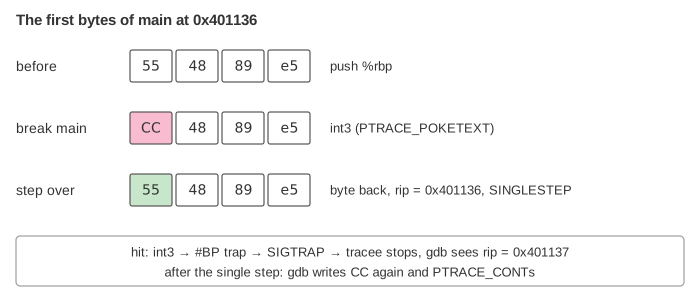
To continue, gdb can't just resume: push %rbp was never run, and its first byte is gone. So it puts 0x55 back, moves rip back to 0x401136 with PTRACE_SETREGS, and calls PTRACE_SINGLESTEP, which sets the trap flag (TF) so the CPU runs exactly one instruction and traps again. Then it writes 0xCC back, so the breakpoint still works next time, and continues (Demo: gdb breakpoint on main). Between the stops the tracee runs freely: PTRACE_CONT doesn't stop at system calls, so the whole gdb run costs only 6 context switches.
Hardware breakpoints and watchpoints use the CPU's debug registers DR0–DR7 instead (set with PTRACE_POKEUSER): no byte is changed, but there are only 4 of them.
Who may trace whom: ptrace_scope and EPERM
A tracer can read every secret of the tracee: keys in memory, passwords typed into it. So the kernel checks ptrace_attach → __ptrace_may_access: the tracer needs the same uid as the target (and the target must be "dumpable"), or CAP_SYS_PTRACE. On top of that, the Yama security module reads /proc/sys/kernel/yama/ptrace_scope:
| ptrace_scope | Who may attach |
|---|---|
| 0 | any process with the same uid (the classic rule) |
| 1 (Ubuntu's default) | only an ancestor of the target, or a process the target named with prctl(PR_SET_PTRACER); root (CAP_SYS_PTRACE) always |
| 2 | only with CAP_SYS_PTRACE |
| 3 | nobody; ptrace attach is off until reboot |
With scope 1, strace cat and gdb cat work, because the tracer is the tracee's parent. But gdb -p 3001 on a cat started in another terminal fails: ptrace() returns -1 with errno = EPERM, and gdb prints ptrace: Operation not permitted. (Demo: gdb -p is denied). Fixes: sudo, echo 0 | sudo tee /proc/sys/kernel/yama/ptrace_scope, or have the target allow it. Containers often block ptrace too, through seccomp or a missing capability.
What the page leaves out
The page has one CPU and a single-threaded tracee. On a real machine the tracer and tracee may run on different CPUs, which saves a little but still needs a wakeup and a stop each time. strace really uses PTRACE_GET_SYSCALL_INFO and process_vm_readv rather than plain GETREGS, and follows threads and children with PTRACE_O_TRACECLONE / -f. The ~25 loader system calls before openat (brk, mmap, the openat of libc.so.6, …; see How Linux Loads a Program) are not drawn. Also skipped: group-stop and PTRACE_LISTEN, PTRACE_INTERRUPT, signal injection on resume, seccomp-based filtering, hardware watchpoints, gdb's own breakpoint bookkeeping and DWARF symbols, and the fact that gdb usually keeps breakpoints out of memory while the tracee is stopped. The addresses are examples.