The idea: one free list, four ways to pick a hole
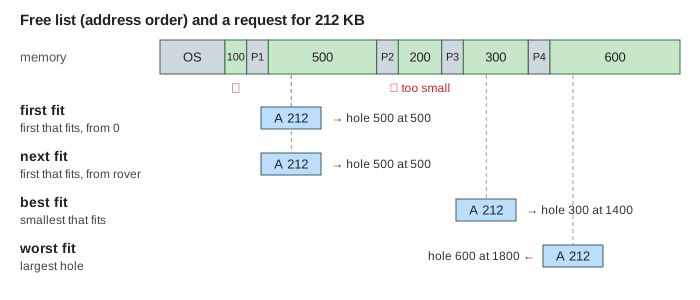
With contiguous allocation, every request gets one unbroken range of addresses. Memory is then a row of used blocks with free gaps between them, called holes. The allocator keeps the holes on a free list, sorted by address. A request for n KB needs one hole of at least n KB. When several holes are big enough, a placement strategy picks one:
- First fit: walk the list from address 0 and take the first hole that is big enough.
- Next fit: the same, but start where the last search stopped. A rover pointer remembers that place, and the search wraps around at the end of memory.
- Best fit: check every hole and take the smallest one that is big enough.
- Worst fit: check every hole and take the largest one.
Reading the canvas
The four rows hold four copies of the same 2400 KB memory, one per strategy. Every action runs in all four rows at once. Grey blocks were there at the start (the OS and processes P1–P4), coloured blocks are your requests A, B, C…, green boxes are holes. During a search the holes a row checks turn yellow and the one it picks turns orange. Under each bar you see the free list as start:size pairs, the free total, the largest hole, and how many holes the row has checked so far. The dark blue tick on the next fit row is its rover.
Splitting and coalescing
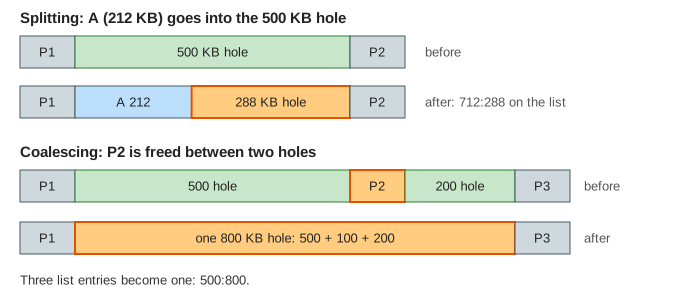
A hole is rarely the exact size. The block takes the front of the hole and the rest stays on the list as a smaller hole: that is splitting. When a block is freed, it may touch a hole on the left, on the right, or both. The allocator then coalesces them into one hole, so the list never holds two holes side by side.
In Demo: free merges with free neighbours, freeing P2 (100 KB at 1000) joins the 500 KB hole before it and the 200 KB hole after it into one 800 KB hole at 500. Freeing P1 then joins 100 + 100 + 800 into 1000 KB at 300. Now a 900 KB request fits in every row; before the frees the largest hole was 600 KB.
External fragmentation
After many requests and frees, free memory is spread over many small holes. A request can then fail although the free total is larger than the request: no single hole is big enough. This is external fragmentation. In Demo: enough free memory, no hole big enough, three 600 KB blocks fill memory, B is freed, and a 700 KB request fails in every row: 900 KB are free, but as holes of 600 and 300 KB. The strategy does not matter here; the shape of the free memory does.
For first fit, Knuth's analysis and simulations give the 50-percent rule: with N blocks in use, about N/2 holes exist on average. So up to a third of memory can be lost to holes too small to use.
Which one is best?
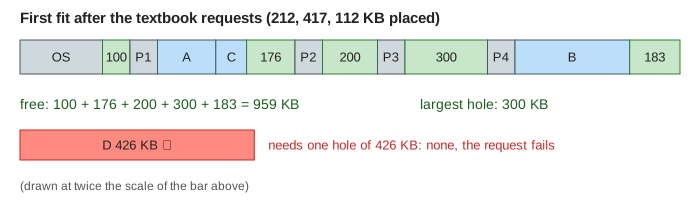
None of them wins every time. Demo: textbook holes, four strategies is the classic exercise from Silberschatz: holes of 100, 500, 200, 300 and 600 KB, then requests of 212, 417, 112 and 426 KB. Only best fit places all four; first fit, next fit and worst fit cannot place the 426 KB request although 959 KB are free. In Demo: best fit leaves a sliver the result turns around: with holes of 200 and 120 KB and requests of 110, 120 and 90 KB, best fit puts 110 KB into the 120 KB hole and leaves a useless 10 KB sliver, so the last request fails there and only there.
| Strategy | Holes checked per request | What it tends to leave | Demo numbers |
|---|---|---|---|
| First fit | until the first fit | small slivers near low addresses, which every later search walks past | textbook: 14 holes checked, 426 KB fails |
| Next fit | until the first fit, from the rover | allocations spread over all of memory; often more fragmentation than first fit | textbook: 12 checked, 426 KB fails |
| Best fit | all of them | very small slivers | textbook: 20 checked, all placed; sliver demo: 90 KB fails |
| Worst fit | all of them | medium holes, but the big holes are gone soon | textbook: 20 checked, 426 KB fails |
Simulations reported in the textbooks find first fit and best fit better than worst fit in both time and memory use. First fit and best fit use memory about equally well, and first fit is faster. Demo: next fit starts where it stopped shows the difference between the two "first that fits" rules: after A takes 450 KB of the 500 KB hole, first fit puts the 80 KB request back at address 300 and the 30 KB one into the 50 KB rest, leaving two 20 KB slivers. Next fit goes on from its rover and places them at 1100 and 1180.
Real allocators avoid the long walks. They keep segregated free lists, one list per size class, so a best-fit search only looks at holes of about the right size. glibc's malloc works like that, see glibc vs jemalloc vs tcmalloc. The Linux kernel uses power-of-two blocks instead, which makes coalescing cheap, see The Buddy Allocator.
What the page leaves out
Compaction, which slides blocks together to merge all holes (see Paging vs Segmentation); paging, which removes external fragmentation by using fixed-size frames; the block headers and boundary tags that a real allocator stores in memory to find neighbours in O(1); rounding requests up to an alignment, which adds internal fragmentation; keeping a hole at the end when the rest is too small to be worth listing; and size-class lists. Placement here is always at the start of the hole.