The idea: learn from the source, forward by the destination
An Ethernet switch connects the computers of one local network. It never needs to be told where anything is. Every time a frame comes in, the switch writes down the frame's source MAC address and the port it came in on, in its MAC address table. To send a frame on, it looks up the destination MAC: if the table knows the port, the frame goes out of that one port; if not, the switch sends a copy out of every other port (flooding) and lets the right host pick it up.
The canvas has two switches, SW1 and SW2, joined by two links (p7 to p7 and p8 to p8), so there is a loop. Hosts A, B and C are on SW1; D and E are on SW2. Each switch shows its ports (green = forwarding, red = blocking) and, below, its MAC table: new entries are blue, entries that moved are orange. A host sends an ARP request (a broadcast, the most common one on any LAN), an ARP reply or a ping; see How ARP Finds a MAC Address for what the hosts do with ARP.
Learn, forward, filter, flood
| The frame's destination | What the switch does |
|---|---|
| in the table, on another port | forward out of that port only |
| in the table, on the port it came in on | filter: drop it, the destination already has it |
| not in the table (unknown unicast) | flood to every other port; hosts that are not the destination discard their copy |
broadcast ff:ff:ff:ff:ff:ff | flood to every other port, always |
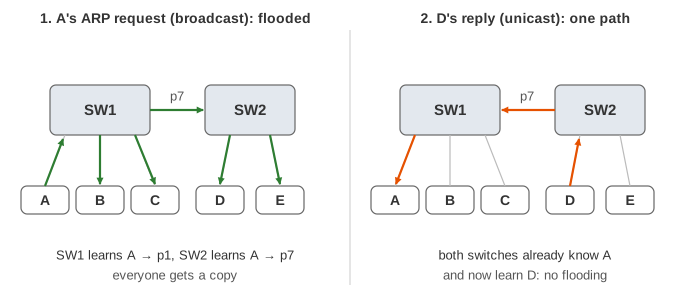
In Demo 1 A's ARP request is flooded to everyone, and both switches learn A. D's reply is a unicast to A, which the switches already know, so it travels on exactly one path; on the way they learn D. The ping after that floods nowhere. The switch itself has no address in these frames: hosts cannot see it, which is why it is "transparent".
Aging and hosts that move
Entries are not kept forever: one that has not been refreshed by a frame from that MAC for 300 seconds
(the usual default, mac address-table aging-time; bridge fdb on Linux) is removed. After that, a
frame for that host is unknown again and gets flooded (Demo 2, Demo 3).
When the same MAC shows up on a different port, the entry simply moves. That is how a laptop moved to another desk, or a virtual machine migrated to another server, keeps working: as soon as it sends one frame. Until it does, frames for it go to the old place and are lost (Demo 4). Hosts that move therefore announce themselves at once, for example with a gratuitous ARP.
Why loops are deadly
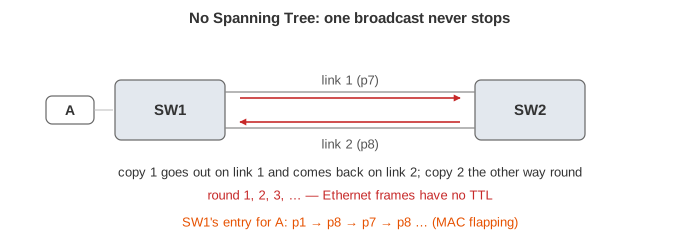
Two links between switches are good for availability, but they form a loop, and an Ethernet frame has no TTL (unlike an IP packet, see How a Router Forwards a Packet). A broadcast is flooded out of both links, each copy is flooded back over the other link, and so on forever: a broadcast storm (Demo 5). Every host keeps receiving copies, and the switches keep moving A's entry between p1, p7 and p8 (MAC flapping), so even unicast traffic goes the wrong way. With more redundant links the copies multiply until the links are full and the network stops.
Spanning Tree: block one link
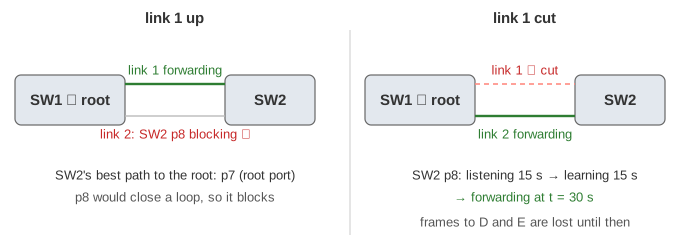
The Spanning Tree Protocol (IEEE 802.1D) keeps the extra link but blocks it. Switches exchange BPDUs and elect the root bridge: the lowest bridge ID (priority 32768, then the MAC). Every other switch keeps its best path to the root (its root port) and blocks ports that would make a loop. Here SW1 is the root, SW2 uses p7 and blocks p8: a broadcast reaches every host exactly once (Demo 6). SW1 still sends on p8, and SW2 discards what arrives there.
If link 1 breaks, SW2's blocked port takes over, but carefully: 15 s listening and 15 s learning before it forwards, so frames are lost for 30 s (Demo 7), or 50 s when the failure is further away and SW2 first waits for the old root information to expire (max age, 20 s). Rapid STP (802.1w, the default today) does the same in about a second, and many data centres avoid STP entirely with routed links or link aggregation.
VLANs: several networks on the same switches
A VLAN splits a switch into separate broadcast domains. Each access port belongs to one VLAN (here A, C and D in VLAN 10, B and E in VLAN 20), and a frame is only ever flooded to ports of its own VLAN. The links between the switches become trunks: they carry every VLAN and add a 4-byte 802.1Q tag (TPID 0x8100, then a 12-bit VLAN ID, so up to 4094 VLANs) so the next switch knows which VLAN a frame belongs to. The MAC table is kept per VLAN (Demo 8). A host in VLAN 10 cannot reach VLAN 20 at all without a router, which is why each VLAN normally gets its own IP subnet (the page keeps one subnet for simplicity).
Hub, switch, router
| Device | Reads | Sends a frame to | Broadcasts |
|---|---|---|---|
| hub (old) | nothing | every port, always | passed everywhere |
| switch | Ethernet header (MAC) | one port if known, else every port | flooded within the VLAN |
| router | IP header | the next hop from its routing table | stopped |
See Internet Protocol Layers for a switch as one hop of a packet's whole trip.
See also: Every frame ends with a 4-byte frame check sequence, a CRC-32 over the header and payload; a switch drops a frame whose FCS does not match. See how it is computed in Cyclic Redundancy Check (CRC).
See also: a switch next to a hub and a router on the same traffic, with collisions, flooding and broadcast domains, in Hub vs Switch vs Router.
What the page leaves out
- MAC flooding attacks (filling the table so the switch floods everything) and port security.
- Link aggregation (LACP), RSTP and MSTP details, port costs, priorities and the topology-change flush.
- The 30 s that a restored port also waits in 802.1D, the native VLAN and VLAN hopping.
- Store-and-forward vs cut-through switching, queues, PoE, Wi-Fi access points that bridge to Ethernet.
- IPv6 Neighbor Discovery, which replaces ARP's broadcast with multicast.