The idea: a whole machine, or a fenced-in process
Say you want to run three copies of one app on one server and keep them apart. A virtual machine (VM) gives each copy a whole pretend computer: virtual hardware, its own operating system kernel, its own services. A container gives each copy nothing new to boot: it is an ordinary process of the host's kernel, which the kernel fences in with namespaces (what the process can see) and a cgroup (how much it can use).
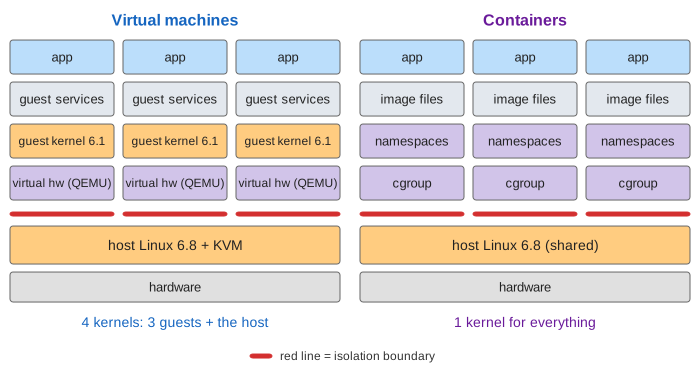
The page runs both on the same server (16 cores, 64 GB of RAM, an NVMe disk, host Linux 6.8) and does the same thing in each lane: start an instance, start three, make one system call, exploit a kernel bug, leak memory. The scoreboard under each lane collects the results. Times and megabytes are illustrative but in the right proportion for a small cloud image.
The VM stack
On Linux the usual hypervisor is KVM, a part of the host kernel that uses the CPU's virtualization support (Intel VT-x, AMD-V) to run guest code directly on the processor. Each VM is a QEMU process (qemu-system-x86_64 -enable-kvm -m 2G -smp 2 vm1.qcow2) that emulates the devices: a virtio disk backed by the file vm1.qcow2, a virtio network card, a clock. Inside, the guest boots firmware, GRUB, its own guest kernel (here Linux 6.1, but it could be FreeBSD or Windows) and systemd with all its services, and only then the app.
The container stack
docker run -d -m 512m app ends in runc, which asks the host kernel for three things: a cgroup with memory.max = 512M, a new process from clone() with CLONE_NEWPID, NEWNS, NEWNET, NEWUTS and NEWIPC (its own PIDs, mounts, network, hostname and IPC), and an OverlayFS root made from the image's layers. Then it runs the app with execve(). There is no second kernel: uname -r in a container prints the host's version. What a Container Really Is follows these steps in detail, and How a Dockerfile Becomes Image Layers shows where the image's files come from.
Start-up time
A VM boots a computer (Demo 1: start one instance): KVM creates the VM and its vCPUs (0.1 s), the firmware and GRUB run (1.5 s), the guest kernel boots and probes its virtual devices (3.5 s), systemd starts the guest's services (7.6 s), and the app is ready at 8.0 s. A container skips everything up to the app: cgroup (0.05 s), namespaces (0.10 s), root file system (0.15 s), and the app is ready at 0.55 s, of which 0.4 s is the app's own start, the same in both lanes.
Memory per instance
Each VM carries a whole operating system in its RAM: guest kernel 120 MB, guest services 180 MB, its own page cache 100 MB, plus the app's 200 MB, so 600 MB per VM (Demo 2: three instances). A container carries only the app and a few MB of kernel bookkeeping, 205 MB. The image's files are read through the host's page cache once (50 MB) and shared by all three containers, and so is the kernel.
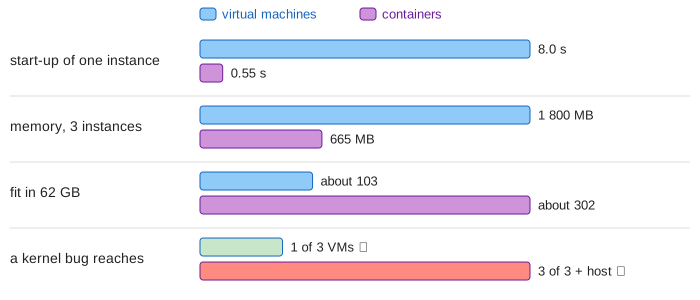
That is why a server that holds about 103 such VMs holds about 302 containers. Real hypervisors claw some of it back: KSM merges identical pages between VMs, and a balloon driver hands unused guest RAM back to the host.
The isolation boundary
The red line on the canvas is the isolation boundary: the interface an instance must break through to touch anything else. Demo 3: one system call sends the same open("/etc/hostname") from instance 1 in both lanes.
- In the VM the call traps into the guest kernel; the host never sees it. Only when the guest kernel touches its virtual disk does the CPU leave the guest (a VM exit), and KVM hands the request to QEMU, which reads
vm1.qcow2with an ordinary host system call. The boundary is the virtual hardware: a handful of devices and exit reasons. - In the container the call goes straight to the host kernel. The kernel resolves the path in the container's mount namespace, so it finds the container's own file, not the host's, but it is the same kernel code that serves the host and every other container. The boundary is the whole system call interface, about 350 calls.
See A Linux System Call, Step by Step for what happens inside the kernel.
How far a kernel bug reaches
Kernels have bugs. Dirty Pipe (CVE-2022-0847) let any process overwrite files it could only read. In Demo 4: a kernel bug in app 1 an attacker who runs code in app 1 uses such a bug:
- VM: the bug is in VM 1's guest kernel. The attacker owns VM 1, but VMs 2 and 3 run other kernels and never saw the call. To reach the host it needs a second, much rarer bug in KVM or in QEMU's device emulation. Reach: 1 of 3.
- Container: the bug is in the host kernel. Namespaces and cgroups are only data structures inside that kernel, so the attacker can step out of them. Reach: all 3 containers and the host.
Container platforms shrink this surface: the Docker default seccomp profile blocks rarely needed system calls, user namespaces make root inside the container an unprivileged user outside, and dropped capabilities remove the most dangerous calls.
Limits: a fixed slice or a cgroup
In Demo 5: app 2 leaks memory both lanes contain the leak, in different places. The VM was given 2 GB at boot (-m 2G); when the guest runs out, the guest kernel's OOM killer kills app 2 and the VM keeps running. The container's pages are charged to its cgroup; at memory.max = 512M the host kernel reclaims, then OOM-kills inside that cgroup (Docker reports exit code 137). Without -m there is no limit, and the leak can starve the host.
Which one?
| Virtual machine | Container | |
|---|---|---|
| kernels | one per VM + the host's | one, shared |
| start-up | seconds (8.0 s here) | under a second (0.55 s) |
| memory each | 600 MB (kernel, services, app) | 205 MB (the app) |
| a system call goes to | the guest kernel | the host kernel |
| isolation boundary | virtual hardware (VM exits) | ~350 system calls |
| a kernel bug reaches | one VM | every container + host |
| other operating systems | yes (Windows, BSD) | no: same kernel as the host |
In practice they are stacked: cloud providers run your containers inside VMs, so only your own containers share a kernel. Kubernetes picks the runtime per pod (How Kubernetes Talks to containerd and Docker).
In between: sandboxes and microVMs
gVisor puts a user-space kernel between the container and the host, so the app's system calls hit gVisor, not Linux. Kata Containers and Firecracker run each container in a tiny VM with a minimal guest kernel and no BIOS or systemd; Firecracker boots one in about 125 ms with a few MB of overhead. They keep the container workflow and get back a VM's boundary.
What the page leaves out
Hardware page tables (EPT/NPT) and the cost of a TLB miss in a guest, device passthrough (VFIO, SR-IOV), paravirtual clocks, live migration, KSM and memory ballooning in detail, CPU scheduling and steal time, Xen and Hyper-V's different designs, user namespaces and capabilities in detail, rootless containers, Windows containers, and side channels such as Spectre that can cross both boundaries.