The idea: a line becomes pixels
A screen is a grid of pixels, but a line is thin and continuous. To draw it, the computer has to pick which pixels to light. Bresenham's line algorithm (1962, published 1965) does this with one integer, the error term D. Each step it adds one of two fixed numbers to D and looks at its sign. There is no multiply, no division and no floating point.
The page uses a 24 × 14 grid with y pointing up, as in the textbooks. Each pixel is the square around its integer centre (x, y), and a line runs from one pixel centre to another.
One pixel per column: the major axis
For the line (2, 3) → (20, 10), dx = 18 and dy = 7. The line is wider than tall, so x is the major axis: x goes up by 1 every pixel, and the line gets exactly dx + 1 = 19 pixels. y, the minor axis, can only stay the same (a straight step) or go up by 1 (a diagonal step), because the slope 7/18 is less than 1. (Demo 1: a gentle line, pixel by pixel)
The midpoint test
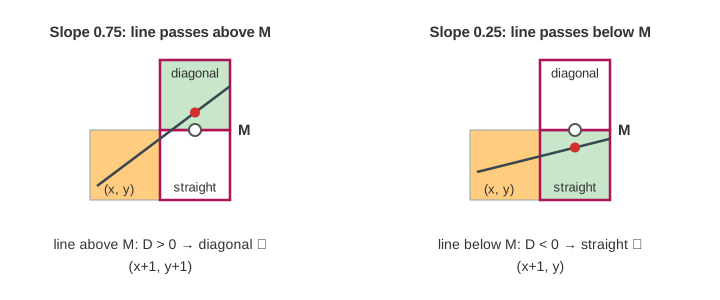
After lighting (x, y), the next pixel is (x + 1, y) or (x + 1, y + 1). Halfway between them is the midpoint M = (x + 1, y + 0.5). If the true line crosses column x + 1 above M, the diagonal pixel is nearer; below M, the straight one is. On the canvas the two candidates get a frame, the grey circle is M and the red dot is where the line really crosses.
From the midpoint to an integer
The test "line minus midpoint" is a fraction, but it changes by the same amount every step: the line rises dy/dx per column, and a diagonal step moves the midpoint up by 1. Multiply everything by 2·dx and the fractions go away. That scaled value is D:
D = 2·dx · (line − midpoint), so D > 0 means "the line is above M".
| moment | D | gentle line (dx 18, dy 7) |
|---|---|---|
| start | 2·dy − dx | −4 |
| D ≤ 0: straight step | D += 2·dy | +14 |
| D > 0: diagonal step | D += 2·(dy − dx) | −22 |
For the gentle line D runs −4, 10, −12, 2, −20, … and the line ends with 7 diagonal and 11 straight steps. The constants 2·dy and 2·(dy − dx) are worked out once with a shift and a subtract. Per pixel the loop does one compare and two or three integer adds: step x, maybe step y, update D. That is why it was built into plotters and early graphics hardware.
D = 2*dy - dx
for each of the dx steps:
    x += 1
    if D > 0:  y += 1;  D += 2*(dy - dx)
    else:      D += 2*dy
    plot(x, y)
Steep lines and the eight octants
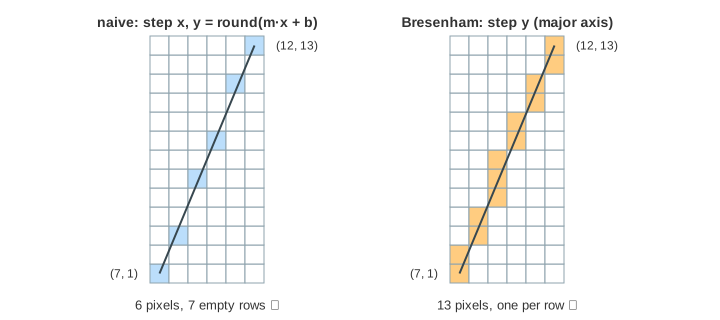
The loop above only works for slopes between 0 and 1. A steep line such as (7, 1) → (12, 13) has |dy| > |dx|, so y must be the major axis: y steps every pixel and x only sometimes. The line gets 13 pixels, one per row. (Demo 2: a steep line swaps x and y) Lines that go left or down use the same loop with a step of −1 instead of +1. Together, swapping the axes and flipping the signs cover all eight octants. (Demo 6: a line going down)
Floats vs integers
The obvious way is y = y0 + m·(x − x0) with m = dy/dx, rounded for every x. It needs a float multiply and a round per pixel, and if it always steps x it breaks on steep lines: for (7, 1) → (12, 13), m = 2.4, so it lights only 6 pixels and 7 of the 13 rows are empty. (Demo 3: naive y = m·x + b on a steep line leaves gaps)
On the gentle line the two methods agree on 18 of the 19 pixels. The one that differs is at x = 11,
where the true y is exactly 6.5. The line passes through the midpoint, a tie.
round() sends 6.5 up to 7. Bresenham has D = 0 there, and its test is D > 0, so it steps
straight and stays at 6. Both are as close as possible; only the tie rule differs.
(Demo 4: floats vs integers on the gentle line)
| naive float | Bresenham | |
|---|---|---|
| per pixel | 1 multiply, 2 adds, 1 round | 1 compare, 2–3 integer adds |
| steep lines | gaps unless you swap axes ✗ | swaps axes ✓ |
| rounding error | float error can pile up | exact ✓ |
| tie (line through M) | rounds .5 up | goes straight (D > 0) |
The same line drawn backwards
Drawing (20, 10) → (2, 3) uses the same D values, but steps x −1 and y −1. At the tie, straight now means staying at y = 7 instead of 6, so pixel (11, 7) is lit instead of (11, 6). The forward and backward lines differ by one pixel. That matters when a line is erased by drawing it again from the other end, or when two polygons share an edge: many implementations always draw from the same end, for example the lower x first. (Demo 5: the same line drawn backwards)
Where it is used
The same idea, an integer error term that is updated by adds, is the root of scan conversion: the midpoint circle algorithm, ellipse drawing, and the edge walking that fills polygons row by row. Modern GPUs test pixels against edge functions instead (see Rasterization), but those are also stepped by adding a constant per pixel. Once the pixels of a closed outline are known, Flood Fill can paint its inside.
What the page leaves out
Anti-aliased lines (Xiaolin Wu's algorithm) that shade two pixels per column, line thickness and line caps, clipping a line to the screen first (Cohen–Sutherland), endpoints that are not pixel centres (sub-pixel precision), run-length versions that emit whole horizontal runs at once, the midpoint circle algorithm, and the "diamond exit" rule GPUs use for one-pixel lines.